How to Use Pinterest for Business: A Beginner's Guide
To use Pinterest for business, you publish original pins, each an upright 2:3 image with a keyword-led title (up to 100 characters), a natural description (up to 800), and a link to a specific page on your site, saved to boards named the way people search.
JN
Joe Nyambura
Founder & operator, Pinners Haven · August 20, 2026
You made the business account, claimed the site, and now you're looking at a red "Create" button, an empty Business Hub, and a dozen articles telling you to "post consistently and use keywords." None of them tells you what to actually type into which box, or what to do on Tuesday. Breathe. This is that manual.
To use Pinterest for business, you publish original pins, each an upright 2:3 image with a keyword-led title (up to 100 characters), a natural description (up to 800), and a link to a specific page on your site, saved to boards named the way people search. You do that on a sustainable weekly rhythm, then read Pinterest Analytics for saves and outbound clicks rather than views. Pinterest is a search engine you feed, not a feed you post to. The eight steps below are the whole routine, with the exact fields, limits, and a 30-day plan.
If you haven't got the account yet, do the setup guide first; this page starts the morning after. And if you're still deciding whether Pinterest is worth it for your kind of business, the Pinterest for business playbook is the page before this one.
Find your way around first
A business account adds a few screens to the Pinterest you may know as a user. Pinterest's own business account page describes the two that matter: the Business Hub (top-left on desktop, a dashboard of recent performance, shortcuts, and ad tools) and Analytics. The rest of the tour:
Screen
Where
What you'll use it for
Business Hub
"Business hub" top-left
Glance at performance; the door to Analytics and Ads
Create
"Create" button
Publish pins and boards, schedule up to 30 days out
Analytics
Business Hub → Analytics, or the Analytics menu
Impressions, saves, pin clicks, outbound clicks, top pins
Profile
Your avatar
How visitors see your boards; check it on a phone
Settings → Claimed accounts
Avatar → Settings
Your claimed website, which unlocks domain analytics and attribution
That's it. Ads Manager and audience insights can wait until you have something worth promoting.
Step 1: Make five to eight boards named the way people search
Boards are context. Pinterest's distribution guidance says to add relevant keywords to board titles and descriptions and to save content to relevant boards, and your pins inherit that context.
Start with the five to eight topics you can publish about repeatedly. Name each one as a searcher would type it, not as a mood:
❌ Inspiration · ❌ Our Stuff · ❌ Things We Love
✅ Low-Light Indoor Plants · ✅ Small Apartment Plant Care · ✅ Pet-Safe Houseplants
Don't create thirty empty boards on day one. Five full boards read as a real account; thirty empty ones read as a placeholder, to visitors and to Pinterest.
Step 2: Find the words before you make the pin
Type your topic into Pinterest's search bar and look at two things: the autocomplete suggestions as you type, and the guided-search refinements that appear under the bar after you search. Those are real phrases real people use. Add Pinterest Trends for seasonality (remembering it shows normalised interest, not volume), and write down five to ten phrases per board.
Each pin will target one of those phrases. Our Pinterest keywords guide goes deeper, but for week one, the search bar is enough.
Step 3: Make your first pin properly, field by field
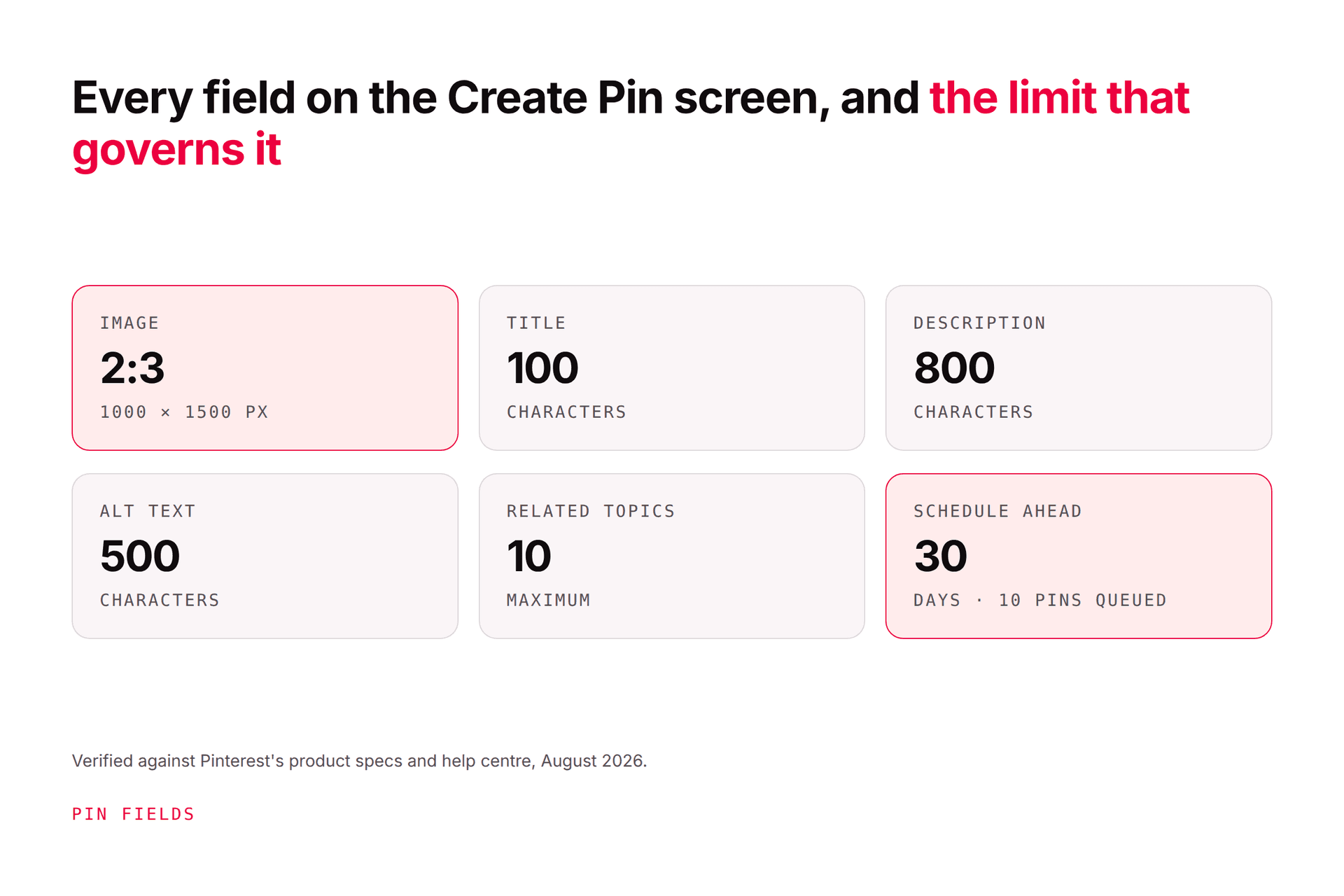
This is the step every "how to use Pinterest" guide waves past, so here it is in full. On desktop, click Create, upload your image, and you'll see the fields below. The app flow is the same fields in a slightly different order.
Field
Limit / spec
What to put in it
Image
2:3 aspect ratio, commonly 1000 × 1500 px
An original visual that shows the idea or result, with overlay text readable at phone size. Taller than 2:3 gets cropped in feed.
Title
100 characters
The search phrase, naturally, front-loaded. Once.
Description
800 characters
Two or three real sentences: what the page delivers, who it's for, the supporting detail. Pinterest uses it for relevance even when it isn't shown. Not a keyword list.
Link
Exact URL
The specific page the pin promises: the post, the product, the booking page. Never the homepage.
Board
Pick one
The most specific relevant board from Step 1.
Tag related topics
Up to 10
Pinterest's own topic tags; pick the closest ones.
Alt text
500 characters
Describe what's in the image for accessibility. It's not a keyword slot.
AI-modified
Toggle
Mark it if the image was generated or materially edited with AI. Pinterest labels these.
Publish at a later date
Business accounts; up to 30 days ahead
Use it from week two onwards to batch your publishing.
Here's what a finished one looks like for an online plant shop:
Image: 1000 × 1500, a snake plant on a windowsill in a dim flat, overlay "7 Houseplants That Survive a North-Facing Flat" Title: 7 Low-Light Indoor Plants for North-Facing Flats Description: North-facing windows get almost no direct sun, and most "easy" houseplants still sulk. These seven genuinely cope with low light, with how often to water each one and which are safe around cats. Ranked from bulletproof to slightly fussy. Link: yourshop.com/blog/low-light-houseplants-north-facing Board: Low-Light Indoor Plants Tags: houseplants, low light plants, apartment plants, snake plant, pet-safe plants Alt text: A tall snake plant in a terracotta pot on a windowsill in a dimly lit room.
Every field tells the same story. That alignment, across image, title, description, board, and page, is what Pinterest SEO actually is.
Publish it. Then make a second pin for the same page with a different angle ("Pet-Safe Low-Light Plants"), a different image, and a fresh description. Two originals for one page is the habit that makes everything else work.
Step 4: Turn on rich Pins
Rich Pins pull live information from your page onto the pin. Pinterest's rich Pins guide lists three types: article (headline, description, author), product (current price, availability, product info), and recipe (serving size, cook time, ingredients, ratings). They need a claimed website plus Schema.org or Open Graph markup in the page <head>, then a run through Pinterest's validator; most WordPress SEO plugins and Shopify themes add the markup already. Pinterest notes it can take up to 24 hours to sync.
Do it in week one. Product rich Pins showing a live price are the difference between a pretty picture and a shoppable one.
Step 5: Publish on a rhythm you can keep
You might be thinking, "How many a day?" Pinterest's only published cadence guidance asks for original content weekly; the "15 to 25 a day" number comes from a 2020 webinar and has never been restated. For a beginner, three to five original pins a week, every week, beats a burst of thirty and a month of silence. How often to pin has the arithmetic; the short version is that your honest supply of original pin ideas is the real limit.
Use the native scheduler to spread them out: it holds 10 pins at a time, up to 30 days ahead, one at a time. When that's the bottleneck, how to schedule pins on Pinterest covers the free ways past it and when an authorised tool earns its keep.
Step 6: Read Analytics once a week, for 20 minutes
Open Analytics and look at four numbers, in this order, over the last 30 days: impressions (were we shown), saves (did people want it later), pin clicks (did they look closer), outbound clicks (did they leave for our site). Then three questions:
Which pins earned outbound clicks? Make more angles for those pages.
Which earned impressions but no clicks? The image or title promised something weak.
Which earned nothing? Check the board, the topic, and whether the link even works.
Here's the thing nobody tells you: steps 3 and 5 are the whole job, forever. Every page on your site should earn several genuinely different pins over time, each a new image, new title, new description, aimed at a different search. Not the same graphic with a new background colour. Pinterest's guidance asks for original content, and our fresh pins guide shows exactly where "fresh" stops and "duplicate" starts.
This is also where beginners stall, at about week six, when the obvious pins are made and every new one takes an hour. It's the one part of this routine that's mechanical enough to hand off. Pinners Haven does Steps 3 and 5 for you: from a URL or topic it writes a keyword-led title, three to five distinct descriptions, and the alt text, designs an original image on a human-designed template, and publishes on a paced, account-safe cadence, with you approving each pin before it goes out. Steps 1, 2, and 6 stay yours, and they're the ones that need your judgment.
(Disclosure: we make Pinners Haven. We're not affiliated with Pinterest.)
Step 8: Leave ads alone until organic tells you what to promote
Ads Manager is right there in the Business Hub, and it's tempting. Wait. Ads buy reach for pins and pages that already convert; if you don't yet know which of your pins earn outbound clicks, you'd be paying to find out. Run organic for 90 days, then read Pinterest ads vs organic and promote the pins that have already proved themselves.
Your first 30 days, week by week
Week 1: Five to eight boards with descriptions. Ten search phrases per board. Rich Pins set up and validated. Your first five original pins, each to a specific page.
Week 2: Five more pins, two of them second angles for week-one pages. Start using "Publish at a later date" so you batch on one day.
Week 3: Five more. Check every link on a phone. First Analytics look: don't react, just note which pins have impressions.
Week 4: Five more. First real 20-minute review. Pick the one page that earned outbound clicks and give it three new angles next week.
Twenty pins, all original, all linked, in a month. That's a real account, and it's more than most business profiles ever manage.
Where beginners get stuck
Using it like a personal profile. Saving other people's pins to your boards is fine as seasoning; it isn't the strategy. Your own pins to your own pages are.
Linking to the homepage. A pin about low-light plants that lands on a homepage loses the click. Link the exact page.
Keyword lists in the description. "plants, houseplants, indoor plants, low light" helps nobody and looks exactly like what it is. Write sentences.
One pin per page, then reposting it. One page deserves several originals over months. Reposting one pin is not the same thing.
Judging at day ten. Pins take weeks to get indexed and distributed and months to mature. Look weekly, judge quarterly.
Scaling with a bot. Anything that asks for your Pinterest password or auto-follows and auto-comments is how accounts get flagged. How to automate Pinterest safely covers the line.
Frequently asked questions
Is Pinterest free to use for business?
Yes. The business account, boards, pins, scheduling up to 30 days ahead, rich Pins, and Analytics are all free. You pay only if you choose to run ads or to buy tools or help for producing pins. Most small businesses can run Pinterest entirely on the free features for their first few months.
How often should a beginner post on Pinterest?
Three to five original pins a week, every week, is a sustainable and effective start. Pinterest's written guidance asks for original content weekly rather than a daily quota; the "15 to 25 pins a day" advice dates from a 2020 webinar and hasn't been restated. Consistency and originality matter more than volume.
Do I need a website to use Pinterest for business?
You can create the account and publish pins without one, but the business value comes from sending clicks to a page you control: a product, a post, a booking page. Claiming a website also unlocks analytics for every pin linked to it. Marketplace shops such as Etsy can't be claimed, so those sellers usually point pins at listings and claim a separate site if they have one.
Should I repin other people's content?
A little is fine and can round out a board, but it doesn't grow your business. Distribution goes to the original pin's creator, and clicks go to their page. Put your effort into original pins linking to your own pages, and treat saving others' pins as occasional curation rather than a strategy.
What's the difference between a pin and a video pin?
Both are created from the same Create flow and carry the same fields: title, description, link, board, tags. A video pin uses a video file and lets you choose a cover frame. Video can stop the scroll, but the image pin with a clear title and a specific link is still the workhorse for driving traffic, so start there.
How long before Pinterest works for a new business account?
Expect the first meaningful impressions within a few weeks and real traction over two to three months, with pins continuing to earn for much longer. Judge the account at 90 days on outbound clicks, not at 30 days on views. New accounts, competitive topics, and seasonal niches all move at different speeds.
Feed the search engine
That's the whole operating manual: boards named like searches, pins with every field filled and one specific link, a rhythm you can keep, and a 20-minute weekly look at what earned clicks. Do it for 90 days and you'll know more about what your customers search for than any report could tell you.
You've got the routine. If the repeat work in Steps 3 and 5 is what you'd rather not spend your Tuesdays on, Pinners Haven writes and designs the pins from your pages and publishes them safely, and you approve each one.