Pinterest for Bloggers: Build a Repeatable Traffic System
Pinterest works for bloggers when it's connected to a genuinely useful, searchable content library. It does not work as a daily posting contest, and treating it as one is why most bloggers burn out on it by month three.
Joe Nyambura
Founder & operator, Pinners Haven · August 18, 2026
On this page20 sections
- Build the foundation
- Use a business account
- Claim your website
- Create intent-led boards
- Build clusters before you build a calendar
- Turn each strong post into concepts
- A weekly workflow
- The monthly review
- New posts versus old posts
- A 90-day rollout
- Where bloggers actually stall
- Ten common blogging mistakes
- Frequently asked questions
- Is Pinterest still useful for bloggers?
- How many pins should a blogger publish?
- How long does Pinterest traffic take?
- Should bloggers use a scheduler?
- Why are impressions high but blog visits low?
- Do I need a lot of followers?
- Build a library, not a treadmill
Pinterest works for bloggers when it's connected to a genuinely useful, searchable content library. It does not work as a daily posting contest, and treating it as one is why most bloggers burn out on it by month three.
The setup is straightforward: business profile, claimed domain, boards organised around reader problems, several distinct pin concepts per strong post, and measurement that follows people onto your site.
The part that actually decides your results is what you point it at. Pinterest can introduce the right person to a great library. It cannot rescue thin posts, and more pins to a weak page just distributes the disappointment faster.
Build the foundation
Use a business account
Pinterest's business account guide confirms it provides the Business Hub and Analytics. It's free, and converting a personal account keeps your existing pins and followers.
Write a profile description that says who the blog helps and what problems it solves. A narrow promise makes everything downstream easier.
Claim your website
Follow Pinterest's claim process for a domain you control. Claiming associates your profile with content saved from the site.
While you're there, confirm HTTPS, canonical URLs, indexability, and mobile performance. Pinterest traffic is wasted on a slow page with a popup over the answer, and blog traffic from Pinterest is unusually impatient.
Create intent-led boards
Boards should reflect topics a reader recognises. A food blog:
30-Minute Vegetarian Dinners
High-Protein Breakfast Ideas
Make-Ahead Work Lunches
One-Pot Family Meals
Beginner Sourdough Guides
Not "Recipes," "Food," "Blog Posts." Avoid boards so broad that everything fits: a board that accepts every post signals nothing about any of them.

Build clusters before you build a calendar
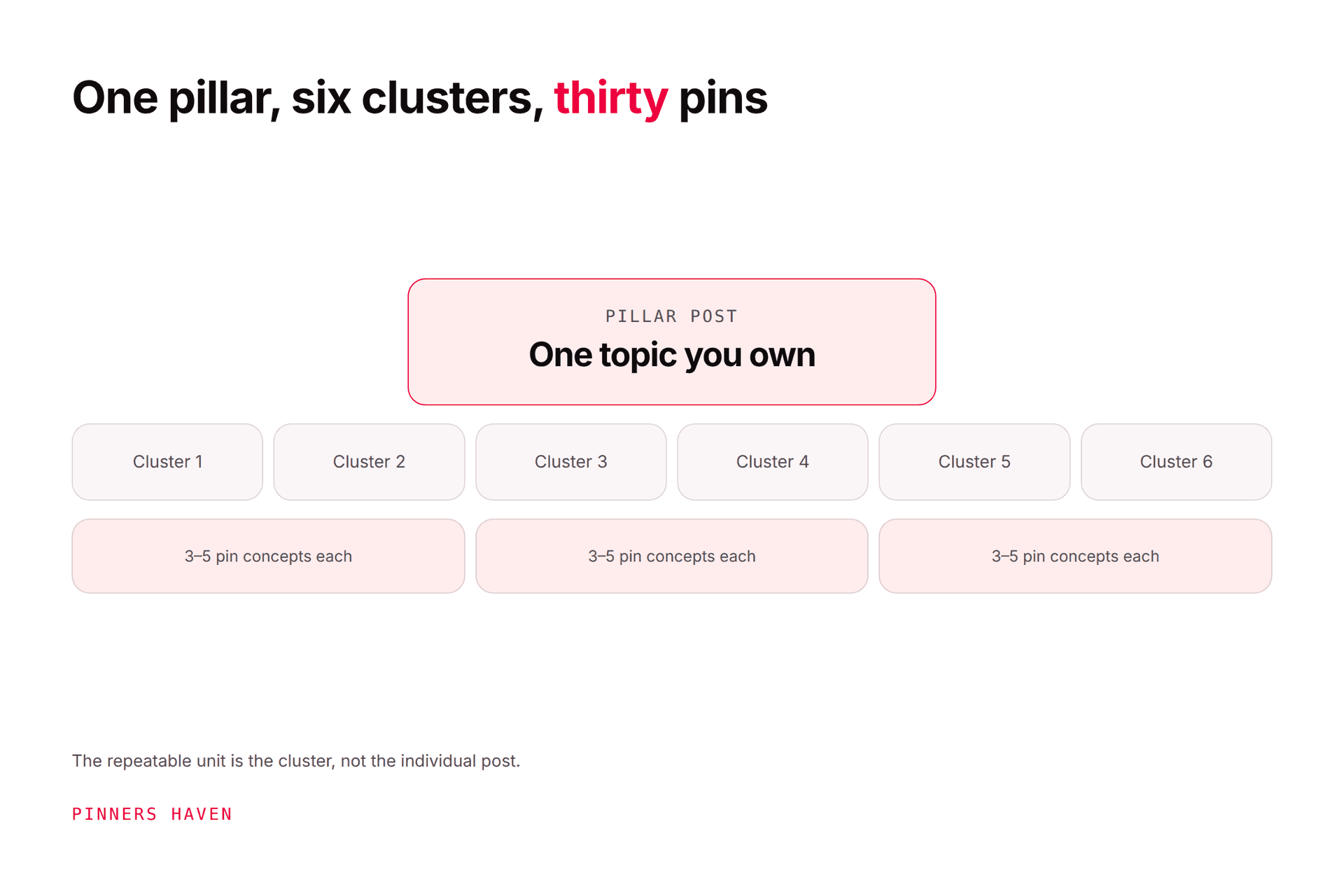
A cluster answers several connected questions for the same reader. For "small balcony gardening":
layout ideas by balcony size
a container depth chart
herbs for partial shade
renter-safe privacy options
watering while travelling
a seasonal planting calendar
Six destinations Pinterest can understand separately, and six pages a reader can move between. Internal links connect them; that's what turns a pile of posts into a library.
Use Pinterest search results and Pinterest Trends to confirm intent and seasonality. Our Pinterest SEO guide covers aligning query, pin, board, and page.
Turn each strong post into concepts
Two to four concepts, only where each expresses a genuinely different angle. For a guide to freezing herbs:
the step-by-step method
an herb-by-herb storage chart
the mistakes that cause freezer burn
a comparison of oil, water, and dry freezing
Each needs an accurate image, readable headline, natural title and description, the right board, and a direct URL.
Pinterest's distribution guidance recommends original content weekly and warns against duplicates. Our fresh pins guide draws the line between a concept and a recolour.
A weekly workflow
Monday — choose destinations. One or two updated, high-value posts based on demand, timing, and site goals. Verify every fact, offer, and link.
Tuesday — brief concepts. Write the search intent, pin promise, visual subject, headline, board, and success metric. Reject any concept the article doesn't actually fulfil.
Wednesday — create and review. Produce the graphics. Check rights, crop, mobile text, contrast, spelling, brand treatment, disclosure, URL.
Thursday — schedule. Publish approved pins with spacing.
Friday — maintain. Check delivery, broken links, account notifications, urgent factual changes. Save deep analysis for the monthly review.
That's roughly three hours a week. Sustainable matters more than optimal here, because the thing Pinterest actually rewards is not missing months.

The monthly review
Use Pinterest Analytics for impressions, saves, pin clicks, and outbound clicks — remembering the latest 48 hours are estimates that can change.
Pair it with site analytics: engaged sessions, newsletter subscriptions, affiliate clicks, form completions, purchases, revenue.
Group by topic, destination, concept, and board. Then pick one action:
Scale a proven topic with another article or another distinct concept
Improve a pin with reach but weak click appeal
Improve a page getting visits but weak engagement
Update seasonal content earlier next cycle
Retire an inaccurate or off-strategy destination
Full framework in our analytics guide.
New posts versus old posts
Don't limit Pinterest to publication day. This is the biggest unforced error bloggers make.
A well-maintained evergreen post supports new concepts whenever the information is still accurate, examples and screenshots are current, links and offers work, demand still exists, and the new creative has a genuinely distinct angle.
Update the article first. Keep the evergreen URL — don't add a year to the slug, because you'll be stuck with it. Change the visible title date only when the content received a real update and the date genuinely helps readers.
Some of your best-performing pins this year will point at posts you wrote two years ago. That's the library compounding, and it only works if you keep the library maintained.
A 90-day rollout
Month 1 — foundation. Profile, claimed site, three content clusters, focused boards, and an audit of your ten strongest destinations.
Month 2 — production. Repair the weak pages first. Then two or three concepts per approved destination, published consistently against a checklist.
Month 3 — evidence. Compare Pinterest and site results. Expand the strongest cluster, repair the weakest stage, document seasonal lead times. Don't reset the strategy over one slow week — you'll be doing it inside a channel where results routinely arrive late.
Where bloggers actually stall
Look at Tuesday and Wednesday, repeated for fifty posts.
Briefing three distinct angles per post, writing unique copy for each, and producing original graphics (every week, alongside actually writing the blog) is the work that quietly stops. Traffic plateaus around month four, and the usual conclusion is that Pinterest stopped working.
Pinners Haven runs that specific loop: twenty angles per topic so one post yields genuinely different pins rather than one, an SEO title and three to five unique descriptions each, original designs on human-designed templates, and a Freshness Meter that retires each design after roughly 5–10 uses. Everything waits on your approval.
Its published testimonials include a personal-finance blogger, Priya S., reporting 0 → 210k monthly views and noting the design barrier specifically — read that as one blogger's result, not a projection, since niche and existing library size dominate that number.
It won't build your clusters or judge whether a post deserves promotion. The Monday and Tuesday judgment stays yours, and that's where the leverage is anyway.
→ Start a 14-day trial — from $19/mo billed annually. No card needed; when the trial ends, publishing pauses until you pick a plan.
(Disclosure: we make Pinners Haven. We're not affiliated with Pinterest.)
Ten common blogging mistakes
expecting Pinterest to fix thin or generic posts
boards built around internal categories no reader searches
linking every pin to the home page
one visual template for every promise
near-duplicates at high volume
measuring only impressions
ignoring mobile speed and intrusive ads
abandoning old pins before their demand window develops
leaving outdated posts in active promotion
automating before the manual process is reliable
Frequently asked questions
Is Pinterest still useful for bloggers?
Yes, where the blog serves visual or planning-oriented intent and the destination is strong. It's a poor fit for topics with no visual dimension and no planning behaviour. Results depend on demand, execution, competition, timing, and how well your site converts.
How many pins should a blogger publish?
There's no universal number, and chasing one is how people burn out. Publish what your destinations and review process can genuinely support — consistency beats volume, and Pinterest rewards not disappearing.
How long does Pinterest traffic take?
No guaranteed timeline. Pinterest says pins can gain engagement hours, days, months, or years after publication, so a quiet first month tells you very little.
Should bloggers use a scheduler?
Use one when queue management or consistency is the actual problem. It won't replace research or review. See safe automation and our scheduler comparison.
Why are impressions high but blog visits low?
The pin is reaching broad, low-intent viewers, or it isn't explaining why the full article is worth the click. Compare pin clicks against outbound clicks, then work the traffic guide.
Do I need a lot of followers?
No. Pinterest distributes heavily through search and recommendations, so a small account with strong topical fit regularly outperforms a large generic one on a specific query.
Build a library, not a treadmill
The durable advantage is a connected set of genuinely useful pages. Pinterest's job is helping the right person find it.
Your system should make the next useful page and the next honest pin easier to produce, not simply raise the daily count. Those are different goals, and only one of them still works in year two.