How to Increase Pinterest Traffic to Your Blog
Optimise for qualified outbound clicks, not impressions. Pick topics people actively search for, build a page that fully answers the intent, make several genuinely different pin concepts, and measure what visitors do once they arrive.
Joe Nyambura
Founder & operator, Pinners Haven · August 18, 2026
On this page18 sections
- The traffic equation
- 1. Start with demand
- 2. Build the page before the pin
- 3. Make the click worth taking
- 4. Create several distinct concepts
- 5. Improve SEO without stuffing
- 6. Publish for the planning curve
- 7. Read Pinterest and site data together
- A four-week traffic experiment
- Where the effort actually goes
- Common traffic mistakes
- Frequently asked questions
- How long does Pinterest take to send traffic?
- How many pins should I publish a day?
- Why do I have impressions but no traffic?
- Should I make a new pin for an old post?
- Do I need lots of followers for Pinterest traffic?
- Fix the weakest stage first
Optimise for qualified outbound clicks, not impressions. Pick topics people actively search for, build a page that fully answers the intent, make several genuinely different pin concepts, and measure what visitors do once they arrive.
The uncomfortable part first: more publishing cannot repair a weak destination or a pin-to-page mismatch. If your page doesn't deliver, every extra pin just sends more people to be disappointed faster. That's the single most common reason a Pinterest strategy stalls at high impressions and no traffic, and it's why "post more" is such bad advice.
The traffic equation
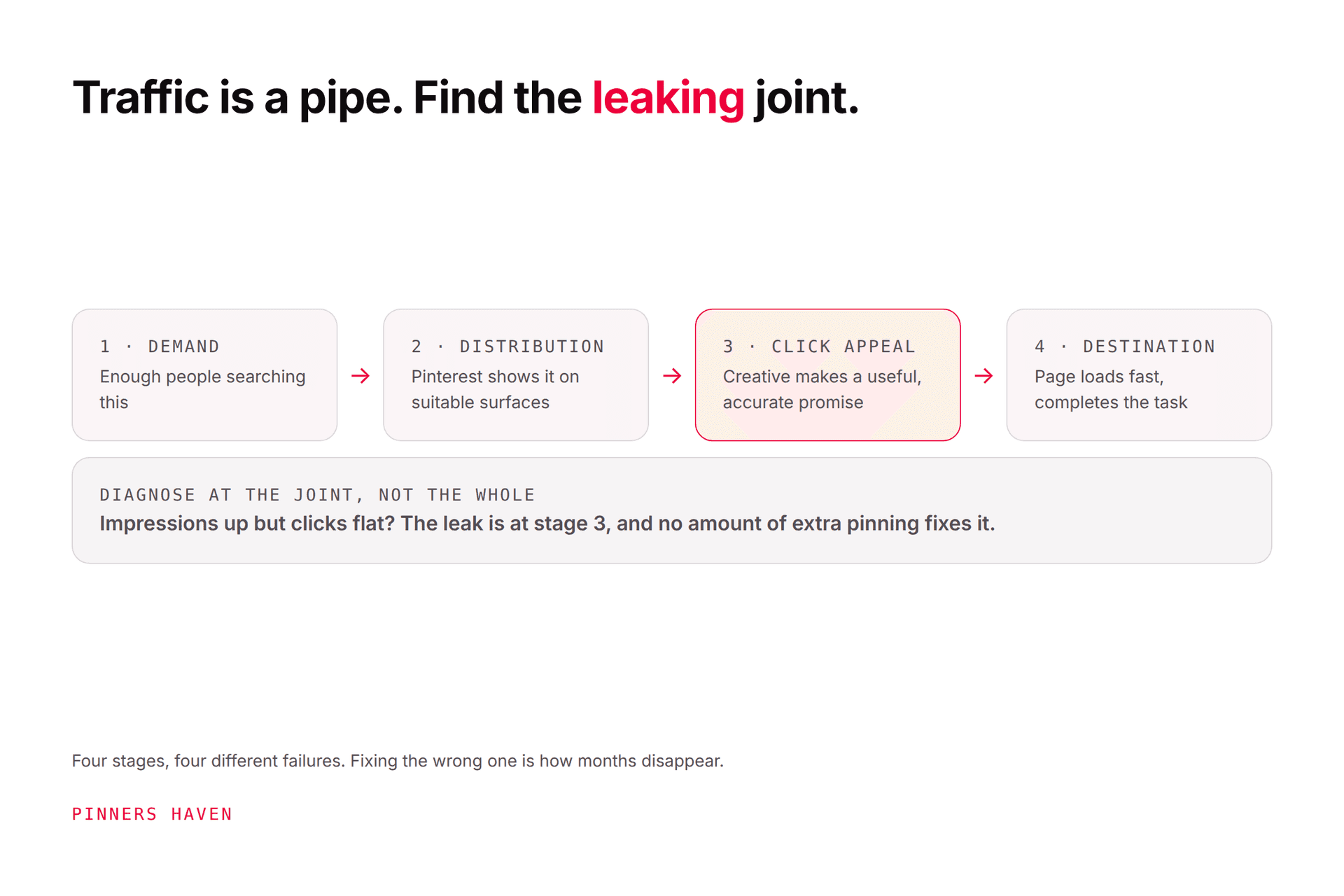
Pinterest traffic depends on four connected stages, and only one of them is usually broken:
Demand — enough relevant people are searching for this
Distribution — Pinterest shows the pin on suitable surfaces
Click appeal: the creative makes a useful, accurate promise
Destination value: the page loads fast and completes the task
Pinterest Analytics distinguishes impressions, saves, pin clicks, and outbound clicks. Only the last one measures leaving Pinterest for your site.
A big impression count with few outbound clicks isn't a traffic success. It's a diagnosis: stage 3 or 4 is failing, and adding more pins will make the same failure larger.
1. Start with demand
Use Pinterest Trends, search suggestions, and your keyword research. Compare the broad topic against the specific task.
"Garden ideas" holds a dozen intents. "Balcony herb garden for renters" hands you a person, a constraint, a clear visual, and an obvious destination.
Prioritise a topic when it fits your established subject, you can add original help, the visual result is clear, the destination has a real next step, and the timing allows discovery before peak demand. Our keyword guide covers the research method.
2. Build the page before the pin
The destination should answer the pin's promise near the top, then support it with depth. Original steps, examples, photos, comparisons, calculations, downloadables.
Check on an actual phone:
fast, stable load
title clearly matching the pin
readable text
no full-screen popup before the answer
accurate images and prices
working links
an obvious next step
Claim your site through Pinterest's website claim process.
That popup point deserves emphasis. Pinterest traffic is famously impatient — cold, mobile, mid-scroll. An email capture that fires before they've seen the answer converts a click into a bounce, and no amount of pin optimisation upstream fixes it.
3. Make the click worth taking
A pin should establish relevance while leaving a real reason to visit.
"12 storage ideas" fails if the image already shows all twelve — you've answered the question on Pinterest and earned a save instead of a visit. "Small pantry layout plan with measurements" gives the destination a specific job the image can't do.
Pick one clear promise: complete instructions, a printable or calculator, the full list with examples, a product comparison, measurements and costs, or a case study.
Don't hide a thin page behind an exaggerated curiosity gap. It works exactly once per reader.

4. Create several distinct concepts
Two to four concepts per strong destination, each true, each aimed at a different angle. For a pantry guide:
the finished result
a labelled layout with measurements
five mistakes to avoid
a renter-friendly checklist
Change the photograph, the framing, the headline, and the information hierarchy. A different background colour is not a new concept — see what actually counts as fresh.
Pinterest's distribution guidance recommends original content, strong vertical creative, accurate titles and descriptions, useful links, and relevant boards, and warns against duplicates.
5. Improve SEO without stuffing
Put the natural primary phrase in the title when it genuinely describes the content. Use the description for audience, context, and value. Save to the most relevant board.
The destination's title, headings, and body should use the same language naturally. Alignment works. Attachment doesn't — keywords bolted onto unrelated creative fail at both jobs. Full checklist in our Pinterest SEO guide.
6. Publish for the planning curve
Pinterest says seasonality, trends, language, location, and holidays all affect engagement. Use the trend curve to find when interest starts rising, then work backwards to allow time to create, publish, and learn.
This is where most seasonal content fails. Christmas content published in December is competing against content published in September that has already accumulated engagement.
And there's no magic hour that rescues a weak pin. Best time to post is an account-specific test after relevance and quality are sound, not before.
7. Read Pinterest and site data together
This table is the fastest diagnostic in the article. Find your row:
What you see | Where the problem is |
|---|---|
Low impressions | Demand, relevance, timing, account status |
Impressions, few pin clicks | Visual, headline, audience fit |
Pin clicks, few outbound clicks | Weak off-platform reason, or unclear link promise |
Outbound clicks, low engaged sessions | Speed, tracking, accidental clicks, mismatch |
Engaged sessions, few conversions | Offer, page flow, price, trust, conversion setup |
Pinterest notes the latest 48 hours are estimates and can change. Compare several weeks, account for seasonality, and annotate your publishing and site changes so future-you can tell what caused what.
Our analytics guide covers the review process. If reach fell suddenly rather than gradually, use the impressions-drop checklist instead — that's a different problem.
A four-week traffic experiment
Week 1 — audit. Pick ten destinations. Record demand, impressions, pin clicks, outbound clicks, sessions, conversions. Test every URL on mobile.
Week 2 — repair. Fix the three destinations with the strongest topic fit and weakest post-click performance. Clarify the answer, fix speed, update screenshots and offers, remove obstructions. Repair before you create — this is the step people skip, and it's the one that compounds.
Week 3 — create. Two or three distinct concepts per repaired page, accurate copy, relevant boards, correct links.
Week 4 — publish and observe. Release with sensible spacing. Watch delivery and link health. Don't declare a winner after a day. Set a review date matching the topic's demand cycle.
Where the effort actually goes
Notice that weeks 3 and 4 are the repeatable part, and they're the part that stops happening. Producing three genuinely distinct concepts per page (new visual, new angle, new copy) for every destination you own, week after week, is the work almost everyone abandons around month two. Traffic then plateaus, and the usual conclusion is "Pinterest stopped working."
That's the loop Pinners Haven runs: twenty angles per topic, an SEO title and three to five unique descriptions per pin, original designs rather than recoloured templates, and a Freshness Meter that retires each design after roughly 5–10 uses. It measures saves and outbound clicks per pin: the stage-3 and stage-4 metrics above, and biases new generation toward what's earning them.
It does not fix stage 4. If your destination is slow or thin, that's still yours to repair, and week 2 above is the highest-return work in this article regardless of what tooling you use.
(Disclosure: we make Pinners Haven. We're not affiliated with Pinterest.)
Common traffic mistakes
treating impressions as visits
linking every pin to the home page
promising more than the page delivers
twenty cosmetic variations of one design
publishing seasonal content after the planning peak
ignoring mobile speed and layout
changing several variables without recording them
using unrelated keywords to chase reach
increasing volume after a policy or technical problem: the worst of the list
Frequently asked questions
How long does Pinterest take to send traffic?
There's no guaranteed period. Pinterest says pins can gain engagement hours, days, months, or years after publication, so early quiet isn't failure. Timing depends on demand, relevance, competition, seasonality, and quality.
How many pins should I publish a day?
Pinterest publishes no guaranteed number. Choose a pace that produces original, reviewed content pointing at useful destinations. Ten strong pins a week beats seventy recolours.
Why do I have impressions but no traffic?
Three possibilities: the pin is surfacing for broad low-intent queries, the creative gives no reason to leave Pinterest, or the promise doesn't match the page. Compare pin clicks against outbound clicks, that comparison tells you which.
Should I make a new pin for an old post?
Yes, when the post is still accurate and the new pin is a materially different, truthful concept. Update the page first — promoting outdated content with fresh creative is how you burn trust efficiently.
Do I need lots of followers for Pinterest traffic?
No. Pinterest distributes heavily through search and recommendations, so topic fit and query relevance reach people who've never heard of you. See getting followers for where followers do and don't matter.
Fix the weakest stage first
Don't answer low traffic by doubling output. Work out whether demand, distribution, click appeal, or the destination is the stage that's failing.
Repair that one thing, run a clean test, and let business outcomes decide what earns another round. That's a slower-sounding approach that gets there considerably faster.