8 Best Pinterest Schedulers for Different Workflows
Start with Pinterest's own scheduler. It's free, and for a lot of people it's enough. It caps you at 10 future pins, one at a time, 30 days out, and the moment you hit that ceiling is the moment paying for something makes sense. Not before.
Joe Nyambura
Founder & operator, Pinners Haven · August 18, 2026
On this page19 sections
- At a glance
- First, diagnose the bottleneck
- What to actually test
- 1. Pinterest's native scheduler — start here
- 2. Tailwind — the established Pinterest specialist
- 3. Buffer — the clean multi-network queue
- 4. Later — the visual calendar
- 5. Pinners Haven — when making the pins is the bottleneck
- 6. Metricool — planning plus reporting
- 7. SocialPilot — agencies and approvals
- 8. Hootsuite — governance for bigger teams
- Native or third-party?
- Frequently asked questions
- Is it safe to use a Pinterest scheduler?
- Does Pinterest have a free scheduler?
- Can scheduling hurt my reach?
- How far ahead should I schedule?
- What's the cheapest way to schedule Pinterest pins?
- The short verdict
Start with Pinterest's own scheduler. It's free, and for a lot of people it's enough. It caps you at 10 future pins, one at a time, 30 days out, and the moment you hit that ceiling is the moment paying for something makes sense. Not before.
After that, the right pick depends on which bottleneck is actually costing you time: queuing pins (Buffer, Later, Publer), making them (Tailwind, Pinners Haven), or reporting on them across a team (Hootsuite, Metricool, SocialPilot).
Don't buy software because it promises a magical posting hour. Buy it when it removes a real bottleneck without taking away your editorial control.
Disclosure: Pinners Haven is ours. Seven of the eight tools here are competitors, and two of them are free.
At a glance
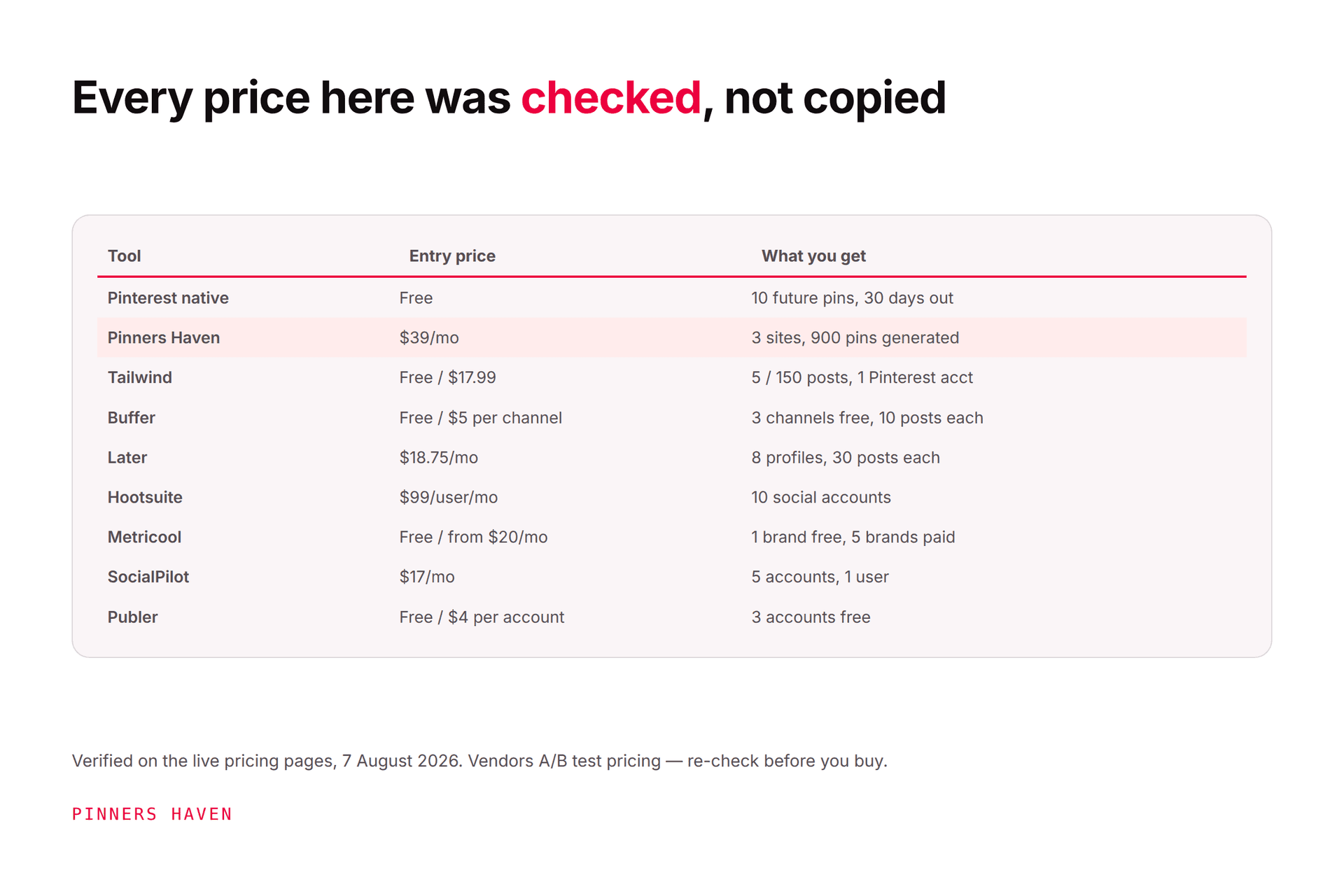
All prices checked 7 August 2026. Annual billing shown where available.
Scheduler | Entry price | Free tier? | Best for | Main trade-off |
|---|---|---|---|---|
Pinterest native | Free | Yes | A few pins, no bill | 10-pin queue, one at a time |
Tailwind | $17.99/mo | Yes — 5 posts | Established Pinterest workflow | Credits ≠ posts; 3 accounts max |
Buffer | $5/channel | Yes — 3 channels | Simple multi-network queue | Cost climbs per channel |
Later | $18.75/mo | Trial | Visual calendar planning | 30 posts/profile on Starter |
Pinners Haven | $19/mo | 14-day trial, no card | Pins created, not just queued | Pinterest only |
Metricool | Free / $20/mo | Yes — 1 brand | Cross-network reporting | Thin creation tools |
SocialPilot | $17/mo | Trial, no card | Agencies, client approvals | Not Pinterest-first |
Hootsuite | $99/user/mo | 14-day trial, no card | Teams needing governance | Expensive for solo use |

First, diagnose the bottleneck
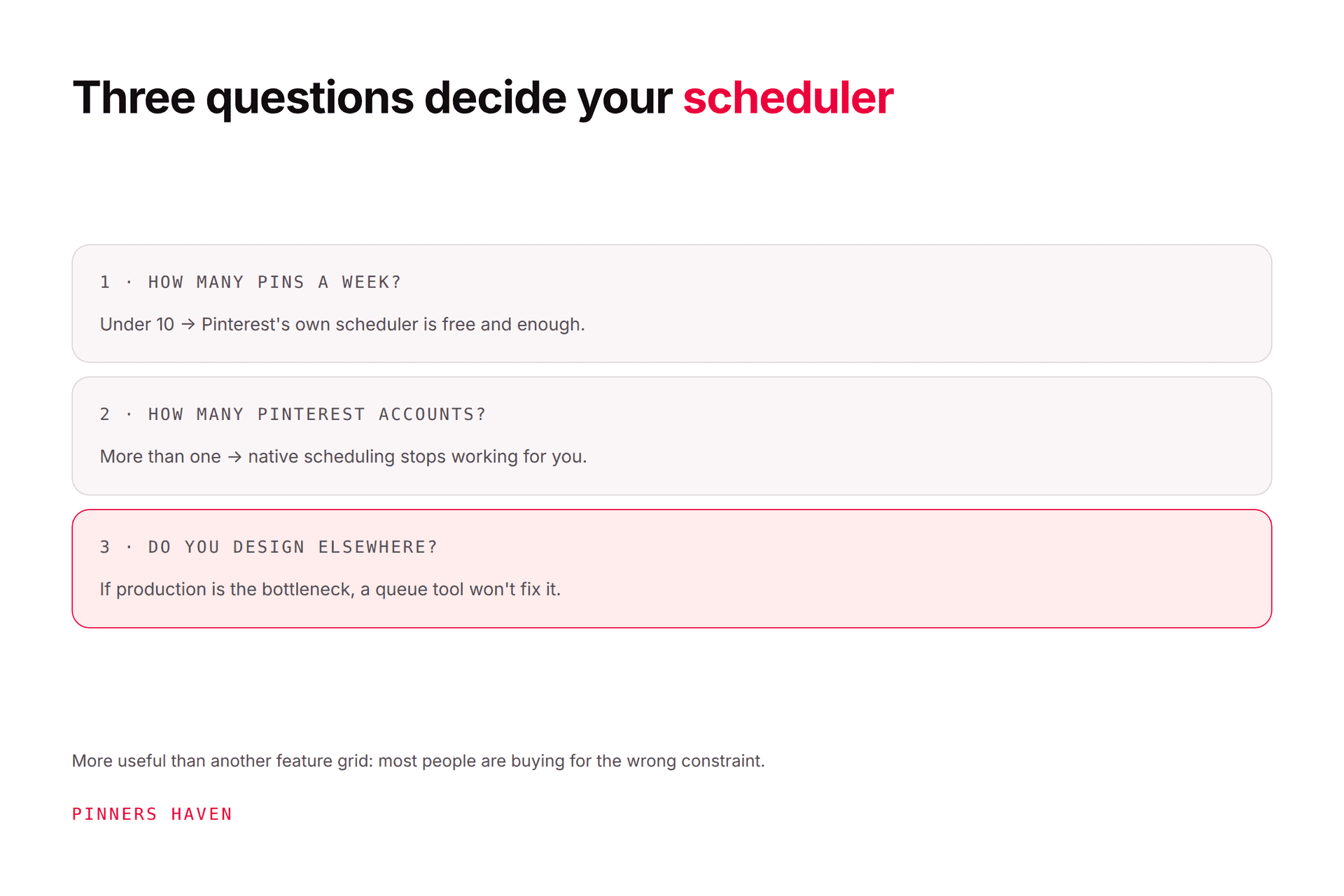
Before comparing features, time yourself for one week. Where does the hour actually go?
"I have the pins, I just can't get them posted consistently." → a queue. Buffer, Later, Publer, or native.
"I can't produce enough good pins to fill a queue." → a creation tool. Tailwind or Pinners Haven. A scheduler will not help you here at all, and this is the most common mis-purchase in the category.
"I can't tell anyone what's working." → reporting. Metricool, Hootsuite, or SocialPilot.
"I'm managing other people's accounts." → approvals and seats. SocialPilot or Hootsuite.
Buying the wrong category is why people churn through three tools in a year and conclude none of them work.
What to actually test
Run a real pin through the whole workflow. Can you select the right board, preserve the destination URL, review image, title and description, set a date in your audience's timezone, and confirm afterwards that it published? If any step is hidden or awkward, a long feature list won't save you.
Then check:
static image and video support
bulk upload or feed import
queues versus fixed date/time scheduling
account, user, channel, and monthly-post caps
drafts, approvals, and audit history
Pinterest-specific analytics versus generic engagement totals
link tracking and export
official API publishing — never a tool that wants your Pinterest password
what happens when a post fails, and whether you're told
That last one is the most-skipped and most-regretted check. Deliberately break a post during your trial and see whether the tool tells you.
1. Pinterest's native scheduler — start here
Free.
Business accounts can schedule standard pins with no third-party tool. Pinterest's scheduling guide currently allows one pin at a time, up to 10 future pins, as far as 30 days ahead. You can later change date, title, board, description and link, but not the scheduled image or video.
Pick it if: you publish a handful of pins a week and don't want a software bill.
Outgrow it when: you need bulk preparation, a longer calendar, team review, or cross-network planning. The 10-pin ceiling is the wall, and it arrives fast.

2. Tailwind — the established Pinterest specialist
Free (5 posts) · Pro $17.99/mo · Advanced $29.99 · Max $49.99, billed annually.
Scheduling, SmartSchedule, bulk upload, Tailwind Create for design, AI credits, and integrations for Shopify, WooCommerce, Squarespace and WordPress. Posts cover Instagram and Facebook as well as Pinterest.
Pick it if: you want a mature Pinterest-focused product and you also post to other networks.
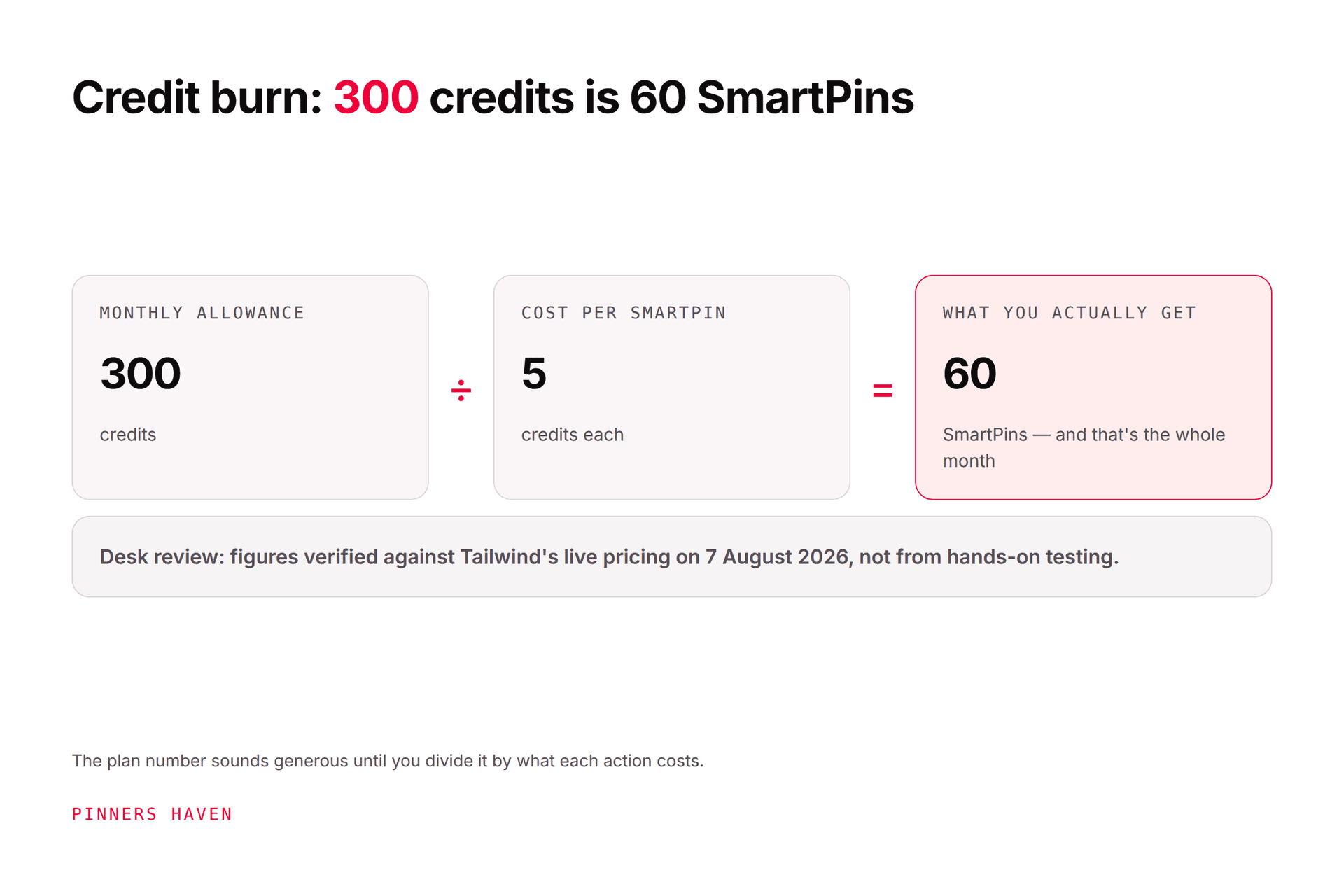
Watch: credits and posts are separate limits: a SmartPin costs 5 credits, so Advanced's 300 credits is about 60 generated pins, not 300. And three Pinterest accounts is the ceiling on every tier. Our Tailwind review works through the credit math properly.
3. Buffer — the clean multi-network queue
Free (3 channels, 10 posts each) · Essentials $5/month per channel · Team $10/month per channel.
Buffer supports Pinterest business and personal accounts alongside Instagram, TikTok, Facebook, LinkedIn, YouTube Shorts and Google Business Profile. It's a predictable queue, not a growth system, and it's very good at being that.
Pick it if: you want one tidy calendar and the free tier nearly covers you.
Watch: the per-channel model. Eight channels on Essentials is $40/month — more than Tailwind Max. Do the multiplication before switching.
4. Later — the visual calendar
Starter $18.75/mo · Growth $37.50 · Scale $82.50, billed yearly.
Later sells "social sets": Starter is 1 set (8 profiles) with 30 posts per profile per month, Growth is 2 sets at 180 per profile, Scale is 6 sets with unlimited posts. Pinterest scheduling and click tracking are on every tier, and Later is a Pinterest Marketing Partner.
Pick it if: your planning genuinely starts from a visual calendar across several networks.
Watch: Starter's 30 posts per profile per month is one pin a day. That's thin for serious Pinterest work, and it pushes you to Growth quickly.
5. Pinners Haven — when making the pins is the bottleneck
Starter $19/mo (1 site, 120 pins) · Solo $41 (3 sites, 900 pins) · Operator $124 (25 sites, 11,250 pins) · Portfolio $291 (50 sites, 30,000 pins), billed annually. 14-day trial, no card.
This is ours, so weigh it accordingly.
It sits in a different category from most of this list: rather than queuing pins you've made, it generates them. You bring a URL and target keywords; it picks from twenty angles, writes the SEO title and three to five descriptions, designs an original image, adds alt text, and holds it for your approval. A Freshness Meter retires each template after roughly 5–10 uses.
Pick it if: production is the constraint, or you run more than three Pinterest accounts.
Skip it if: you need Instagram or Facebook, you want the cheapest entry (Tailwind's free tier and $17.99 Pro both undercut us), or you want unlimited posting volume. We're also not a Pinterest Marketing Partner — Tailwind and Later are, and there's a small separate AI provider cost since you bring your own key.
6. Metricool — planning plus reporting
Free (1 brand, 20 posts/month) · Starter from $20/mo (5 brands) · Advanced from $53/mo (15 brands).
Metricool combines a planner, auto-publishing, analytics, competitor tracking and reporting, with Pinterest supported on every tier including free.
Pick it if: you want a unified calendar and client-friendly reports across networks. The free tier is a genuinely usable trial.
Watch: creation depth. Strong analytics, but it won't design or write your pins.
7. SocialPilot — agencies and approvals
Essentials $17/mo (5 accounts) · Standard $34 (10 accounts, 3 users) · Premium $85 (20 accounts, 6 users) · Ultimate $170 (40 accounts), billed annually. 14-day trial, no card.
SocialPilot targets agencies with client calendars, approval workflows and analytics. On accounts-per-dollar it's one of the strongest here — 20 accounts at $85 undercuts Hootsuite substantially.
Pick it if: you manage several brands and need client approval flows.
Test: the full handoff — draft, comment, approve, schedule, failure alert, report, revoke access.
8. Hootsuite — governance for bigger teams
Standard $99/user/mo (10 accounts) · Professional $199 (unlimited) · Advanced $399, billed annually. 14-day trial, no card.
Hootsuite supports Pinterest inside a broad suite with approvals, permissions, listening and reporting.
Pick it if: several people need audit trails and the cost spreads across them.
Skip it if: you're a solo creator wanting a pin queue. At $99/user/month you'd pay more than five times Tailwind Pro for features you won't open. Note that trial accounts carry daily posting limits and no bulk scheduling.
Native or third-party?
Stay native until the queue is genuinely the constraint. Move when a tool saves measurable production time, supports the formats you publish, and gives you review or reporting you'll actually use.
Run a two-week test and count minutes — creating, checking, scheduling, fixing failures, reporting. Then compare that time against the subscription. A cheap tool that needs constant cleanup is not cheap, and a expensive one that removes three hours a week is not expensive.
Frequently asked questions
Is it safe to use a Pinterest scheduler?
Yes, with tools that publish through supported integrations, protect your credentials, and let you review content before it goes out. No scheduler makes spam safe — Pinterest advises original content and warns against repeatedly saving duplicate pins in its performance guidance. Never use a tool that asks for your Pinterest password rather than sending you to Pinterest's own login.
Does Pinterest have a free scheduler?
Yes — business accounts get one, currently limited to one pin at a time, 10 future pins, 30 days ahead.
Can scheduling hurt my reach?
Pinterest doesn't state that supported scheduling reduces reach. Relevance, originality, quality, board fit, destination quality and audience response still decide it. Avoid duplicate bursts and unsupported automation — see safe Pinterest automation.
How far ahead should I schedule?
Far enough to cover your planning lead time while keeping room to react — product changes, broken links, news, seasonal corrections. A full queue should never become a reason to stop checking what publishes.
What's the cheapest way to schedule Pinterest pins?
Pinterest's native scheduler, at zero. After that, Buffer's free tier (3 channels, 10 posts each), Tailwind's Free Forever (5 posts), Metricool's free plan (1 brand, 20 posts), or Publer's free tier (3 accounts). Only pay once one of those ceilings is genuinely blocking you.
The short verdict
Native if your queue is tiny. Buffer or Later for straightforward multi-network publishing. Hootsuite, SocialPilot or Metricool for team reporting and approvals. Tailwind for a mature Pinterest specialist. Pinners Haven when producing the pins, not queuing them — is what's actually costing you the week.