Pinterest for Amazon Affiliates: A Practical, Compliant Guide
Search whether you can use Amazon affiliate links on Pinterest and you'll get a hundred confident yeses. Read Amazon's actual Operating Agreement and you'll notice something none of them mention: Pinterest isn't named in it. Not once.
JN
Joe Nyambura
Founder & operator, Pinners Haven · August 18, 2026
Search whether you can use Amazon affiliate links on Pinterest and you'll get a hundred confident yeses. Read Amazon's actual Operating Agreement and you'll notice something none of them mention: Pinterest isn't named in it. Not once.
Amazon Associates links are generally usable on Pinterest, but the permission is inferred rather than explicit. Amazon's Operating Agreement allows Special Links on "your website, social media user-generated content, online software application, or Alexa skill," and Pinterest separately permits affiliate links in Pins when you disclose properly and follow its spam rules. Both conditions have to hold, and the requirement that trips up the most pinners is Amazon's rule on price and availability data, which effectively means you cannot burn an Amazon price into your pin graphic. That one catches almost everybody, because a price is exactly what a good product pin seems to want.
Here's what each platform actually requires, and where the two sets of rules collide.
What Amazon actually says
Three clauses matter, and they're worth reading in Amazon's own words rather than in a summary.
On placement, Special Links are permitted on your website, social media user-generated content, an online software application, or an Alexa skill. Pinterest is not named. It's a reasonable reading that a Pin is social media user-generated content, and that's the reading the whole industry operates on. It is still a reading.
On disclosure, Associates must display the required statement:
"As an Amazon Associate I earn from qualifying purchases."
On obscuring the destination:
"You will not use a link shortening service, button, hyperlink or other ad placement in a manner that makes it unclear that you are linking to an Amazon Site."
Note what that says and doesn't. Shorteners aren't banned outright; making the destination unclear is. Given that a Pin's destination isn't visible before the click, be explicit in the description that the link goes to Amazon.
On prices and availability, this is the clause that matters most on Pinterest. Amazon requires pricing and availability data to be obtained through its own serving or through the Creators API or PA API, with the associated requirements including displaying timestamps and disclaimers.
Why that rules out prices in your graphics
A pin image is static. It cannot pull live data, it cannot carry a meaningful timestamp, and once published it sits in feeds and boards for years.
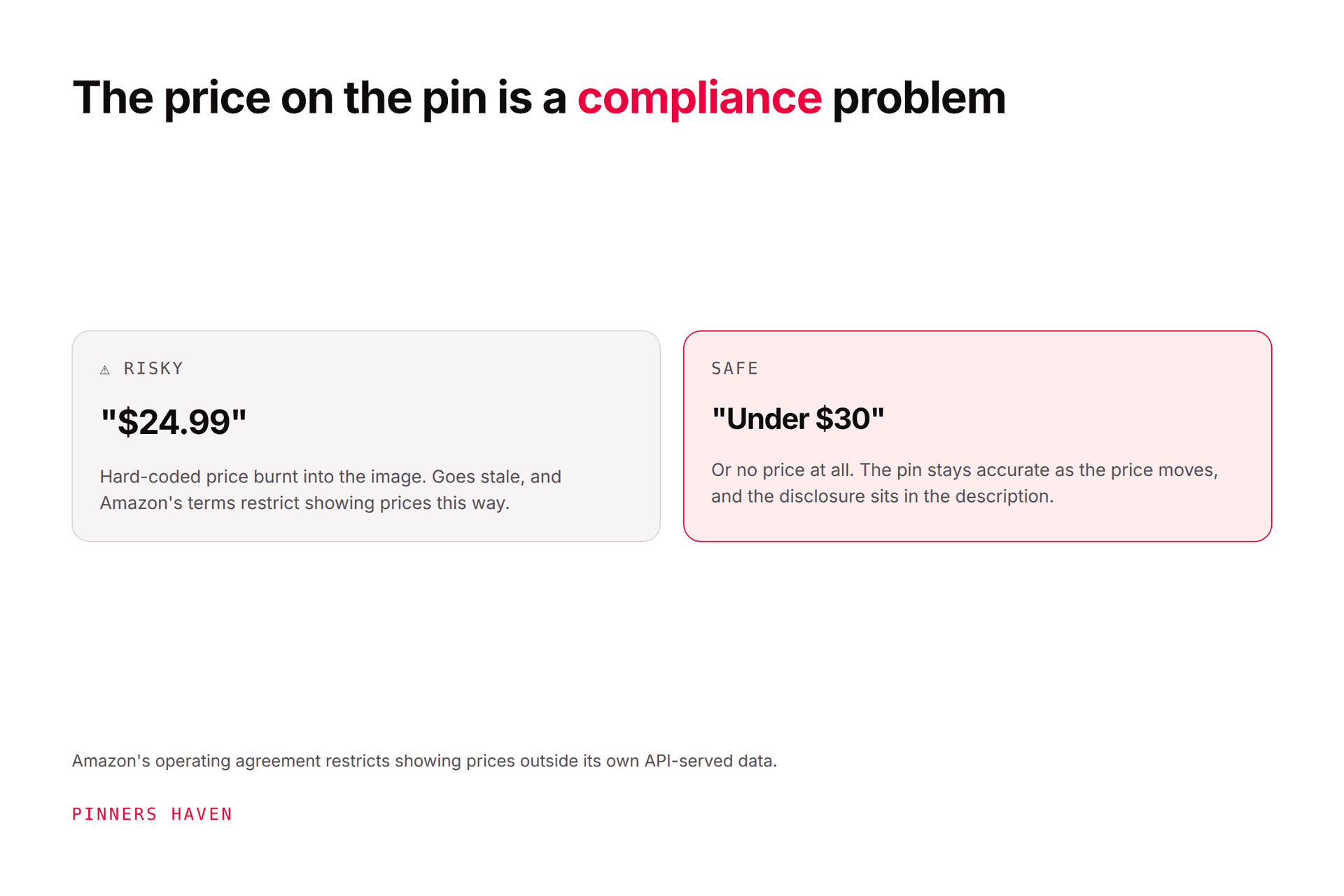
So a pin that says "$24.99" is displaying Amazon pricing data outside the approved mechanism, with no timestamp, no disclaimer, and no way to update when the price changes. It's also just bad practice: that number will be wrong within weeks, and it will keep being wrong in front of shoppers indefinitely.
Keep prices out of pin graphics entirely. Use ranges in text if you must ("under $30" is a claim about a category, not a display of Amazon's price data), and let the actual number live on Amazon where it's current. This single rule eliminates the most common compliance mistake in Amazon-affiliate pinning, and it costs you nothing that was working anyway.
Disclose the affiliate relationship clearly in the description. Add #ad or #affiliate alongside Amazon's required statement.
Use the full destination link, not a chain of redirects that obscures where it goes.
Original creative. Pinterest's guidance is explicit that repetitive content posted to make money is prohibited, and affiliate accounts are exactly the pattern that rule was written for.
The destination has to deliver what the pin promised.
Pinterest has historically taken a harder line on affiliate behaviour than on ordinary publishing, and the reason is the volume of low-effort affiliate spam. Assume your account gets read in that context, and behave accordingly. Our affiliate marketing guide covers the disclosure mechanics in more depth.
The structure that actually works better
You can pin directly to Amazon. Most people who earn meaningfully from Pinterest affiliate traffic don't.
Direct-to-Amazon pins
Pin to your own content
Setup effort
Minimal
You need a site
Compliance surface
Everything rides on the pin
Your page carries the disclosure, prices, comparisons
Prices
Can't show them
Live, updatable, compliant on your page
Cookie window
Starts at click
Starts at click, after pre-selling
If Amazon changes rules
Every pin is affected
Change one page
Email capture
None
Possible
Comparison content
Impossible in an image
The whole point
The second column is more work and it's structurally sturdier. A pin drives to a real comparison or guide, that page does the persuading with current prices and honest tradeoffs, and the reader arrives at Amazon already convinced.
It also solves the price problem cleanly. Your page can display live pricing through approved means; your pin never has to.
Creative that converts affiliate traffic
Product-shot pins do poorly here for the same reason they do poorly everywhere: nobody searches for your product. They search for the problem.
Concepts that work:
The comparison. "Three [product type]s compared for [specific use]." Genuinely the strongest affiliate pin format.
The specific-person gift guide. "Gifts for someone who [specific trait], under $50."
The problem-first pin. The frustration, then the category that solves it.
The setup or roundup. "Everything I use for [activity]," shown as a real kit.
The buying-mistake pin. "What to check before buying a [product]."
Every one of those is a guide, which is why they pair naturally with the own-site structure above.
One thing to avoid in all of them: checkout-adjacent language. "Buy now," "add to cart" and similar sit awkwardly against Amazon's rules about how you present its program and can read as claiming to transact on Amazon's behalf. "Find it on Amazon" or "see current price on Amazon" does the same job without the exposure.
Honest limits of this channel
Amazon's commission rates are low in most categories, and they change. That's the business you're in, and Pinterest doesn't alter it.
What Pinterest offers is qualified, compounding, unpaid discovery for gift, home, hobby and planning categories, which happen to be where Amazon affiliate content works best. What it doesn't offer is speed. Expect a season, not a month, and don't build a financial plan on it before you have data.
No income claims, in your content or your pins. Amazon has its own restrictions on how you talk about the program publicly, and the FTC has views on earnings representations generally. Describe what products do; don't promise what readers will earn.
Where affiliate operators stall
Comparison content is the best-performing format and the most expensive to produce. Each guide justifies four or five distinct pin concepts, and a functioning affiliate site has dozens of guides.
Which is where portfolio operators end up: the top ten pages have real creative, the other ninety have one pin each from launch week, and the whole thing is capped by how many designs one person can make on a Sunday.
Pinners Haven exists for that layer. It writes up to 20 angles per topic so one comparison guide yields real keyword surface, produces an SEO title with three to five unique descriptions per pin, and designs original images on human-designed templates. The Freshness Meter retires each design after roughly five to ten uses, which matters disproportionately for affiliate accounts because repetition is precisely what Pinterest scrutinises in this category. Nothing publishes until you approve it, which also means nothing publishes without a compliance check.
For operators running several affiliate sites, Operator covers 25 sites and 11,250 pins a month at $124/mo billed annually. Solo is $41 for 3 sites. There's a 14-day trial; no card is needed, and when it ends publishing pauses until you pick a plan.
It does not handle compliance for you. Disclosure, price rules, link structure and destination accuracy remain yours, and they are the part that ends accounts.
(Disclosure: we make Pinners Haven. We're not affiliated with Pinterest or Amazon.)
Frequently asked questions
Can you post Amazon affiliate links on Pinterest?
Generally yes. Amazon permits Special Links in social media user-generated content and Pinterest permits disclosed affiliate links in Pins. Amazon's agreement doesn't name Pinterest specifically, so the permission is inferred from the general clause rather than stated, which is a reason to follow the rules conservatively.
Do I have to disclose Amazon affiliate links on Pinterest?
Yes, on both counts. Amazon requires the statement "As an Amazon Associate I earn from qualifying purchases," and Pinterest requires clear disclosure of affiliate relationships. Put both in the description; #ad alone doesn't satisfy Amazon's specific wording requirement.
Can I put the price in my Pinterest affiliate pin?
Not in the image. Amazon requires pricing and availability data to come through its approved routes with timestamps and disclaimers, none of which a static graphic can do. The price will also be stale within weeks. Leave the number on Amazon.
Can I use link shorteners for Amazon links on Pinterest?
The rule is about clarity rather than shorteners themselves: you must not obscure that you're linking to Amazon. Since a Pin's destination isn't visible before the click, state plainly in the description that the link goes to Amazon.
Should I link pins straight to Amazon or to my own site?
Your own site is the sturdier structure. It lets you show live prices compliantly, build comparisons an image can't, capture email, and survive a rule change by editing one page instead of every pin.
Will Pinterest ban me for affiliate pins?
Not for disclosed affiliate links, which are permitted. Accounts get actioned for repetitive, low-original-content posting at volume, which is the pattern most affiliate spam takes. Publish genuinely distinct creative and space it out.
Do Amazon affiliate pins still work in 2026?
They work where the content earns the click: comparisons, specific gift guides, and problem-first guides in gift, home and hobby categories. Bare product-shot pins linking straight to a listing perform poorly and always have.
Read the agreement, then build the sturdier version
The honest summary is that Amazon affiliate marketing on Pinterest is allowed, lightly documented, and easy to get subtly wrong. The rules that catch people aren't exotic: disclose properly, don't display Amazon's prices in places you can't update, don't obscure where the link goes, and don't publish the same pin forty times.
Do all four, put a real page between the pin and the listing, and you've built something that survives both platforms changing their minds.