7 Best Pinterest Automation Tools for Safer Publishing
The best Pinterest automation tool automates production and publishing through an authorised connection, and leaves strategy, rights checks, and final approval to a person. For light use, Pinterest's own scheduler and RSS importer are free and first-party. For Pinterest-focused production, look at Tailwind or Pinner
Joe Nyambura
Founder & operator, Pinners Haven · August 18, 2026
On this page19 sections
- What "safe automation" actually means
- The five things to never automate
- The shortlist
- 1. Pinterest's native tools
- 2. Pinners Haven
- 3. Tailwind
- 4. Buffer
- 5. Later
- 6. Hootsuite
- 7. Metricool
- A safer automation blueprint
- Frequently asked questions
- Is Pinterest automation allowed?
- What should never be automated?
- What's the best free Pinterest automation tool?
- How many pins should I automate per day?
- Will automation get my account flagged?
- Can I automate affiliate pins?
- Choose the workflow before the brand
The best Pinterest automation tool automates production and publishing through an authorised connection, and leaves strategy, rights checks, and final approval to a person. For light use, Pinterest's own scheduler and RSS importer are free and first-party. For Pinterest-focused production, look at Tailwind or Pinners Haven. For multi-network teams, Buffer, Later, Hootsuite, or Metricool.
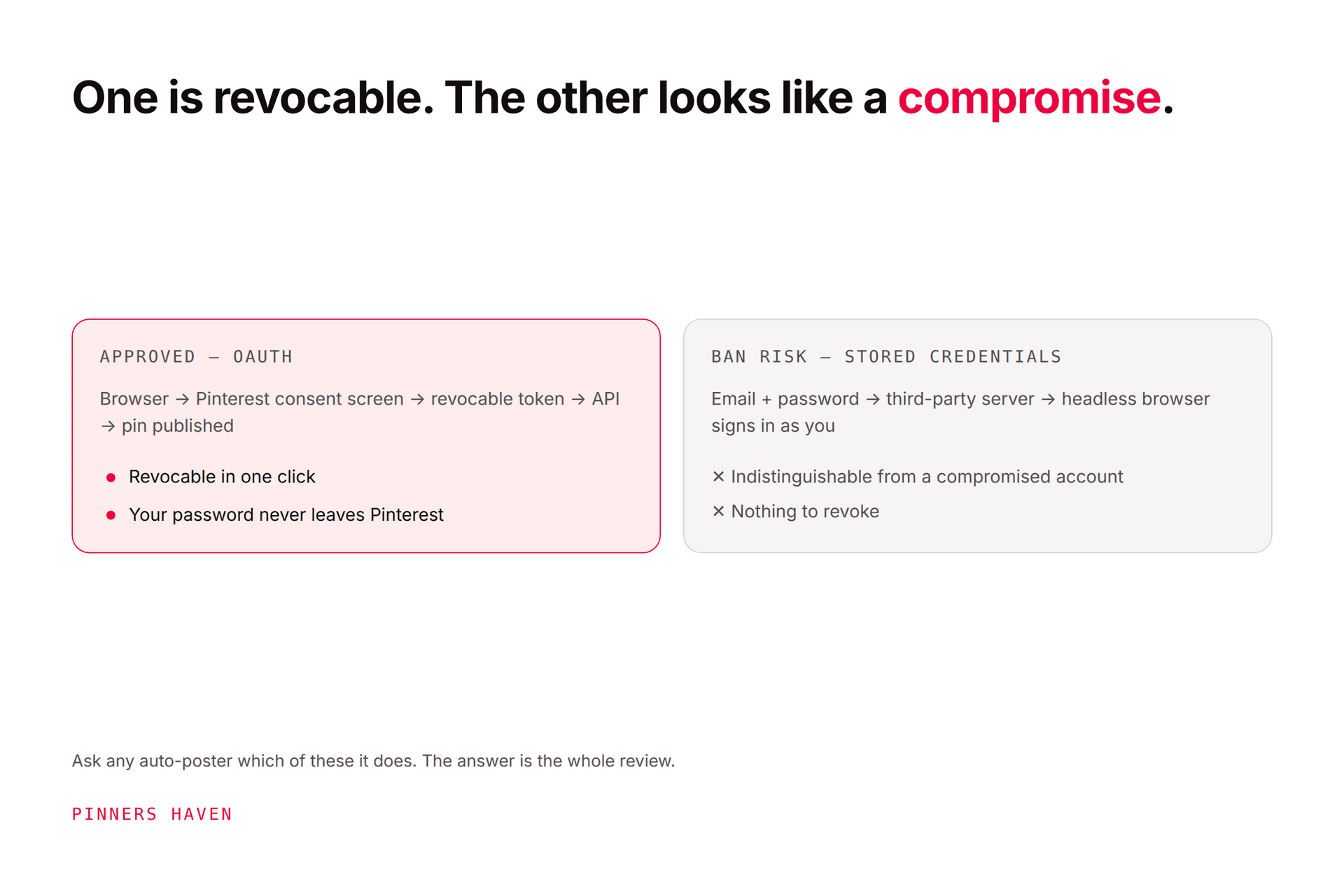
The more important half of this article is the exclusion list. Avoid any tool that asks for your Pinterest password outside Pinterest, follows accounts automatically, buys engagement, evades limits, or republishes identical pins indefinitely. Those five behaviours cause the enforcement people blame on "automation" in general.
Disclosure: Pinners Haven is ours. Six of the seven tools here are competitors, and the first one is free.
What "safe automation" actually means
Pinterest's Community Guidelines prohibit unauthorised services that automatically perform actions for users, along with inauthentic accounts, repetitive or deceptive money-making content, unsafe or low-value destinations, bought engagement, keyword stuffing, metric manipulation, and attempts to evade anti-spam systems.
Read that list again and notice what's not on it: scheduling. Publishing on a timer through an approved connection isn't the problem, and never has been.
No tool makes prohibited behaviour safe. An approved connection reduces credential and integration risk; your content and operating pattern still determine compliance. A careless human with a design tool gets flagged. A well-built automation that generates original creative on a paced cadence does not.
The five things to never automate
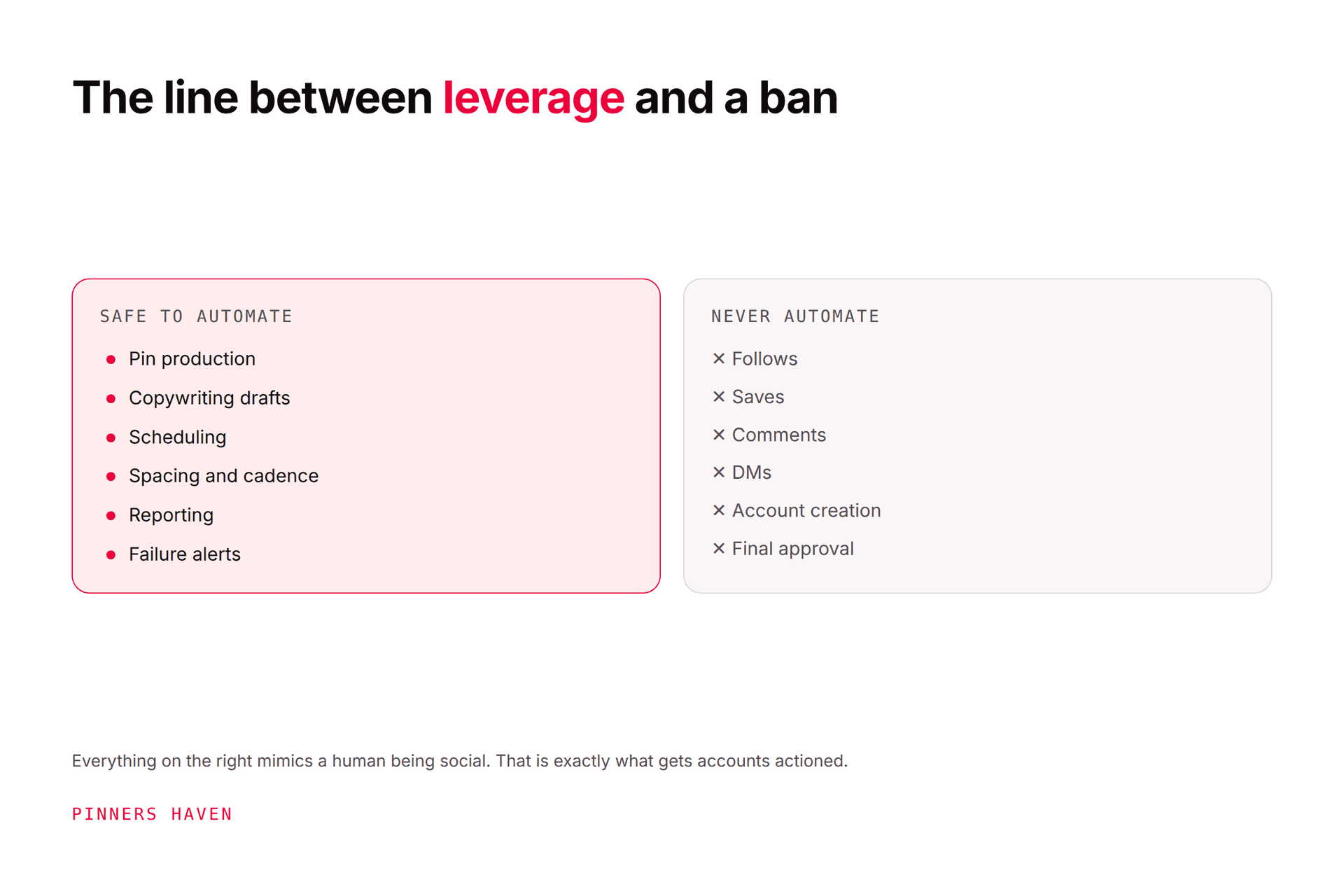
Follows, saves, comments, and DMs. These are the classic ban triggers. Any tool advertising "auto-engagement" is selling you enforcement risk.
Account creation. Mass or inauthentic accounts are explicitly prohibited.
Engagement purchases. Bought saves and clicks are manipulation, full stop.
Deceptive redirects or policy evasion. Including re-pointing old pins at unrelated destinations.
Final approval of factual, medical, financial, or rights-sensitive claims. A person signs off, every time.

The shortlist
Prices checked 7 August 2026.
Tool | Price from | Automates | Main caution |
|---|---|---|---|
Pinterest native | Free | Schedule, RSS, bulk import | 10-pin queue ceiling |
Pinners Haven | $19/mo | Generate, approve, space, publish, alert | Pinterest only |
Tailwind | Free / $17.99 | Create, write, schedule, analyse | Credits ≠ posts; 3 accounts max |
Buffer | Free / $5/channel | Queue and calendar | Cost scales per channel |
Later | $18.75/mo | Visual calendar, auto-publish | 30 posts/profile on Starter |
Hootsuite | $99/user/mo | Approvals, bulk, reporting | Expensive for solo use |
Metricool | Free / $20/mo | Planning and reports | Thin creation tools |
1. Pinterest's native tools
Free. Three genuinely useful automation paths that cost nothing:
The native scheduler — one standard pin at a time, up to 10 future pins, 30-day horizon.
RSS auto-publishing — creates pins from a claimed site's feed, generally within 24 hours, with Pinterest documenting a ceiling of up to 200 pins a day.
Content import — CSV or TXT for multiple image and video pins.
The RSS caveat matters more than the feature. RSS will faithfully reproduce weak titles, missing descriptions, badly cropped images, and wrong board mappings, at scale, without complaint. Fix the feed first or you're automating your worst work.
And to be very clear about that 200/day figure: a technical ceiling is not a target. Publishing 200 near-identical pins a day is exactly the pattern that draws duplicate flags.
2. Pinners Haven
Starter $19/mo (1 site, 120 pins) · Solo $41 (3 sites, 900 pins) · Operator $124 (25 sites, 11,250 pins) · Portfolio $291 (50 sites, 30,000 pins), billed annually. 14-day trial, no card.
Ours, so verify it yourself.
It takes a destination link and target keywords, picks from twenty angles, writes the SEO title and three to five unique descriptions, designs an original image, adds alt text, and holds it for your approval. Publishing runs on a warm-up and paced cadence, and a Freshness Meter retires each template after roughly 5–10 uses.
On the exclusion list above: it connects via official OAuth (password never stored) and does zero auto-follow, auto-like, or auto-comment.
Skip it if: you need Instagram or Facebook, or you want the cheapest possible entry — Tailwind's free tier undercuts us. We're also not a Pinterest Marketing Partner; we're building toward Trusted Partner status, and Tailwind and Later already hold partner status.

3. Tailwind
Free (5 posts) · Pro $17.99/mo · Advanced $29.99 · Max $49.99, annual.
Tailwind combines creation, copy assistance, a Pinterest-oriented calendar, bulk upload, integrations, and analytics. Strong for creators wanting one product from URL to scheduled pin, and an official Pinterest partner.
Model posts and credits separately — a SmartPin costs 5 credits, so Advanced's 300 credits is roughly 60 generated pins. Our Tailwind review works the math.
4. Buffer
Free (3 channels, 10 posts each) · Essentials $5/month per channel · Team $10/channel.
Buffer is right when Pinterest is one part of a simple multi-network calendar. Clean queues, per-network customisation, no pretence of being a Pinterest strategy suite.
Test board selection, pin formats, analytics, approvals, and the per-channel pricing at your real channel count.
5. Later
Starter $18.75/mo · Growth $37.50 · Scale $82.50, billed yearly.
Later emphasises visual planning, media editing, and automatic photo and video publishing. A sensible match if you already use it for Instagram or TikTok, and it's a Pinterest Marketing Partner.
Confirm profiles, users, approvals, analytics retention, and monthly allowances on your exact plan — Starter's 30 posts per profile per month is one pin a day.
6. Hootsuite
Standard $99/user/mo (10 accounts) · Professional $199 · Advanced $399, annual. 14-day trial, no card.
Hootsuite is strongest where access control, approvals, bulk operations, listening, and client-ready reporting matter.
It's rarely the economical answer to "I need to schedule ten pins." Buy it for governance, not because it can publish.
7. Metricool
Free (1 brand, 20 posts/month) · Starter from $20/mo (5 brands) · Advanced from $53/mo (15 brands).
Metricool combines planning and reporting across brands and networks. Useful when you want one measurement workspace comparing Pinterest against other acquisition channels.
Verify how it handles Pinterest-specific metrics, formats, board selection, failed posts, team access, and exports.
A safer automation blueprint
Whichever tool you choose, the workflow matters more than the brand:
Research — a real audience question and a destination with original value.
Create — two or three materially different visual concepts and accurate copy. Our fresh pins guide defines "materially different."
Review — rights, spelling, claims, link, board, disclosure, mobile legibility.
Approve — a named person signs off the final publish unit.
Schedule — sensible spacing, never a sudden repetitive burst.
Monitor — surface failed posts, broken links, account warnings, unusual performance.
Learn — compare outbound clicks and conversions, then update the next batch.
Keep every login inside the official OAuth or partner connection. Pinterest's account protection guide says to enter your password only on pinterest.com or in the official app. Any tool that asks for it directly is a tool that can lose you the account.
Frequently asked questions
Is Pinterest automation allowed?
Yes — authorised scheduling and import tools are permitted. Unauthorised services acting on your behalf and manipulative behaviour are not. Follow the current Community Guidelines and use official connections.
What should never be automated?
Follows, saves, comments, messages, account creation, engagement purchases, deceptive redirects, policy evasion, and final approval of factual or rights-sensitive content. See the five-item list above.
What's the best free Pinterest automation tool?
Pinterest's own scheduler, RSS auto-publishing, and content import. Eligibility varies by account type and whether your site is claimed. Buffer, Tailwind, Metricool, and Publer also have free tiers worth testing.
How many pins should I automate per day?
There's no universal safe number, and anyone quoting one is guessing. Publish at the pace your original content supports — how often to pin on Pinterest shows how to derive it from your library. Pinterest's 200/day RSS ceiling is a technical limit, not a recommendation.
Will automation get my account flagged?
Not by itself. The flags come from duplicates, bursts, password-based connections, bought engagement, and volume that outruns your creative — all of which a careless human produces just as easily. Our flagged-as-spam guide covers what actually triggers enforcement, and safe automation covers implementation.
Can I automate affiliate pins?
Yes, with disclosure. Pinterest prohibits deceptive or repetitive money-making content, so the pin must be honest about the destination and the page must deliver. Check the affiliate marketing guide for the disclosure requirements.
Choose the workflow before the brand
Write down the exact steps you want removed, the approvals you need, and your real monthly volume. Then run one full cycle end to end, including a deliberately failed post to see whether the tool tells you.
The best tool isn't the one that performs the most actions. It's the one that removes repetitive work without removing your control.