Pinterest Auto Poster: What's Safe vs What Gets You Banned
You want to stop uploading pins by hand at eleven at night, and every search for a tool turns up two kinds of results: polished software that looks legitimate, and something promising unlimited undetectable posting for a one-off $27. Somewhere in your head is the story of the person whose account vanished overnight.
Joe Nyambura
Founder & operator, Pinners Haven · August 18, 2026
On this page17 sections
- The one distinction that decides everything
- What Pinterest's rules actually say
- The per-item rule almost nobody knows
- What actually gets accounts banned
- Six questions that test any auto poster
- Where Pinners Haven sits on this test
- If you'd rather not connect anything
- Frequently asked questions
- Is using a Pinterest auto poster against the rules?
- Can you get banned for scheduling pins?
- What's the safest way to auto post to Pinterest?
- Do auto-posted pins get less reach than manual ones?
- Is it safe to give a tool my Pinterest password?
- How many Pinterest accounts can I safely run from one tool?
- What should I do if my auto poster already got me flagged?
- Is a Pinterest automation tool the same as a Pinterest bot?
- Judge the architecture, not the landing page
You want to stop uploading pins by hand at eleven at night, and every search for a tool turns up two kinds of results: polished software that looks legitimate, and something promising unlimited undetectable posting for a one-off $27. Somewhere in your head is the story of the person whose account vanished overnight. Breathe. The line between the two is much sharper than the marketing makes it look, and you can test any tool against it in about a minute.
A Pinterest auto poster is safe when it publishes through Pinterest's official API using OAuth authorisation, which never requires your password and can be revoked from your account settings. It becomes a ban risk when it logs into your account with your credentials and simulates a human, or when it automates follows, likes, comments, or messages. Pinterest's Community Guidelines state plainly: "Don't use automation that hasn't been explicitly approved by Pinterest." That single architectural difference, official API versus browser emulation, predicts almost every account loss in this category.
Everything else in this article is detail on that distinction and how to check for it yourself.
The one distinction that decides everything
There are only two ways software can put a pin on your account, and they are not remotely equivalent.
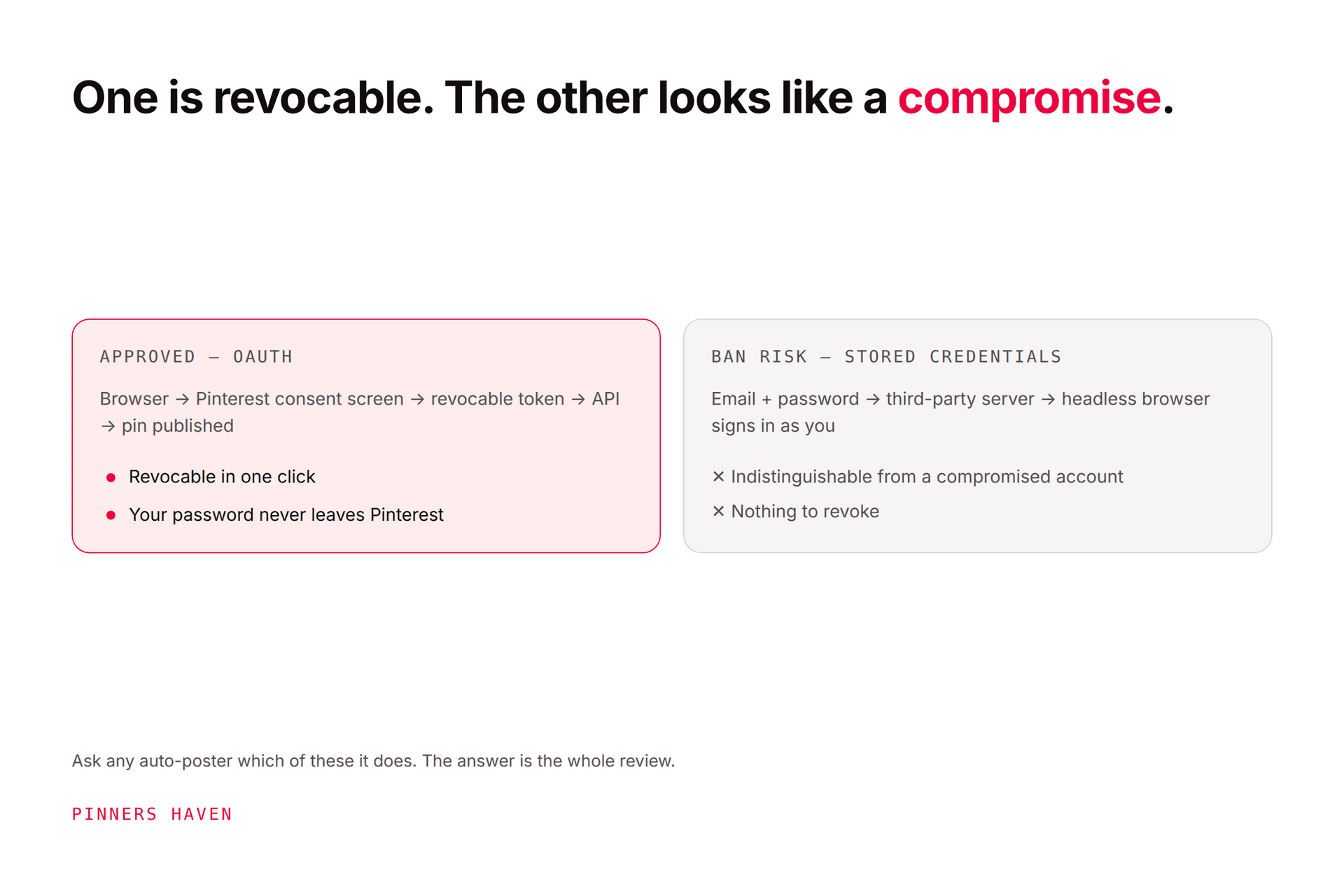
Path one: the official API with OAuth. You click a button, Pinterest shows you its own consent screen on its own domain, you approve specific permissions, and Pinterest hands the tool a revocable token. The tool never learns your password. Pinterest knows exactly which application is acting, on whose behalf, and with what permissions. You can withdraw it whenever you like.
Path two: credential-based browser automation. You hand over your email and password. A server somewhere logs in as you, drives a headless browser, and clicks buttons faster than a person can. Pinterest has no record of a third party being involved, because from its side there is no third party. There is only your account, behaving strangely.
That second path is why accounts disappear. Not because the pins were bad, but because the login pattern is functionally identical to a compromised account, and Pinterest's abuse systems are built to act on exactly that signal.
You might be thinking: "But it worked fine for months." That's the genuinely dangerous part. Credential bots usually do work, right up until an enforcement sweep or a login from an unusual location, and by then the tool holds your password and your account holds years of work.
What Pinterest's rules actually say
Two documents govern this, and they're short enough to read yourself.
The Community Guidelines are blunt about unapproved tooling:
"Don't use automation that hasn't been explicitly approved by Pinterest."
They also prohibit operating inauthentic accounts, creating accounts en masse, saving repetitive or irrelevant content to make money, and buying or selling engagement.
The Developer Guidelines are the more interesting document, because they bind the tool rather than you, and almost nobody reads them. They prohibit:
"Taking actions on behalf of end users without their specific knowledge and consent. This includes but is not limited to actions like: modifying Pinner profiles; creating, saving and editing Pins; following and unfollowing; sending messages; and making comments."
They also forbid scraping, storing data pulled from the API, and testing Pinterest's rate limits or abuse-prevention systems without authorisation.
The per-item rule almost nobody knows
This is the clause worth reading twice, because it quietly disqualifies a whole category of product:
"if your app allows end users to schedule Pin publishing, the end user must choose each Pin to be published"
And the parallel rule for following:
"if your app allows end users to follow accounts on Pinterest, the end user must choose each account to follow"
Pinterest's framing is that authenticity is the point: "don't build automations that could lessen the authenticity of engagement on Pinterest."
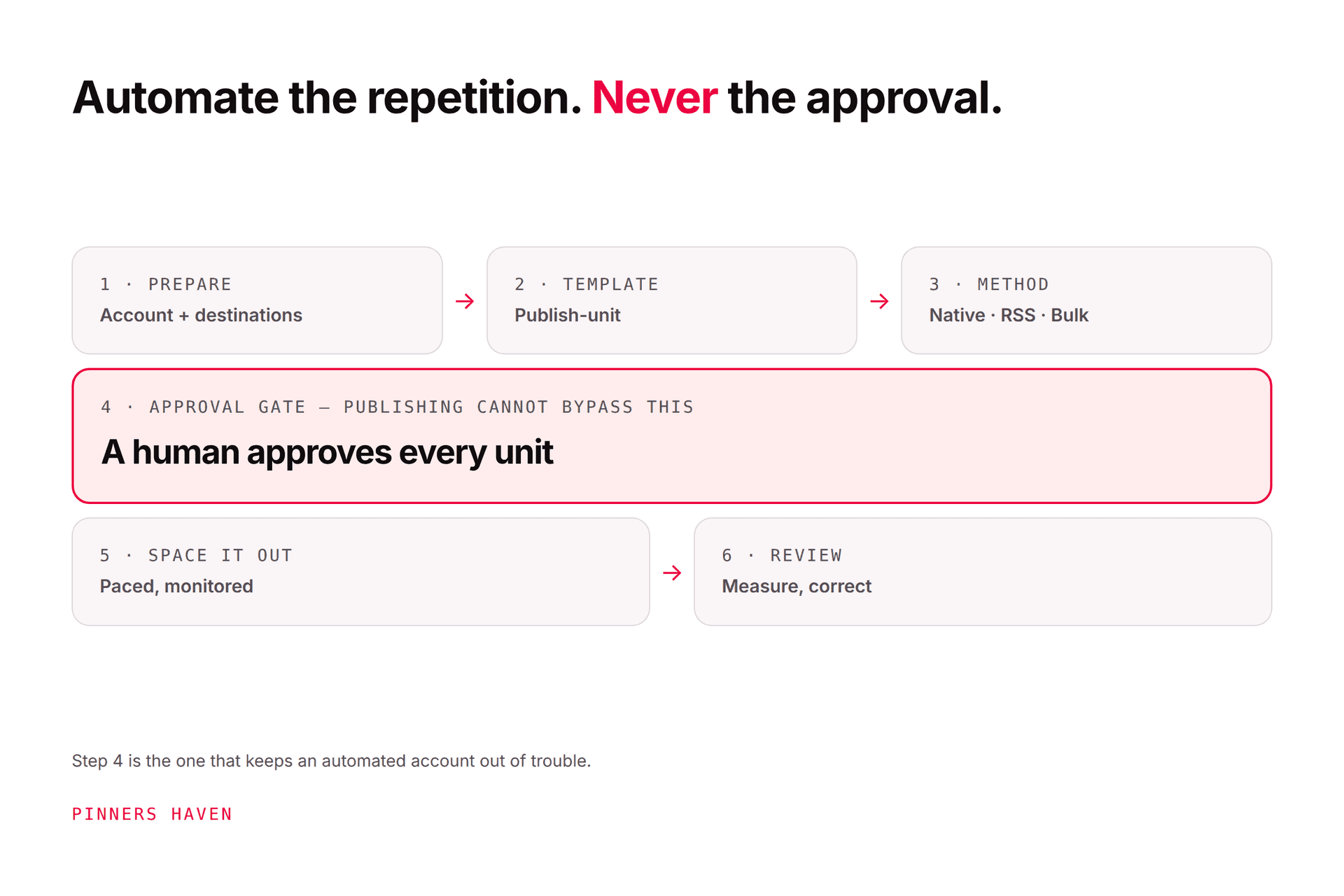
So a tool that generates pins and fires them at your account with no approval step is not merely aggressive. It's outside the developer rules, whatever its interface looks like. "Set it and forget it" is a marketing phrase that describes a policy violation. The compliant version is set it, review it, and approve it, which takes about ninety seconds a day.
What actually gets accounts banned
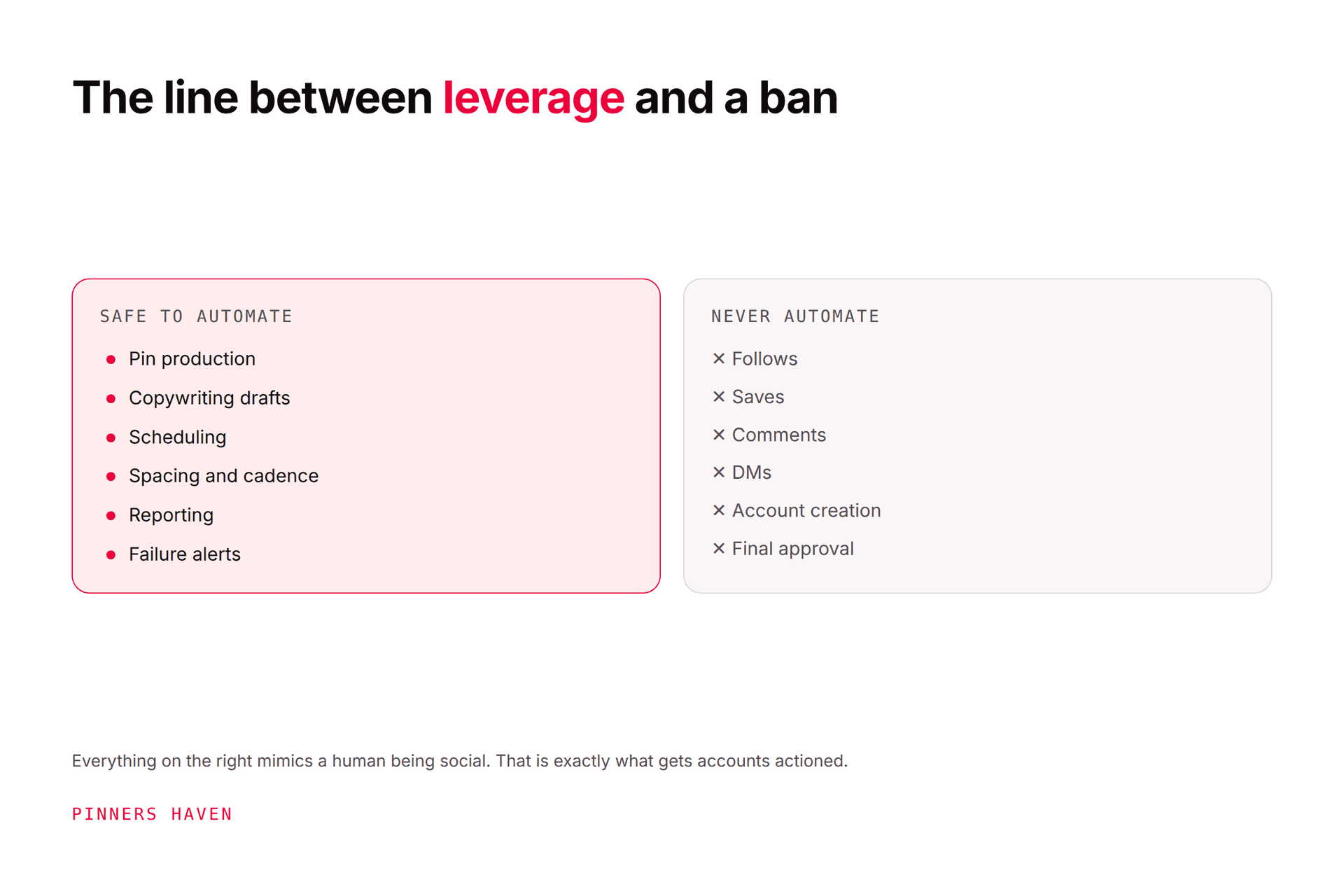
Publishing on a schedule is not the risk. Pinterest endorses scheduling and names third-party partners for it. The enforcement risk clusters around a specific set of behaviours:
Behaviour | Why it triggers enforcement |
|---|---|
Password-based login by software | Indistinguishable from account compromise |
Auto-follow / unfollow cycling | Explicitly requires per-account choice; classic manipulation pattern |
Auto-like, auto-comment, auto-DM | Prohibited as actions taken without specific consent; comments also hit the repetitive-content rule |
Bulk duplicate pins | Pinterest warns this can get you flagged as spam and temporarily blocked from creating Pins |
Blasting one pin to many boards at once | The most common duplicate pattern in practice |
Engagement pods and bought saves | "Buying or selling engagement" is named directly |
Running many accounts from one system | Coordinated behaviour to manipulate the platform |
Probing rate limits | Named in the developer guidelines |
Notice the shape. Almost none of these are about volume, they're about authenticity. Pinterest's concern is whether a real person is genuinely choosing to do the thing. Automate the tedium of the choice and you're fine; automate the choice itself and you're not.
If you're reading this because something already went wrong, the diagnosis and recovery steps are in Pinterest account flagged as spam and why your impressions dropped.
Six questions that test any auto poster
Run these before you connect anything. They take a minute and they're decisive.
1. Does it ask for your Pinterest password? If yes, stop. There is no legitimate reason for it. OAuth exists precisely so that third parties never handle credentials, and any vendor asking is either building on browser automation or hasn't been approved for API access.
2. Can you review and approve every pin before it goes out? The developer guidelines require you to choose each Pin. If approval is absent, or buried, or on by default with no way to inspect the queue, the product is designed around a rule it doesn't meet.
3. Does it offer auto-follow, auto-like, auto-comment, or auto-DM? Any one of these tells you the vendor's stance on the rules. Even if you never switch it on, it's built to be there, which means the rest of the product was designed with the same judgement.
4. What does the marketing promise? "Unlimited pinning", "undetectable", "bypasses Pinterest's limits", "no API restrictions". These aren't features, they're descriptions of evading enforcement, written by people who know exactly what they're selling.
5. Is it in Pinterest's partner directory, and if not, does the vendor admit it? Check the Marketing Partners directory. Buffer and Canva were both listed there when we checked on 21 August 2026, and Tailwind is a Pinterest Marketing Partner. The directory is long and paginated, so search it for the specific tool rather than trusting a list in a blog post, including this one. Absence from that list isn't automatically disqualifying, since plenty of compliant tools aren't in a formal partner programme. A vendor implying partner status it doesn't have absolutely is.
6. Can you revoke its access from Pinterest, in one click? This is the best test on the list because you can verify it yourself after connecting. Open your Pinterest settings and look at connected apps. A genuine OAuth integration appears there and can be cut off instantly, without Pinterest's involvement. A credential bot won't appear anywhere, because there's nothing to revoke except your password.

Where Pinners Haven sits on this test
It would be a bit rich to hand you a six-question test and dodge it, so here are our own answers, including the one that isn't flattering.
Question | Pinners Haven |
|---|---|
Asks for your password? | No. Official OAuth; the password is never stored or seen |
Per-pin approval? | Yes. Nothing publishes until you approve it, on every plan |
Auto-follow / like / comment / DM? | None. Not built, not planned |
Marketing promises? | Hard pin caps by plan: 120, 900, 11,250, or 30,000 a month. No unlimited claim |
In Pinterest's partner directory? | No. We're not a Pinterest Marketing Partner. Tailwind is, and Buffer and Canva are listed in the directory — that's a real advantage they have over us |
Revocable from your settings? | Yes. We appear in your connected apps and you can cut access without contacting us |
On the partner question, our public position is that we're "building toward Trusted Partner" and architected around Pinterest's API rules. That's a statement of intent, not a credential, and anyone comparing tools deserves to see the difference stated rather than blurred.
What the product does with that architecture: publishing is paced rather than bursty, new accounts get a gradual warm-up instead of 50 pins on day one, and it reserves Pinterest API budget before each call rather than pushing until something breaks. The Freshness Meter retires each design after roughly five to ten uses, which addresses the duplicate-content risk that causes far more trouble than posting speed ever does. Plans start at $19/mo billed annually with a 14-day trial. No card is needed; when it ends, publishing pauses until you pick a plan.
(Disclosure: we make Pinners Haven. We're not affiliated with Pinterest.)
If you'd rather not connect anything
Reasonable, and you have real options. Pinterest's own scheduler queues up to 10 pins as far as 30 days ahead, its bulk upload accepts around 200 pins from a CSV, and RSS auto-publishing can post new content automatically. All free, all first-party, all covered step by step in how to schedule pins on Pinterest.
They're limited, which is the point at which people start looking at third-party tools. But starting there costs nothing and tells you whether scheduling is actually your bottleneck.
Frequently asked questions
Is using a Pinterest auto poster against the rules?
Not inherently. Pinterest publishes its own guidance on automating pin scheduling and maintains a partner directory of approved platforms. The Community Guidelines prohibit automation that Pinterest hasn't approved, so the question is always which tool, not whether automation.
Can you get banned for scheduling pins?
Scheduling by itself is endorsed by Pinterest and won't get you banned. Accounts get actioned for credential-based bots, automated following or engagement, bought engagement, and repeatedly uploading duplicate content, which Pinterest warns can lead to a temporary block on creating Pins.
What's the safest way to auto post to Pinterest?
Use an OAuth-based tool that requires you to approve each pin, publish original creative rather than duplicates, space posts out instead of blasting boards, and automate nothing social. If you want zero third-party exposure, Pinterest's native scheduler and bulk upload are free.
Do auto-posted pins get less reach than manual ones?
Pinterest hasn't published anything suggesting scheduled pins are distributed differently. Its distribution guidance points at relevance, quality and original content. Where automated accounts underperform, it's usually because the automation was used to publish repetitive creative at volume, which is a content problem rather than a scheduling one.
Is it safe to give a tool my Pinterest password?
No. Legitimate tools use OAuth and never ask. Handing over credentials means the tool can do anything you can, you can't revoke it without changing your password, and the resulting login pattern looks to Pinterest like a compromised account.
How many Pinterest accounts can I safely run from one tool?
Running multiple accounts is normal for agencies and portfolio operators, and Pinterest's partner tools support it. What's prohibited is operating accounts inauthentically or coordinating them to manipulate the platform, so keep each account genuinely distinct in audience, content and destination.
What should I do if my auto poster already got me flagged?
Stop the automation, revoke its access, and don't publish anything further while you assess. Then work through account flagged as spam, which covers the appeal process and the publishing pattern to return to afterwards.
Is a Pinterest automation tool the same as a Pinterest bot?
No, and the difference is the whole point of this article. A Pinterest automation tool worth using publishes through Pinterest's official API with OAuth, never holds your password, appears in your connected apps where you can revoke it, and leaves every pin for you to approve. A Pinterest bot logs in as you with your credentials and simulates clicks, follows, likes, or comments, which is the behaviour Pinterest's Community Guidelines prohibit and the pattern that gets accounts flagged. Judge any "automation tool" by that architecture, not by its landing page.
Judge the architecture, not the landing page
Every auto poster on the market looks trustworthy on its own website. That's what websites are for.
So don't evaluate the copy, evaluate the plumbing. Ask for the password, check for the approval step, look for the social automation, and confirm you can revoke it from your own settings. A tool that passes all four is doing the same thing Pinterest's own partners do. One that fails the first is asking you to bet an account you've spent years building on a $27 purchase.