Pinterest Pins Not Showing Up? 9 Reasons and Fixes
You published a pin, went to look for it, and it isn't there. Depending on where you looked, that's either completely normal, a fixable mistake, or the one genuinely serious case. Breathe, because it's usually the first two.
Joe Nyambura
Founder & operator, Pinners Haven · August 18, 2026
On this page24 sections
- First: the two-minute diagnosis
- Where it's missing tells you what it is
- The nine reasons, and what to do
- 1. It's still processing
- 2. It saved to the wrong board
- 3. You're searching for your own exact title
- 4. It's live but not ranking
- 5. The keywords don't match the creative
- 6. Your account or domain is new
- 7. The destination is blocked or broken
- 8. The pins are too similar to each other
- 9. There's an actual enforcement action
- What not to do
- If it's genuinely a ranking problem
- The pattern behind most of these
- Frequently asked questions
- How long does it take for a pin to show up on Pinterest?
- Why can I see my pins but nobody else can?
- Why are my pins not showing up in search?
- Does deleting and re-uploading a pin help?
- Do my followers see all my pins?
- Can a broken link stop my pins showing?
- Is this a shadowban?
- Find the location, then fix the cause
You published a pin, went to look for it, and it isn't there. Depending on where you looked, that's either completely normal, a fixable mistake, or the one genuinely serious case. Breathe, because it's usually the first two.
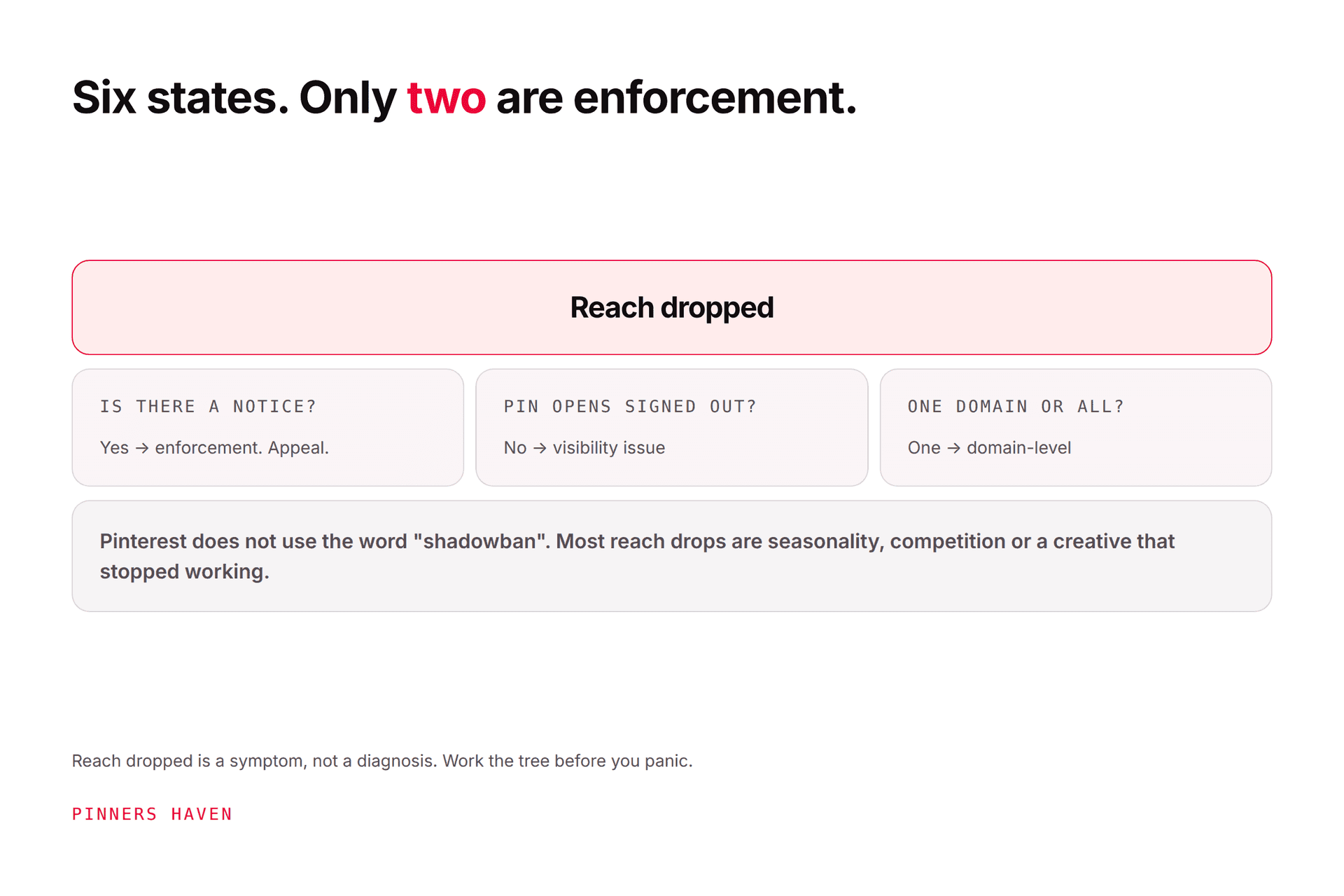
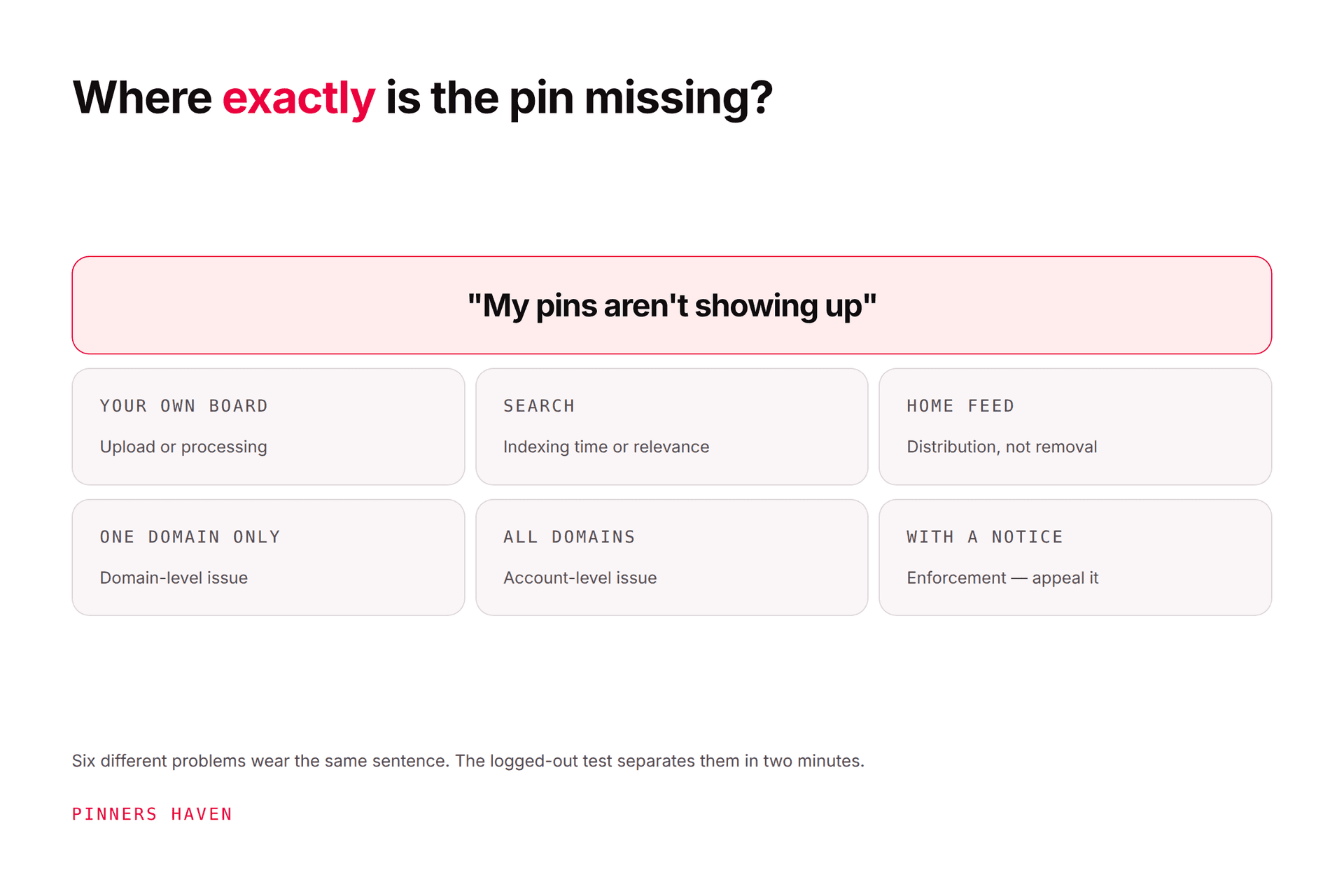
"Pins not showing up" is not one problem. It's six, and they're distinguished by where the pin is missing rather than by what your analytics say. A pin absent from your own board is an upload or processing issue. A pin absent from search is usually indexing time or keyword mismatch, and new pins routinely take hours to days to appear. A pin visible to you but not when you're signed out is the only case that suggests suppression, and it's also the rarest. Find the location first. The fix follows from it, and half the "fixes" people apply make the wrong problems worse.
Two minutes of diagnosis beats a week of panic-editing.
First: the two-minute diagnosis
Do these in order, before touching anything.
1. Open your own board. Is the pin there at all?
2. Copy the pin's URL. Open it in a private or incognito window, signed out. Does it load normally?
3. Search Pinterest, signed out, for the phrase a stranger would use. Not your exact title. The phrase.
4. Click through to your destination, signed out, on mobile.
Those four checks separate every case below. Write down which one failed, because the rest of this article is organised by that answer.
Where it's missing tells you what it is
Where it's missing | Most likely cause | Serious? |
|---|---|---|
Your own board | Upload failed, still processing, or saved to a different board | No |
Your public profile, signed out | Pin deactivated, or profile set to hidden from search | Possibly |
Pinterest search | Indexing delay, keyword mismatch, or it's live but ranking low | No |
Follower home feeds | Normal distribution; feeds are not chronological | No |
The destination loads wrong | Blocked or broken link | Yes, fix now |
Gone entirely, with a notice | Enforcement | Yes |
The nine reasons, and what to do
1. It's still processing
Video and larger images take time, and the pin can be genuinely invisible for a while after upload. Fresh uploads also take time to reach search.
Fix: wait. Give it 24 hours before treating it as a problem at all, and up to a few days for search specifically.
2. It saved to the wrong board
Far and away the most common cause, and the most embarrassing. Board selection is sticky in some flows and resets in others, so pins land on the last board you used or on a secret board you forgot exists.
Fix: check your secret boards and your most recently used board. Move it rather than re-uploading.
3. You're searching for your own exact title
Searching Pinterest for the precise phrase you wrote and not finding it tells you almost nothing. Results are personalised, your own content is treated differently for you, and an exact-title match is not how anyone else will ever find the pin.
Fix: search signed out, in a private window, for the phrase a stranger would type. If it appears there, the pin is fine.
4. It's live but not ranking
This is the big one, and it's misdiagnosed constantly. The pin exists, opens signed out, and is fully distributed. It just isn't on page one for a competitive term.
That's not a visibility fault. That's search competition, and it's solved with Pinterest SEO and keyword research, not with troubleshooting.
Fix: check whether the pin ranks for a longer, more specific phrase. If it does, the pin is working and the keyword was too ambitious.
5. The keywords don't match the creative
If your title, description and board all say one thing and the image says another, Pinterest has conflicting signals about what the pin is for, and it surfaces for neither.
Fix: make the image, title, description and board agree. That alignment does more for findability than any volume increase.
6. Your account or domain is new
New accounts and newly claimed domains carry no track record, and everything takes longer: indexing, distribution, and the point at which a pin's performance becomes readable.
Fix: publish consistently and wait. How often to pin covers setting a rate you can hold while this builds.
7. The destination is blocked or broken
If Pinterest can't reach your page, or the link redirects somewhere unexpected, or the site is flagged, pins pointing there can stop being distributed regardless of how good they are.
Fix: open the link signed out on mobile. Check for redirects, expired certificates, geo-blocking and interstitials. This is the one case worth treating urgently, because it silently affects every pin to that domain. Our flagged as spam guide covers blocked destinations specifically.
8. The pins are too similar to each other
If you published a run of near-identical pins, distribution can quietly reduce, because Pinterest's guidance warns that repeatedly uploading content that already exists may get you flagged as spam and temporarily blocked from creating Pins.
Fix: stop publishing variations, and read what counts as a fresh pin. Vary the concept, not the colour.
9. There's an actual enforcement action
Only conclude this if there's a notice in your account, or the logged-out test genuinely fails, or you've lost the ability to create pins.
Fix: don't guess at it. Work through account flagged as spam for the appeal process, and Pinterest shadowban for telling real suppression apart from the five things that imitate it.
What not to do
Protective warnings, because these are the reflexes and they all make it worse:
Don't delete and re-upload. You lose the pin's history and engagement, restart any indexing, and create something that looks like duplication.
Don't publish twenty more pins to compensate. If reason 8 is in play, that's the exact accelerant.
Don't overhaul your whole profile on the strength of one missing pin.
Don't trust a "shadowban checker." They can't see Pinterest's ranking systems and mostly re-run a search you can run yourself.
Don't edit the pin repeatedly while waiting for indexing. Let it settle.

If it's genuinely a ranking problem
Once the logged-out test passes, you're no longer troubleshooting. You're competing, and that's a different job:
Target a phrase with realistic competition. Long and specific beats broad and popular for a new account.
Make the image match the query at thumbnail size.
Give one page several genuinely distinct concepts so you cover more of the search surface.
Publish steadily so the account keeps accumulating signal.
Our algorithm guide covers what distribution actually responds to, which is not the same as what makes a pin exist.
The pattern behind most of these
Look at reasons 4, 5, 6 and 8 together. None of them is a fault. They're all the same underlying situation: not enough distinct, well-targeted creative, published steadily enough for the account to build a track record.
That's the slow version of this problem, and it's the one that doesn't announce itself. There's no notice, no error, just pins that technically exist and never get found.
Pinners Haven addresses that layer directly: up to 20 angles per topic so a single page covers real search surface instead of one phrase, an SEO title with three to five unique descriptions per pin so the copy never collapses into repetition, and original designs on human-designed templates with a Freshness Meter that retires each one after roughly five to ten uses. It also watches reach week over week and emails you when it falls off a cliff at a threshold you set, which is the difference between finding out now and finding out three weeks late.
Nothing publishes until you approve it. Plans start at $19/mo billed annually with a 14-day trial; no card is needed, and when it ends publishing pauses until you pick a plan.
It won't fix reasons 1, 2, 7 or 9, which are upload, board, destination and enforcement problems. Those are yours, and they're the ones to check first.
(Disclosure: we make Pinners Haven. We're not affiliated with Pinterest.)
Frequently asked questions
How long does it take for a pin to show up on Pinterest?
Appearing on your own board should be immediate to a few minutes. Appearing in search takes longer, from hours to several days, and newer accounts sit at the slower end. Judge nothing before 24 hours.
Why can I see my pins but nobody else can?
Usually you can't confirm that nobody else can, because your signed-in view is personalised. Run the logged-out test: open the pin URL in a private window. If it loads, other people can see it, and what you actually have is a ranking problem.
Why are my pins not showing up in search?
Most often indexing time, keyword mismatch between the image and the text, or the pin being live but ranking below where you looked. Search signed out for the phrase a stranger would use rather than your exact title.
Does deleting and re-uploading a pin help?
No, and it usually hurts. You lose accumulated engagement, restart indexing, and produce something that resembles a duplicate. Move a mis-filed pin instead of republishing it.
Do my followers see all my pins?
No. Home feeds are ranked rather than chronological, so followers see a selection based on relevance and behaviour. Absence from a follower's feed is normal and isn't evidence of a problem.
Can a broken link stop my pins showing?
Yes, and it's the most damaging item on this list because it affects every pin pointing at that domain rather than one pin. Test the destination signed out, on mobile, and check for redirects and blocks.
Is this a shadowban?
Almost never. Six ordinary situations imitate suppression, and the logged-out test rules out most of them in a minute. See Pinterest shadowban before concluding anything.
Find the location, then fix the cause
The reason this problem generates so much anxiety is that "not showing up" sounds like one thing and behaves like six.
So resist the urge to fix before you diagnose. Open the board, run the logged-out test, search as a stranger, click the link. Four checks, two minutes, and you'll know whether you're waiting on indexing, correcting a board, repairing a link, or competing for a keyword you were never going to win yet.