How to Improve SEO on Pinterest (10 Tactics That Actually Work)
To improve SEO on Pinterest, re-aim each pin at one search phrase (title front-loaded, under 100 characters), rewrite descriptions as natural sentences that add context (Pinterest uses them for relevance even when they're not shown), make the image, text, and keywords match the landing page exactly, put each pin on
JN
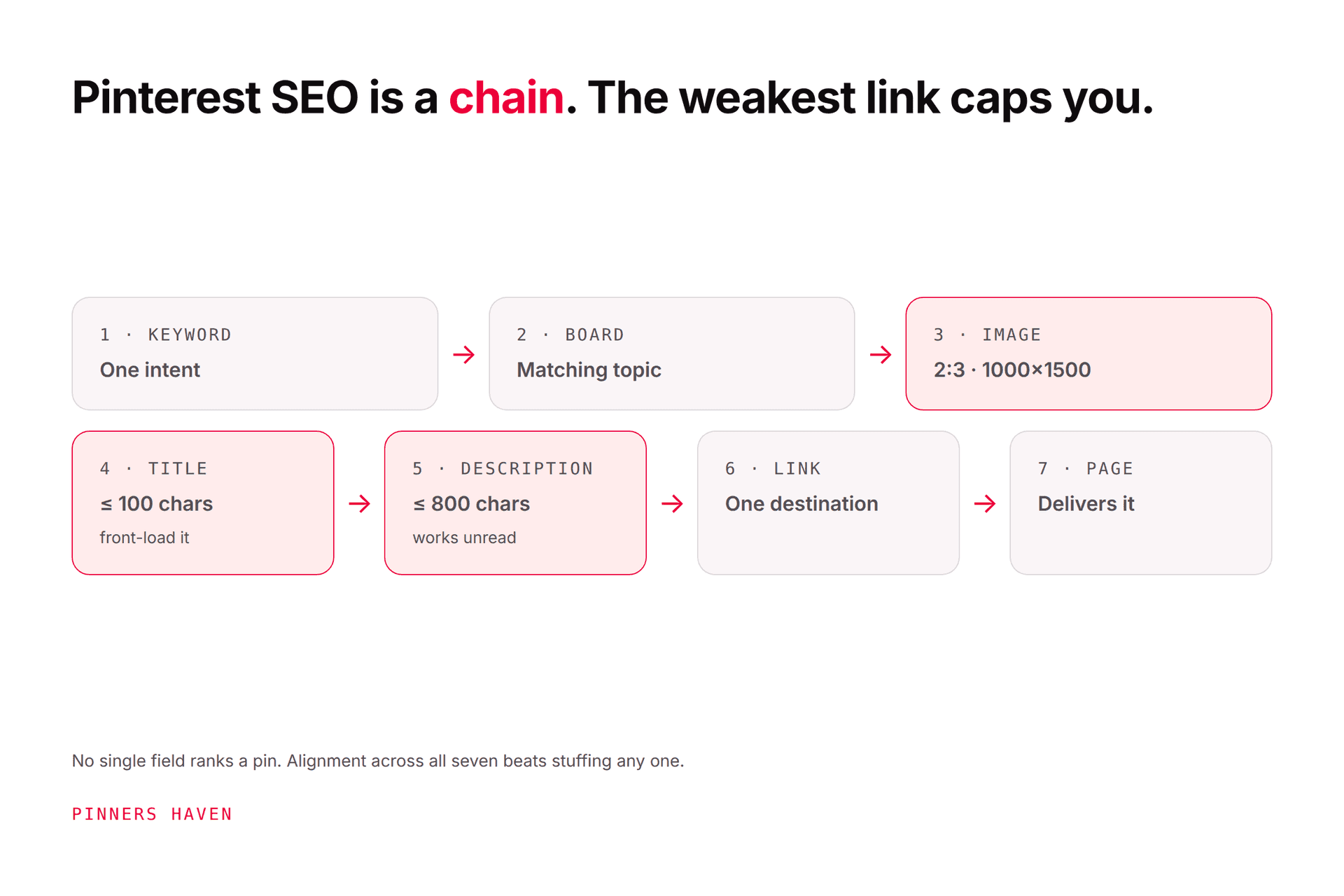
Joe Nyambura
Founder & operator, Pinners Haven · August 18, 2026
You already know Pinterest is a search engine. You've got keywords in your titles, boards that aren't called "Inspiration," and a claimed site. And it's still not moving the way the guides promised. This isn't the "what is Pinterest SEO" article; that's our hub. This is the list of what to change next, ranked by how much it tends to move distribution for the effort, with Pinterest's own words next to each one so you're not optimising for folklore.
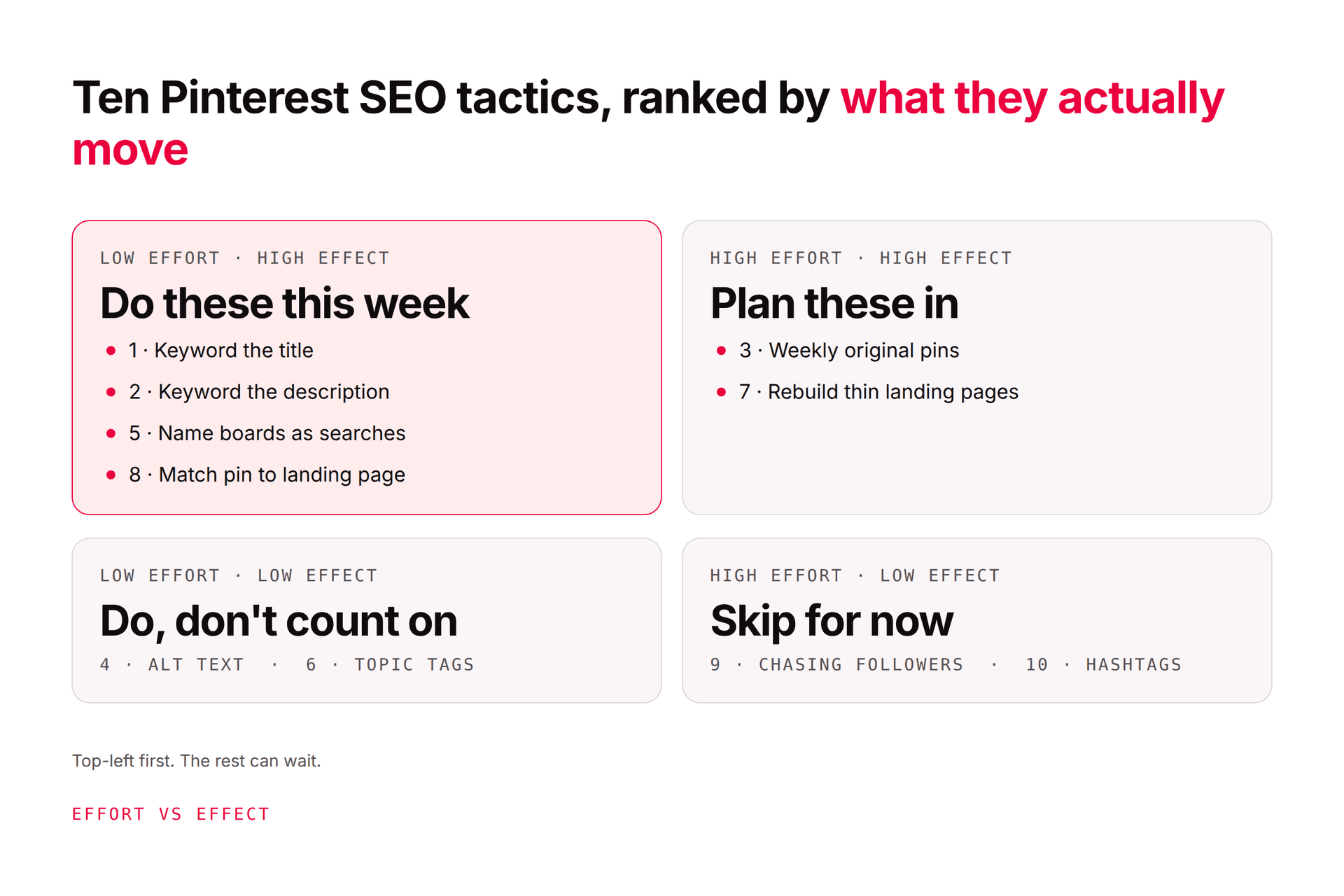
To improve SEO on Pinterest, re-aim each pin at one search phrase (title front-loaded, under 100 characters), rewrite descriptions as natural sentences that add context (Pinterest uses them for relevance even when they're not shown), make the image, text, and keywords match the landing page exactly, put each pin on the most specific board, and publish new angles instead of re-saving the same pin, which Pinterest warns can get you flagged as spam. Then read Analytics by outbound clicks, not impressions, and make more of what earns them. Those are the big five; the other five are below, with a ten-minute audit you can run on any pin today.
How to use this list
Each tactic has three parts: what Pinterest actually says (with the source), the ten-minute version, and the signal that tells you it worked. Do them in order if you're short on time; the first five carry most of the effect. Pinterest's creator guide to SEO and its Pin performance and distribution page are the two primary sources, and they're shorter than you'd think.
1. Re-aim every pin at one search phrase
What Pinterest says: "Work them into your titles, descriptions, image names and even your descriptive alt text," where "them" is the specific words and phrases people type into search. Titles run to 100 characters; the first part is what people see.
Ten minutes: Open your last ten pins. For each, write down the single search phrase it's trying to win. If you can't, that's the problem. Rewrite the title so the phrase comes first, naturally, once: "Small Apartment Storage Ideas for Renters" rather than "Ideas, Tips and Hacks for Storage, Organisation and Decluttering."
You'll know it worked when: impressions for that pin stop being random and start clustering around the phrase you chose. Check its pin stats in four weeks, not four days.
2. Rewrite descriptions as sentences that add context
What Pinterest says: descriptions help its systems determine relevance even when they aren't visible in the feed, and you get up to 800 characters. Its guidance is to add a description and title so more people discover the pin.
Ten minutes: Replace any keyword list with two or three real sentences: what the page delivers, who it's for, and the supporting phrases a searcher might also use. "Renter-friendly storage for a small apartment: over-door racks, under-bed bins, and the three things landlords actually allow you to mount." That's the primary phrase plus three natural supporting ones, and it reads like a person wrote it.
You'll know it worked when: the pin starts appearing for related searches you didn't target directly. If you want the method in depth, how to write descriptions that rank.
3. Make the image, text, and keywords match the landing page
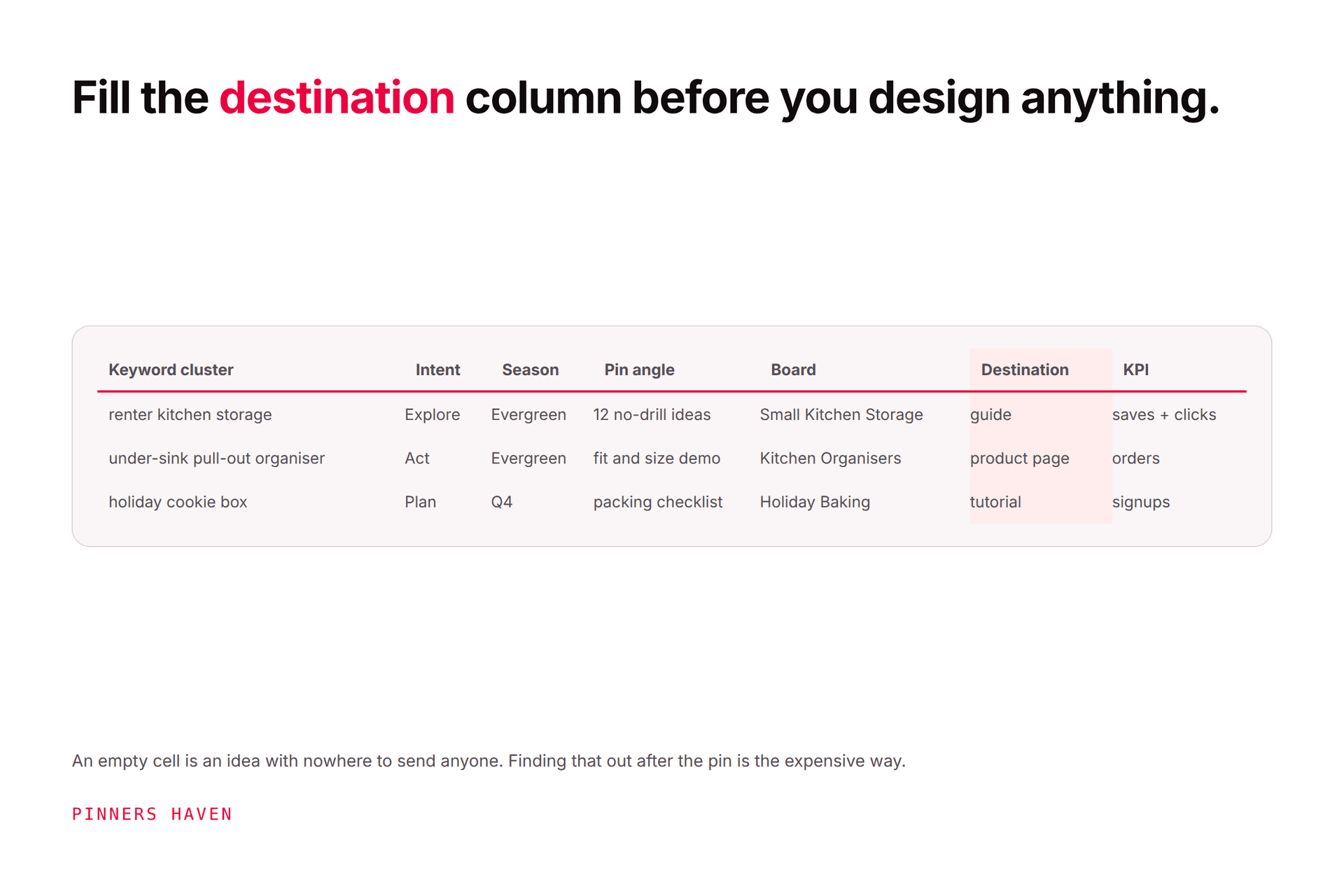
What Pinterest says: "Make sure the images, text, and keywords in your Pin match the details in the landing page," and "Link to a landing page that provides additional content clearly related to your Pin." Its creator guide adds that your site should load quickly and be mobile-friendly, and that broken links and duplicate content hurt.
Ten minutes: Open the pin and the page side by side on your phone. Does the page deliver what the overlay promised, above the fold, in under three seconds? If the pin says "12 ideas" and the page has 7, or the pin shows a finished kitchen and the page opens on a 400-word preamble, fix the pin or the page. Then click every link in your last 20 pins; one dead link is one wasted ranking.
You'll know it worked when: pin clicks and outbound clicks move together. A gap between them (lots of close-ups, few clicks through) is a mismatch signal.
4. Put the search phrase on the image
What Pinterest says: its guidance asks for images, text, and keywords that match the landing page, and for vertical, high-resolution assets. Third-party SEO guides widely report that Pinterest reads overlay text; Pinterest itself stops at "match," so treat overlay as a clarity-and-match tactic first and a ranking tactic second.
Ten minutes: Add the phrase (or a close, human version of it) as the main overlay on your next pin, readable at phone size. Not a paragraph; four to eight words. Pin design maker shows why most overlays fail at 12% scale.
You'll know it worked when: save rate rises. People save what they can read.
5. Move each pin to the most specific board, and name the board like a search
What Pinterest says: "save your content to a relevant board," and its growth guidance says to save to relevant boards that have already gained engagement, with boards titled and described properly because people discover boards in search too.
Ten minutes: List your boards. Any named with a mood ("Cozy," "Nourish") gets renamed as a search phrase. Then check your last 20 pins: is each on the most specific board that fits, or on a catch-all? Move them. If you have no board specific enough, make it; five focused boards beat thirty vague ones. Board names that get found has the formulas.
You'll know it worked when: pins on the renamed board pick up impressions without being edited themselves. Context is inherited.
6. Add alt text and descriptive image filenames
What Pinterest says: work keywords into "image names and even your descriptive alt text," and add alt text to all images. Alt text on Pinterest runs to 500 characters.
Ten minutes: Describe what's actually in the image, for someone who can't see it, using natural language that happens to include the topic. "A narrow white bookshelf used as a room divider in a studio apartment." Name the file the same way before you upload it: narrow-bookshelf-room-divider-studio.jpg, not IMG_4821.jpg.
You'll know it worked when: you won't see a dramatic spike; this is hygiene that compounds and a Google Images factor for the page. Do it anyway.
7. Turn on rich Pins
What Pinterest says: rich Pins pull live metadata from your page (article headline and author; product price and availability; recipe ingredients and times) and need a claimed website plus Schema.org or Open Graph markup.
Ten minutes: Check whether your platform already outputs the markup (most WordPress SEO plugins and Shopify themes do), run one URL through Pinterest's validator, and apply. Pinterest notes syncing can take up to 24 hours.
You'll know it worked when: your pins show the extra metadata in the close-up, and product pins carry a live price. More information on the pin is more relevance signal and more reason to click.
8. Publish new angles instead of re-saving the same pin
What Pinterest says: "Aim to create original content weekly," and "Try not to repeatedly save the same Pins or upload content that already exists on Pinterest. You may get flagged as spam."
Ten minutes: Take your best-performing page and make one new pin for it that targets a different phrase than the existing pin, with a different image and a fresh description. Not the same graphic recoloured. One page, many honest angles, is the single most effective Pinterest SEO habit and the one most people replace with re-saving. Fresh pins on Pinterest shows exactly where the line is; repins vs fresh pins covers what re-saving still does and doesn't do.
You'll know it worked when: the page's total outbound clicks rise across several pins rather than one pin being "refreshed" over and over.
9. Target seasonal phrases four to six weeks early
What Pinterest says: use Pinterest Trends to find what people are searching and when; trends on Pinterest last nearly twice as long as on other platforms. Trends shows normalised interest, not search volume.
Ten minutes: Open Pinterest Trends, type your topic, and note when the curve starts climbing, not when it peaks. Publish pins for that phrase four to six weeks before the climb, because pins take weeks to get distributed and there's "no set engagement window."
You'll know it worked when: the seasonal pin is already earning impressions when the search volume arrives, instead of being published into the peak and missing it.
10. Read the sequence, then double down
What Pinterest says: it "uses that engagement information to determine what content is most relevant to share with people." Engagement on your pins teaches Pinterest what to show, and Analytics shows you which engagement you're getting.
Ten minutes: In Analytics, sort the last 30 days by outbound clicks, not impressions. For the top three pins, write down the phrase, the board, and the page. That's what Pinterest can distribute for you. Make three more angles for each (tactic 8). For pins with high impressions and no clicks, apply tactics 1–4. Pinterest Analytics: metrics that change your next move is the longer read; the algorithm guide explains why the sequence matters.
You'll know it worked when: your weekly review gets boring, because the same topics keep winning and you keep feeding them.
The ten-minute pin audit
Pick one under-performing pin and run the list:
[ ] One search phrase, front-loaded in a title under 100 characters
[ ] Description: two or three sentences, supporting phrases, no list
[ ] Overlay readable at phone size, says what the page delivers
[ ] Page delivers that promise above the fold, loads fast, link works
[ ] Most specific board, named like a search
[ ] Alt text describes the image; filename descriptive
[ ] Rich Pin metadata showing
[ ] Is there a second angle for this page yet?
Most pins fail three or four boxes. Fix them, note the date, check outbound clicks in 30 days.
What doesn't improve Pinterest SEO
Keyword stuffing. Alignment across fields beats density in one; stuffed copy reads stuffed.
Hashtags as a strategy. Pinterest doesn't build search around them; clear topics do the work.
Twenty-five pins a day. That number is from a 2020 webinar. Pinterest's written guidance is weekly originals; how often to pin has the arithmetic.
Deleting "bad" pins. Pinterest says pins can gain engagement months or years later. Fix before you delete.
Group boards and follow-for-follow. Context dilution and, for the schemes, spam risk.
Where the tactics become a workload
Read tactics 1, 2, 6, and 8 again and notice the maths: a distinct title, a real 800-character description, alt text, and a genuinely different image, per pin, with several pins per page, every week. For one post it's twenty minutes. For a content library it's why most people's Pinterest SEO stops at the title.
That's the layer Pinners Haven does. You bring the keywords; it writes up to 20 angles per topic, a keyword-led title and three to five distinct descriptions per pin, and the alt text, designs an original image on a human-designed template, and publishes at a paced, account-safe cadence, with you choosing the board and approving each pin. Tactics 3, 5, 9, and 10 stay yours: the destination, the board structure, the timing, and the reading. No tool should make those calls for you.
(Disclosure: we make Pinners Haven. We're not affiliated with Pinterest.)
Frequently asked questions
How do I improve my Pinterest SEO fast?
Start with the four tactics that need no new pins: re-aim each existing pin's title at one search phrase, rewrite the description as two or three sentences with supporting phrases, move each pin to the most specific board, and fix any mismatch between the pin and its landing page. Then publish one new angle for your best page this week. Expect to see movement in outbound clicks over 30 days rather than overnight; Pinterest distributes over weeks.
Do hashtags help Pinterest SEO?
Not meaningfully. Pinterest's own SEO guidance talks about keywords in titles, descriptions, image names, and alt text, not hashtags, and its search is built on topic relevance. A hashtag or two won't hurt, but a plan built on hashtag counts is a plan built on nothing. Spend the characters on a natural description instead.
Does Pinterest read the text on pin images?
Pinterest's guidance says the images, text, and keywords in your pin should match the landing page, and many third-party guides report that its systems read overlay text. Treat overlay text as a match-and-clarity tactic first: a readable phrase on the image tells both people and Pinterest what the pin delivers, and improves saves. Don't rely on it instead of the title and description.
How many keywords should one pin target?
One primary search phrase, plus naturally related phrases in the description. A pin trying to rank for four searches usually ranks for none, because title, overlay, board, and page can't all align with four things at once. Cover more searches with more angles, each its own pin, not with more keywords crammed into one.
Should I edit old pins or make new ones?
Both, in that order. Edit titles, descriptions, alt text, and board placement on existing pins; those fields can be improved in place and the pin keeps its history. Don't re-save the same pin repeatedly to "refresh" it; Pinterest warns that can get you flagged. For new reach, make a genuinely new pin with a different angle and image for the same page.
How long until Pinterest SEO changes show results?
Pinterest says there's no set engagement window, and pins can gain traction days, weeks, or months after publishing. Edits to titles and descriptions typically show in impressions patterns within a few weeks; outbound-click changes take longer and depend on the page. Judge a change at 30 days minimum and 90 days for anything seasonal, and don't undo a fix because week one was quiet.
Fix the match, feed the winners
Improving SEO on Pinterest isn't a new trick; it's the same ten things done to every pin, then reading which ones Pinterest rewarded and making more of those. Run the audit on one pin today, fix what fails, and come back in 30 days. That's the whole loop.
You've got the list. If the per-pin work in tactics 1, 2, 6, and 8 is what stops you, Pinners Haven does that part while you keep the judgment.