Skip to content

Pinterest Not Getting Impressions on New Pins? Do This

New pins getting no impressions on Pinterest is almost always one of four things: it's too early (Pinterest says there's no set engagement window and new pins commonly take two to four weeks to get meaningful distribution, longer on a new account); the pins aren't actually visible (a secret board, a private-profile or

JN

Joe Nyambura

Founder & operator, Pinners Haven · August 16, 2026
Troubleshooting
Pinterest Not Getting Impressions on New Pins? Do This
On this page14 sections
  1. Which scenario are you in?
  2. The eight checks, in order
  3. 1. Is it actually too early?
  4. 2. Can anyone actually see them?
  5. 3. Is Analytics telling the truth?
  6. 4. Did the batch look like spam?
  7. 5. Are the new pins aimed at anything?
  8. 6. Did something change on the destination?
  9. 7. Is it the format?
  10. 8. Only now: is it the account?
  11. The 14-day controlled test
  12. What not to do (the forum greatest hits)
  13. Where this comes from, and how to stop it recurring
  14. Patience, then a clean test

Your older pins are fine. Thousands of impressions, steady saves. But everything you've published in the last two weeks sits at zero, or 4, or 17, and the gap between "old pins work" and "new pins don't" is making you wonder whether you've been quietly switched off. Or you're newer than that: a fresh account, daily pins for a month, and the Analytics line hasn't left the floor. Breathe. Both are common, both are diagnosable, and neither is fixed by the thing people do first, which is delete everything and repost it.

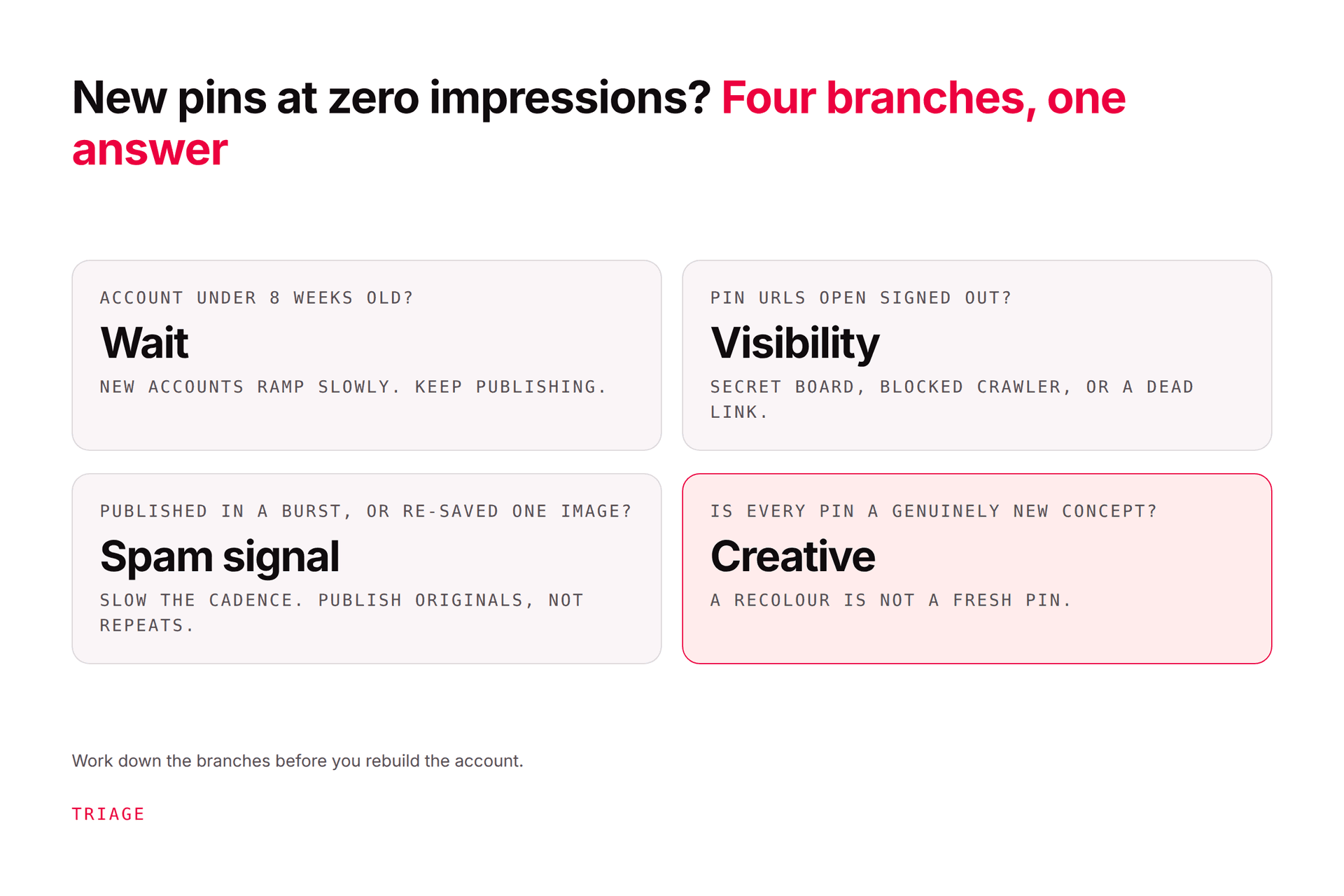
New pins getting no impressions on Pinterest is almost always one of four things: it's too early (Pinterest says there's no set engagement window and new pins commonly take two to four weeks to get meaningful distribution, longer on a new account); the pins aren't actually visible (a secret board, a private-profile or search-privacy setting, a policy removal you were emailed about); the batch tripped a spam or duplicate signal (a burst of pins, the same image re-saved, content that already exists on Pinterest, which Pinterest's own guidance warns "may get flagged as spam"); or the pins target nothing anyone searches right now. Check those four in order before you assume an account problem, then run a 14-day controlled test rather than changing everything. Here are the eight checks, what Pinterest staff actually say when people ask, and the protocol that tells you which one you've got.

Which scenario are you in?

Scenario A: new account, little or nothing anywhere. You're under about eight weeks old and your best pin has 30 impressions. This is mostly a timeline problem, and it has its own page: how to grow on Pinterest from zero sets the expectations week by week. Run the checks below anyway; they take ten minutes and they rule out the things that aren't time.

Scenario B: established account, new pins dead. This is the one that sends people to the forums. One creator on Pinterest's Business Community described it exactly: three months in, 51,000 impressions in 30 days on older pins, and for the last ten days every new pin at 0–20. They changed their username, profile name, and website, reinstalled the app three times, and cleared their caches. None of that was the problem, and Pinterest's moderator replied with the line you'll hear a lot: "Your Pins aren't guaranteed to show in search results — we only yield certain results based on our algorithm," plus "natural ebbs and flows with content distribution." Not helpful, but honest: Pinterest doesn't troubleshoot distribution for individual accounts. You have to.

The eight checks, in order

Do them in this order, because the first three are free and the last two are where people waste weeks.

1. Is it actually too early?

Pinterest's distribution guidance says there's "no set engagement window," and a pin "can gain engagement hours, days, months, or even years after it's first published." In practice, from what we've seen across thousands of scheduled pins, a new pin on a healthy account usually shows its first meaningful impressions within one to three weeks and settles into a pattern by week four; on a new account, add a few weeks. Analytics' latest 48 hours are estimates that can change. If your "dead" pins are under ten days old, stop here, note the date, and come back at day 21.

2. Can anyone actually see them?

Open three of the new pins' direct URLs signed out, or in a private window. Do they load? Is the board they're on public, not secret? Is your profile public, and is the "search privacy" setting (which hides your profile from search engines) off if you want discovery? Check your email for any policy-removal notice; Pinterest's missing-pins page says removed content comes with an explanation by email. A pin nobody can see has no impressions, and this check takes two minutes.

3. Is Analytics telling the truth?

Date range covering the pins' actual publish dates; "Your Pins" not "Other Pins"; no forgotten device or format filter; organic not paid. The full filter-bar walkthrough is in why your impressions dropped. Skip this and you'll diagnose a filter.

4. Did the batch look like spam?

This is the most common self-inflicted cause for Scenario B. Ask honestly: in the week the new pins went dead, did you publish in a burst (twenty pins in an evening), re-save the same image to several boards, upload a graphic that already exists on Pinterest, post many pins to one new domain, or push a run of affiliate pins with identical descriptions? Pinterest's guidance is explicit: "Try not to repeatedly save the same Pins or upload content that already exists on Pinterest. You may get flagged as spam." The effect is usually silent: no notice, old pins untouched, new pins undistributed. Fresh pins on Pinterest draws the line between an original and a re-save, and account flagged as spam covers the case where it escalated to a notice.

5. Are the new pins aimed at anything?

A pin with a vague title ("Cozy Vibes"), no searchable phrase, a generic description, and a new board called "Misc" has nothing for Pinterest to match to a search. If the older pins that work all carry a specific phrase and the new ones don't, that's your answer. Also check season: a pin about Christmas cookies published in March isn't broken; it's early. How to improve SEO on Pinterest has the ten-minute pin audit.

6. Did something change on the destination?

New pins pointing at a new domain, an unclaimed site, a URL behind a redirect, a page that 404s, or a site that's blocking Pinterestbot in robots.txt. Pinterest's crawler indexes pages and checks links; if it can't reach the page, the pin has a missing piece. Claim the site, fix the links, let the bot in.

7. Is it the format?

When the "zero impressions for three months" poster escalated to Pinterest support, the emailed answer was that there was "no issue with my account or any technical problem," with a suggestion to try "different formats of pins." Read that as: Pinterest's systems distribute formats unevenly and that varies over time. If every dead pin is, say, a tall text-only graphic, publish two standard image pins and one short video to the same boards and see if they move.

8. Only now: is it the account?

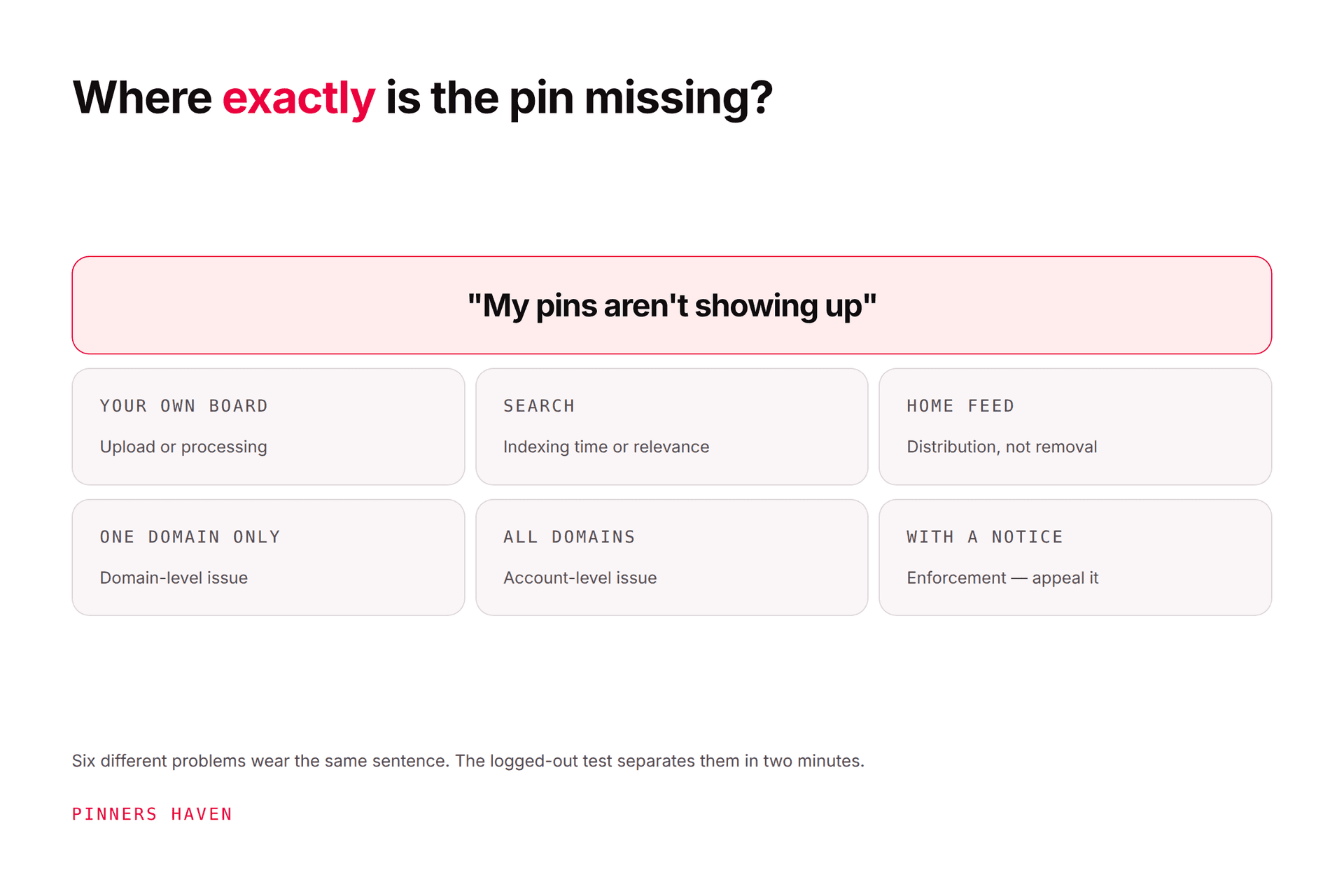
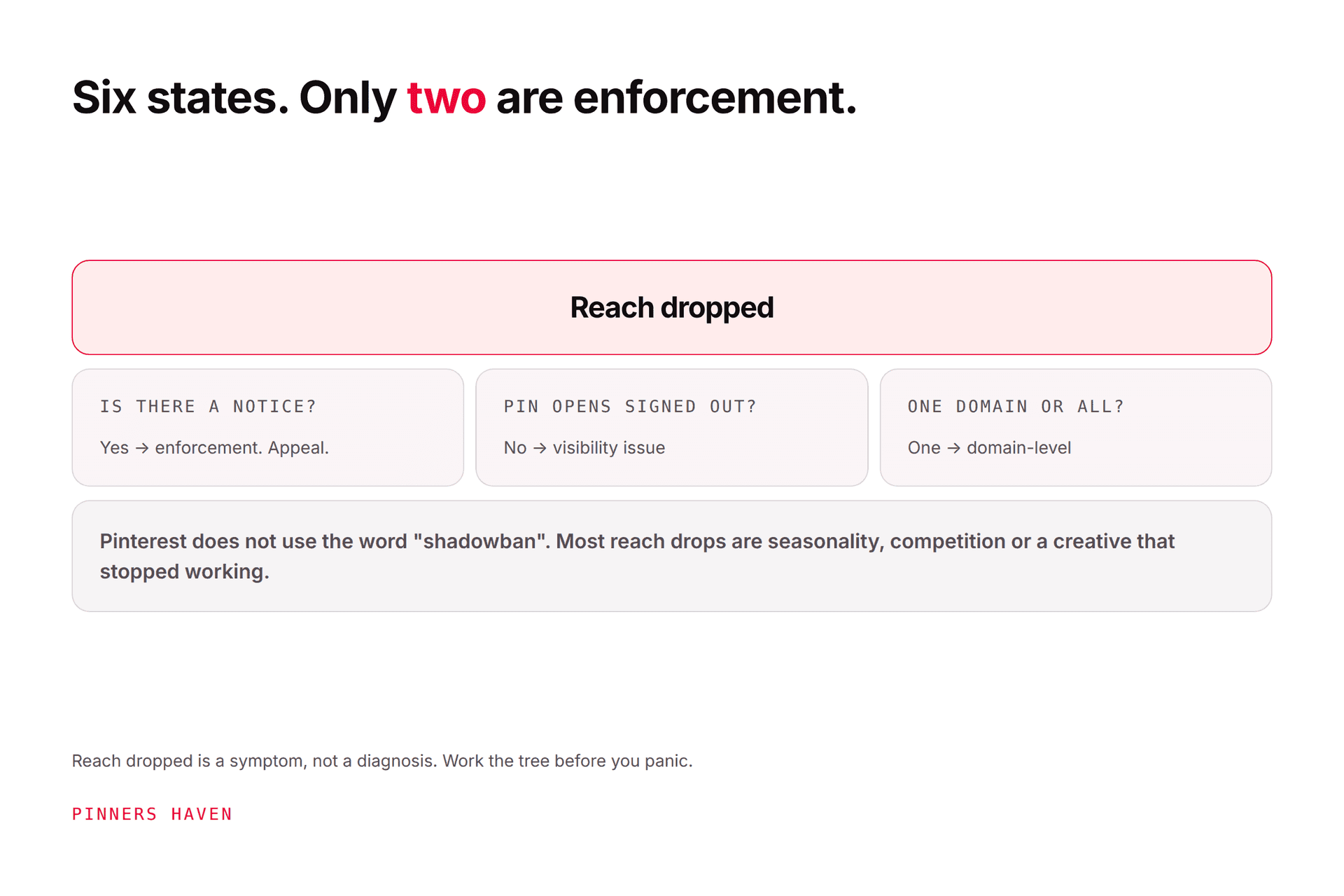
If the pins are visible, correctly targeted, weeks old, not part of a burst, pointing at a healthy claimed site, across formats, and still at zero while everything else on the account is healthy, you may be looking at an account-level distribution limit. Pinterest shadowban: the six states separates the states that look alike, and pins not showing up diagnoses by where they're missing. Contact support with specific pin URLs and dates; expect a generic reply, and treat anything other than a generic reply as useful information.

Checking a phone for pin performance in the first weeks of a new account

The 14-day controlled test

Whatever check you suspect, this protocol confirms it without destroying the evidence. It's the new-pin version of the recovery plan in the impressions guide.

  1. Don't delete or repost anything. Deleted pins are gone, and reposting the same image is check 4.

  2. Make five genuinely new pins for five of your proven pages: five different search phrases, five different images, five real descriptions, every field filled, alt text, topics tagged.

  3. Put each on the most specific board that already has engagement. Not a new board.

  4. Space them: one a day, five days. No burst.

  5. Check each one signed out the day after it publishes. Visible? Right board? Link resolves?

  6. Wait until day 14 before reading impressions. Note which moved.

If the five new ones get distribution and the earlier batch didn't, the earlier batch was the problem (usually check 4 or 5); let it lie and carry on with originals. If the five also sit at zero while old pins stay healthy, you've isolated an account-level issue and you have clean evidence for support. If you're a new account and they move a little, that's growth; keep going.

What not to do (the forum greatest hits)

  • Delete and repost. You lose the pin's history and you teach Pinterest you upload duplicates.

  • Change your username, profile name, and website in a panic. One creator did all three in ten days; it explained nothing and reset what little context the account had.

  • Post more to compensate. A burst on top of a batch problem is two problems.

  • Follow-for-follow, group boards, engagement pods. Followers don't drive distribution, and the schemes carry spam risk.

  • Buy a "shadowban checker." They test visibility signed out, which you can do yourself in check 2, and they can't see distribution.

Viewing a pin close-up on a phone the way a signed-out visitor would

Where this comes from, and how to stop it recurring

Here's the thing nobody tells you about new-pin distribution: the account that never hits this is the one that publishes a steady stream of genuinely original pins, each aimed at a phrase, never in bursts, never the same image twice. That's easy to describe and hard to do by hand at week six, which is exactly when people start re-saving and batching, and exactly when new pins go quiet.

Pinners Haven runs the new-pin supply the way check 4 wants it run: from a page or topic it writes a keyword-led title and three to five distinct descriptions per pin, designs an original image on a human-designed template (a Freshness Meter retires each template after roughly five to ten uses, so you never quietly re-publish the same look), and publishes on a paced, human-like cadence through Pinterest's official OAuth, with a gradual warm-up for new accounts and an approval step before anything goes out. It doesn't make Pinterest distribute a pin; nothing does. It removes the burst-and-repeat pattern that most often stops it.

Start a 14-day trial

(Disclosure: we make Pinners Haven. We're not affiliated with Pinterest.)

Frequently asked questions

Why are my new Pinterest pins getting 0 impressions?

Most often because it's early (new pins commonly take two to four weeks to find distribution, longer on a new account), or because the batch tripped a duplicate or spam signal: a burst of pins, the same image re-saved, or content that already exists on Pinterest, which Pinterest's guidance warns may get flagged. Less often it's visibility (a secret board, private profile, or a removed pin) or targeting (no searchable phrase, wrong season). Check those in order before assuming an account problem.

How long does it take for a new pin to get impressions?

Pinterest says there's no set engagement window; a pin can gain engagement hours, days, or months after publishing. In practice a new pin on a healthy account usually shows its first meaningful impressions within one to three weeks and a pattern by week four, and a brand-new account can take several weeks longer. Analytics' most recent 48 hours are estimates. Judge a new pin at day 21, not day three.

Why do my old pins get impressions but new ones don't?

Because the old pins have already been distributed and keep circulating, while the new ones are being tested. If the gap persists beyond three or four weeks, the usual causes are a batch problem (a burst, re-saved images, identical descriptions), new pins that target nothing searchable, a destination change (new or unclaimed domain, broken links), or a format Pinterest is distributing less. Run a spaced five-pin controlled test to isolate it.

Does a new Pinterest account get fewer impressions?

Yes, for a while. New accounts have no engagement history for Pinterest to lean on, so distribution starts slowly and builds as pins earn saves and clicks. Pinterest doesn't publish a "warm-up" period, but in practice expect weeks of small numbers before a pattern appears. Steady, original pins to good pages on well-named boards shorten it; bursts and re-saves lengthen it.

Should I delete pins with 0 impressions?

No. Deleted pins can't be recovered, Pinterest says pins can gain engagement months after publishing, and deleting-and-reposting the same image is the duplicate pattern its guidance warns about. Leave them, check they're visible and targeted, and publish new original pins to the same pages instead. Treat zero impressions as a diagnosis, not a deletion instruction.

Can zero impressions mean I've been shadowbanned?

It can, but it's the last explanation to reach, not the first. Time, visibility, a spam-looking batch, weak targeting, a destination problem, and format all produce zero impressions and are far more common. If new pins are visible signed out, well targeted, weeks old, not part of a burst, and still at zero while old pins are healthy, you may have an account-level distribution limit; gather pin URLs and dates and contact support.

Patience, then a clean test

New pins with no impressions are a diagnosis waiting to happen, not a verdict. Give them their two to four weeks, make sure they're visible and aimed at something, be honest about whether the batch looked like spam, then run five clean originals and wait 14 days. You'll know which of the eight it was, and you'll have fixed it without burning the account down.

You've got the checks and the protocol. If the clean, paced, original supply is the part you keep failing to sustain by hand, that's what Pinners Haven does.

Start a 14-day trial

Your Pinterest, off your plate by this time next week.

Connect an account, pick your niches, set your approval rules. Then review and approve your queue in minutes.

Free trial · cancel anytime · not affiliated with Pinterest

Start free