Pinterest's own Analytics (free, business accounts) plus Google Analytics 4 (free) answer the two questions that matter: what happened on Pinterest, and what happened after the click.
JN
Joe Nyambura
Founder & operator, Pinners Haven · August 7, 2026
You want to know which of your pins are working and whether Pinterest is worth the hours, and you've hit a wall of "12 best Pinterest analytics tools" lists that are mostly schedulers with a charts tab and an affiliate link. Fair. Let me be honest about what to expect from this one: the free tools cover more than most people use, the paid ones buy you history, exports, and multi-account views rather than better truth, and the thing most people actually need isn't an analytics tool at all.
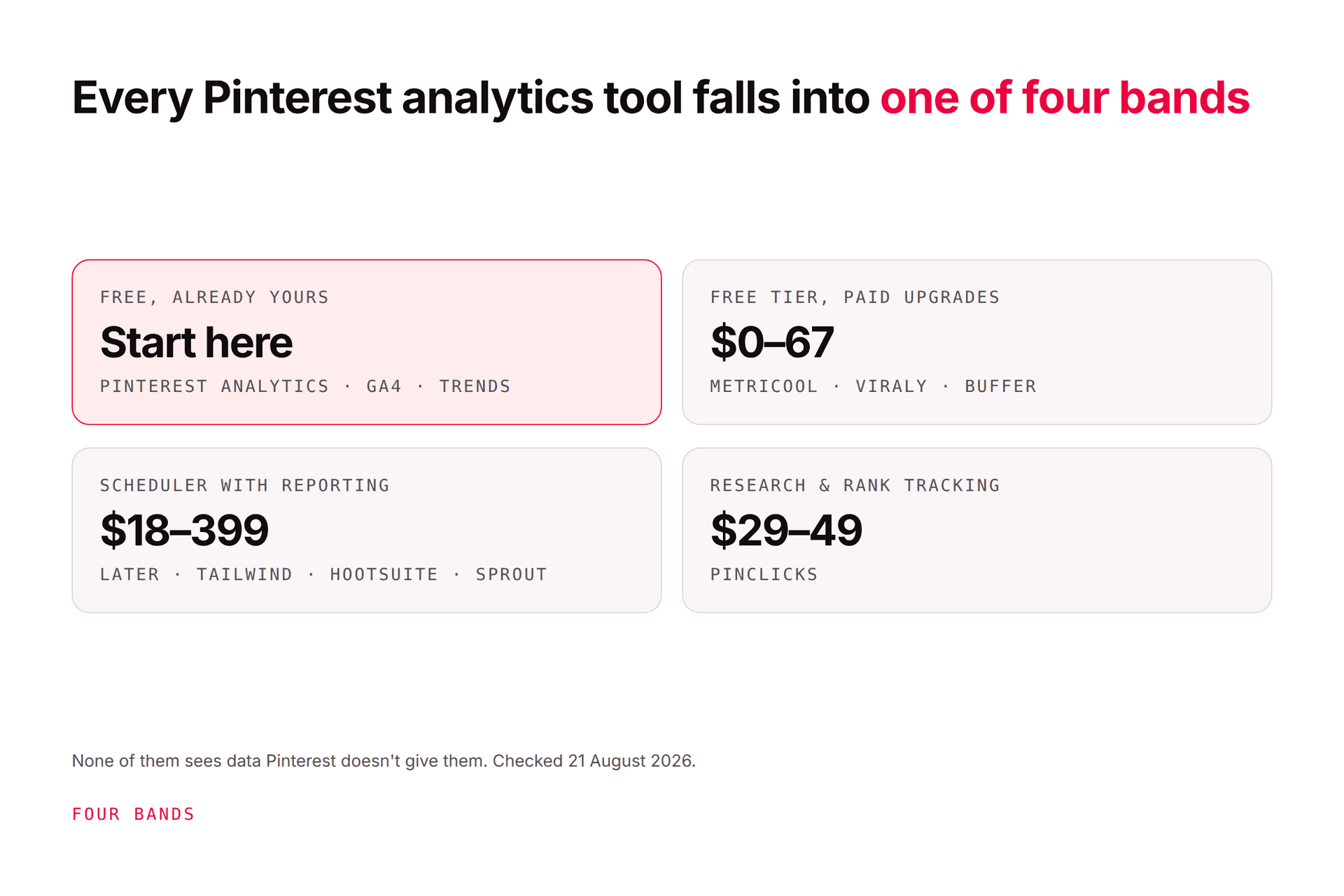
Pinterest's own Analytics (free, business accounts) plus Google Analytics 4 (free) answer the two questions that matter: what happened on Pinterest, and what happened after the click. Third-party Pinterest analytics tools add longer data history, CSV and PDF exports, several accounts in one view, cross-channel reporting, and in one case keyword rank tracking; prices run from free tiers (Metricool, Viraly, Buffer) through roughly $18–83 a month for scheduler-with-reporting tools (Later, Tailwind) to $99–199 per user for enterprise suites (Hootsuite, Sprout Social), with PinClicks at $29–49 for research. None of them sees data Pinterest doesn't give them. Prices re-checked from vendor pages on 21 August 2026 and summarised below; we've compared on documented facts and haven't run each tool hands-on, so treat this as a map, not a review.
The two questions, and the free tools that answer them
Before any comparison: what are you trying to learn? There are only two questions.
1. What happened on Pinterest? Impressions, saves, pin clicks, outbound clicks, by pin, board, and time. Pinterest's own Analytics answers this for any business account, free: an overview, per-pin stats, top pins and boards, audience insights, and, if you've installed the Pinterest Tag or Conversions API, conversion insights. Its own explainer is worth ten minutes. Two quirks: the latest 48 hours are estimates and can go down, and the default sort is impressions, which is the metric that should change your behaviour least. How to read Pinterest Analytics is the companion to this page and arguably the more important one.
2. What happened after the click? Did they stay, sign up, buy? Pinterest can't see that without the Tag. Google Analytics 4 (free) and Search Console (free) can: filter acquisition to Pinterest and you've got engaged sessions, conversions, and revenue per pin destination.
Add Pinterest Trends (free, normalised interest, not volume) for demand, and you have a complete free stack. Everything below is about what you'd add and why.
The comparison: what each tool adds over native
Checked 21 August 2026. Prices are the lowest paid tier unless noted; annual billing where vendors quote it. Several of these vendors change plans often, and Metricool, Later and Tailwind have all moved theirs in the past year, so click through before you budget on any figure here.
Tool
Price
What it adds over Pinterest Analytics
Best for
Caveat
Pinterest Analytics
Free
The source of truth: overview, pin stats, audience, conversion insights with the Tag
Everyone; start here
48-hour estimates; limited history and export
Google Analytics 4 + Search Console
Free
Post-click behaviour, conversions, revenue; organic search for the destination
Anyone with a website
Attribution differs from Pinterest's; expect the two to disagree
Cross-channel dashboards incl. Pinterest, Looker Studio on Advanced
Solo creators on several platforms
Free tier is capped; Pinterest depth is standard API data
Viraly
Free to start · $19 / $49 / $99 / $249 per mo
17+ Pinterest metrics incl. save rate and click rate, CSV export, 6–24 months history by tier
Bloggers who want exports and rates without a scheduler
Young product; verify history limits on the day
Buffer
Free (3 channels) · $5–6 per channel/mo · $10–12 Team
Simple per-channel analytics alongside scheduling
Small teams already scheduling elsewhere
Analytics is a tab, not the product
Later
$18.75 · $37.50 · $82.50 per mo billed yearly (a 25%-off promo; list $25 · $50 · $110)
3 months / 1 year / 2 years of data by tier, reports
Instagram-first brands who also pin
Pinterest is one of six networks; depth follows
Tailwind
Free (5 posts) · from $17.99/mo annual; plan structure varies by page variant
Pinterest-specific scheduler with pin and board performance, Pinterest Marketing Partner
Pinterest-focused bloggers
Caps at 3 Pinterest accounts on the top tier; pricing A/B-tested, check the page you land on
Hootsuite
$99 per user/mo (Standard, annual only) · $199 · $399
Unified multi-network analytics; custom reports on Advanced
Teams with many networks and a budget
Custom reports locked to Advanced; priced per user
Sprout Social
$199 per user/mo · $299 · $399
Enterprise analytics, competitive reporting, team workflow
Large teams and agencies
Per-seat pricing adds up fast for one network
PinClicks
$29/mo Pin Pro · $49/mo Pin Plus ($249 / $399 annual)
Keyword explorer, account explorer, top pins, keyword rank tracking
Anyone serious about Pinterest SEO
Research, not account analytics; doesn't publish
Pinners Haven
$41/mo annual (Solo) · $124 Operator
Not an analytics tool: a publishing tool whose learning loop measures saves and outbound clicks per pin and biases new pins toward winners, plus a reach-drop cliff alert
Operators who want the action automated, not just the chart
You still read Pinterest Analytics and GA4; we don't replace them
Sources: vendor pricing pages and current pricing summaries as of 20 August 2026; Tailwind per our Tailwind review (checked 7 August 2026), PinClicks per our PinClicks alternative page. We've compared on documented features and prices; we haven't run every tool hands-on.
The tools, one paragraph each
Pinterest Analytics. Free with a business account. Overview, per-pin stats (impressions, saves, pin clicks, profile visits, follows, outbound clicks), top pins and boards, audience insights, and conversion insights once the Tag or Conversions API is live. It's the dataset every tool below is reading. Its weaknesses are short history, clumsy export, and that it leads with impressions.
Google Analytics 4 + Search Console. Free, and the only way to know what the click was worth. Filter sessions by source, look at engaged sessions and conversions per landing page, and you'll find that your top-impressions pin is rarely your top-revenue pin. Search Console tells you whether the destination page ranks on Google too, which is the other half of Pinterest SEO.
Metricool. A cross-channel dashboard with a free tier (one brand, basic analytics, Pinterest included) and paid plans from $25 a month; the Advanced tier ($53–67) adds Looker Studio. Good fit if Pinterest is one of five platforms you report on. It isn't deeper than Pinterest's own data; it's more convenient.
Viraly. A Pinterest-first analytics tool that connects to your account and tracks 17-plus metrics, including derived rates (save rate, click rate, engagement rate) Pinterest doesn't show, with CSV export and custom date ranges. Free to start, then $19 to $249 a month by history length. Worth a look if exports and rates are the gap and you don't want a scheduler attached.
Buffer. Per-channel pricing from free (3 channels, 10 queued posts each) to $5–6 per channel; analytics sits alongside the scheduler. Fine for a small team that already uses Buffer. Nobody buys Buffer for Pinterest analytics.
Later. Three tiers. On 21 August 2026 a 25%-off promotion was running, making them $18.75, $37.50 and $82.50 a month billed yearly against list prices of $25, $50 and $110; data history is 3 months, 1 year and 2 years respectively. Check whether the promotion is still live when you read this, because the list price is what you renew at. Instagram-first, Pinterest supported. If your brand lives on Instagram and also pins, it's a reasonable single dashboard.
Tailwind. The Pinterest-specific scheduler, a Pinterest Marketing Partner, with pin and board performance reporting inside. Free tier of 5 posts; paid from $17.99 a month annually on the tiered model, though Tailwind serves different pricing structures to different visitors, so check the page you land on. Top tier caps at 3 Pinterest accounts. Our Tailwind review and Tailwind pricing explained cover the detail.
Hootsuite. Enterprise multi-network management from $99 per user a month on annual billing (no monthly option), with custom reports locked to the $399 Advanced tier. If you already run Hootsuite for everything else, Pinterest reporting comes along. Buying it for Pinterest alone makes no sense.
Sprout Social. Similar logic at $199 per seat and up: serious cross-channel analytics and competitive reporting for teams. Per-seat pricing makes it the most expensive way on this list to look at your pin stats.
PinClicks. The odd one out, and the most useful paid tool here for Pinterest SEO: keyword explorer, account explorer, top pins by keyword, pin stats, and keyword rank tracking, at $29 or $49 a month. It's research and ranking, not account reporting, and it doesn't design or publish anything. We wrote about when you need it and when you don't.
Pinners Haven. We'll be plain: we're not an analytics tool and we don't want to be confused with one. We're a publishing tool. What we do that touches analytics is measure saves and outbound clicks per pin we publish (not impressions) and bias the next batch toward what worked, and watch each account's reach week over week so you get an email when it falls off a cliff at a threshold you set. You still open Pinterest Analytics and GA4 to read the story. More on why that distinction matters below.
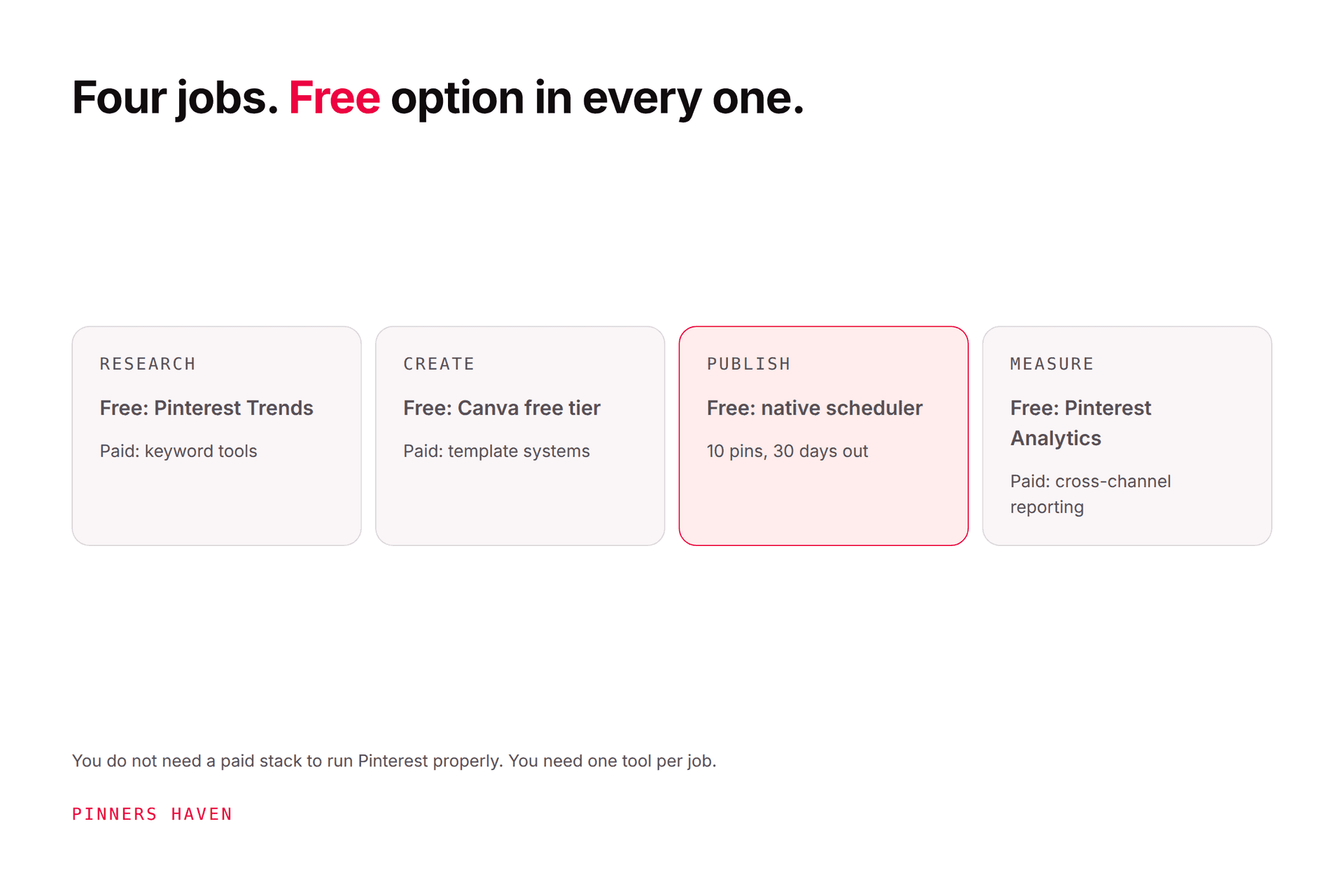
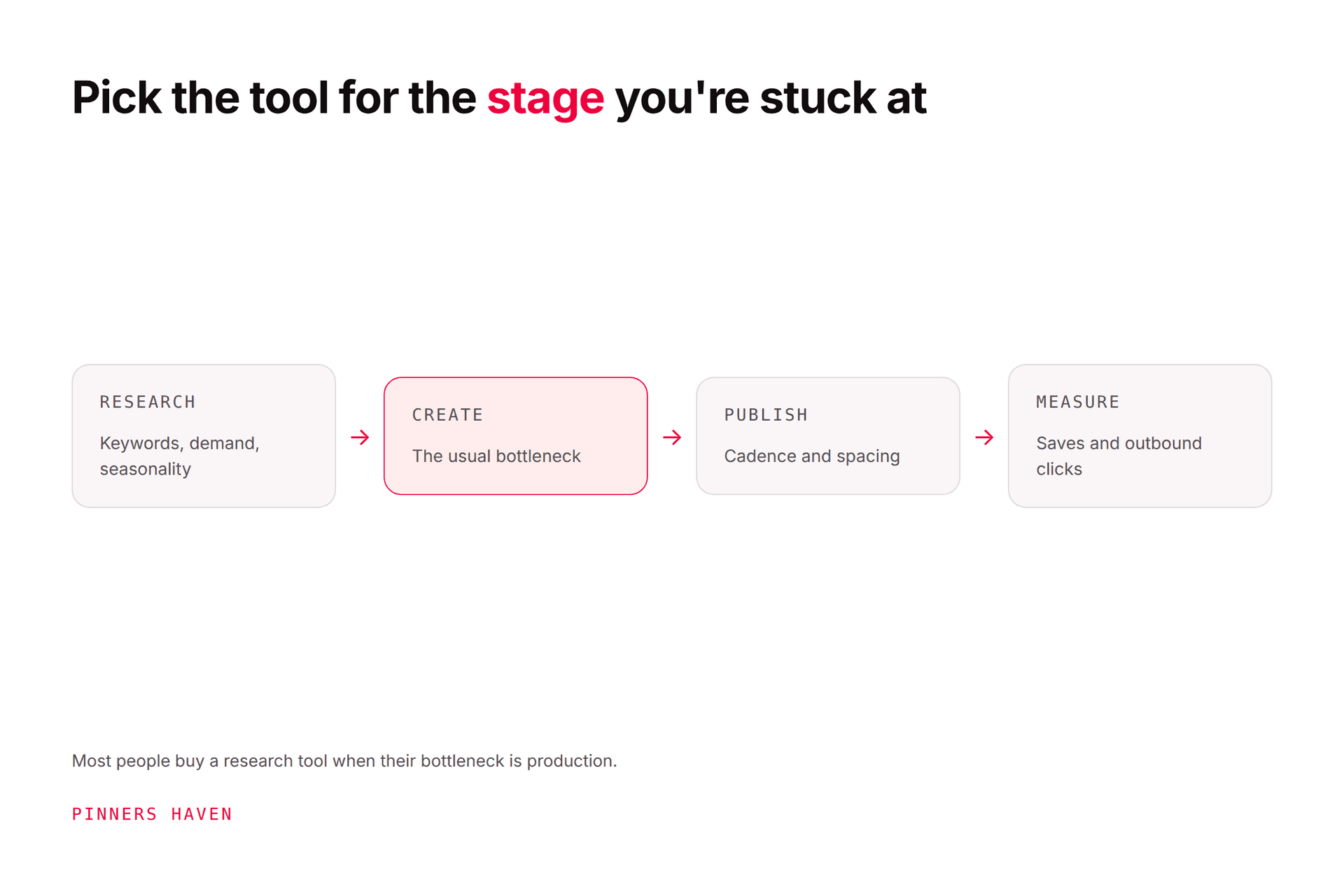
Pick by job, not by list position
If you are…
Use
Skip
A solo blogger or seller
Pinterest Analytics + GA4, weekly. Add Viraly or Metricool free if you want exports
Anything per-seat
Pinterest-first and SEO-minded
Native + GA4 + PinClicks for rank tracking
Cross-channel suites
Running several client accounts
Native per account + a reporting layer (Metricool Advanced or Viraly Agency for exports); PinClicks for research
Tailwind's 3-account cap
A multi-network brand team
Whatever you already run (Later, Hootsuite, Sprout) plus native for Pinterest depth
Buying a second suite for one network
Trying to work out if Pinterest is worth it at all
GA4 conversions by source, for 90 days
Every paid tool until that's answered
What none of these tools will do
Here's the thing nobody tells you about Pinterest analytics tools: they're all rear-view mirrors. They tell you, with varying history and prettier charts, what already happened. Two things they don't do:
Warn you before a slow bleed becomes a cliff. Reach that slides 8% a week for five weeks shows up as a 35% drop the day you finally open the dashboard. We've watched it happen on our own accounts, which is why Pinners Haven's reach-drop cliff alert tracks each account week over week and emails you the moment it crosses a threshold you set. If you're already there, why your Pinterest impressions dropped is the triage.
Act on the numbers. A tool can show you which pin concepts earn outbound clicks; it won't make three more like them tomorrow. Pinners Haven's performance learning loop measures saves and outbound clicks per pin and biases the next batch of generated pins toward the winners, while the Freshness Meter retires templates after roughly five to ten uses, before the sameness shows up in the chart. You approve every pin; the loop just changes what's in the queue.
You might be thinking, "so I still need Pinterest Analytics." Yes. Read it weekly, twenty minutes, the way our analytics guide lays out. The question is what happens after you read it, and that's the part we automate.
There's a 14-day trial. No card is needed; when it ends, publishing pauses until you pick a plan.
(Disclosure: we make Pinners Haven, so we're an interested party in any tools comparison. We're not a Pinterest Marketing Partner; Tailwind, Buffer, and others are. We're not affiliated with Pinterest.)
Frequently asked questions
What is the best free Pinterest analytics tool?
Pinterest Analytics itself, available free on any business account: overview, per-pin stats, top pins and boards, audience insights, and conversion insights with the Pinterest Tag. Pair it with Google Analytics 4 for what happens after the click. Among third parties, Metricool's free tier and Viraly's free start add exports and cross-channel views, but neither sees data Pinterest doesn't already give you.
Is Pinterest Analytics accurate?
Accurate enough to run an account on, with two caveats Pinterest states itself: the most recent 48 hours are estimates that can change, including downward, and real-time metrics generally should be read over sensible windows rather than daily. It will also never match Google Analytics exactly, because the two count different things with different attribution. Use Pinterest for on-platform behaviour and GA4 for on-site results.
Do I need a paid Pinterest analytics tool?
Most accounts don't. Paid tools add longer history, CSV or PDF exports, several accounts in one view, cross-channel dashboards, and (PinClicks only) keyword rank tracking. If you report to clients, manage many accounts, or run Pinterest as one of several networks, those conveniences are worth paying for. If you run one account, the free stack plus a weekly review covers it.
Can I see a competitor's Pinterest analytics?
Not their private stats; impressions, saves, and clicks are visible only to the account owner. You can study public signals: their profile, boards, which pins surface for the keywords you care about, and, with a research tool like PinClicks, which accounts and pins rank for given searches. That's competitive intelligence, not their dashboard.
What's the difference between Pinterest Analytics and Google Analytics for Pinterest?
Pinterest Analytics reports what happened on Pinterest: impressions, saves, pin clicks, outbound clicks, by pin and board. Google Analytics reports what happened on your site after the click: sessions, engagement, conversions, revenue, by landing page and source. You need both, and they will disagree on click counts because they measure at different points with different rules.
How do I track sales from Pinterest?
Install the Pinterest Tag or set up the Conversions API so Pinterest's conversion insights can attribute purchases, and configure conversion events in Google Analytics 4 so you can see revenue by source and landing page. For Shopify and similar stores, the Pinterest app handles much of the tag setup. Expect the two systems to report different totals; use each for the question it answers best.
Read the free data well, then automate what comes next
The honest ranking of Pinterest analytics tools is short: Pinterest Analytics first, GA4 second, and then whichever paid tool fixes a specific inconvenience you actually have: exports, history, many accounts, rank tracking. Buy for the job. And remember the chart is the start of the work, not the end of it.
If the part after the chart, making more of what worked and catching the next drop early, is what you'd rather not do by hand, that's what Pinners Haven does.