9 Tailwind Alternatives Worth Testing
The right Tailwind alternative depends entirely on which part of Tailwind you're replacing. Tailwind bundles scheduling, design, and analytics; most alternatives replace one of those well and the others badly. Choose Pinterest's own scheduler for a small free queue, Buffer at $5/channel for simple multi-network publ
Joe Nyambura
Founder & operator, Pinners Haven · August 18, 2026
On this page17 sections
- The nine, priced
- 1. Pinterest's native scheduler
- 2. Pinners Haven
- 3. Buffer
- 4. Later
- 5. Hootsuite
- 6. Metricool
- 7. SocialPilot
- 8. Publer
- 9. Canva
- How to migrate without breaking anything
- Frequently asked questions
- Is there a free alternative to Tailwind?
- Which alternative is closest to Tailwind?
- Will Pinterest penalise third-party scheduling?
- Should I leave Tailwind because of its post caps?
- Is Tailwind still worth it in 2026?
The right Tailwind alternative depends entirely on which part of Tailwind you're replacing. Tailwind bundles scheduling, design, and analytics; most alternatives replace one of those well and the others badly. Choose Pinterest's own scheduler for a small free queue, Buffer at $5/channel for simple multi-network publishing, Later for a visual calendar, Hootsuite or SocialPilot for teams and approvals, or Pinners Haven if the thing you actually need is the pins made rather than queued.
Don't switch because a comparison table has more checkmarks. Switch when another tool handles your real weekly workflow with less cost, risk, or cleanup, and work out which of those three is actually biting you first.
Full disclosure: Pinners Haven is ours. It's #2 on this list because it's a genuine fit for one specific problem, and we've said plainly where it isn't. Seven of the nine options here are competitors, and two of them beat us on price.
The nine, priced
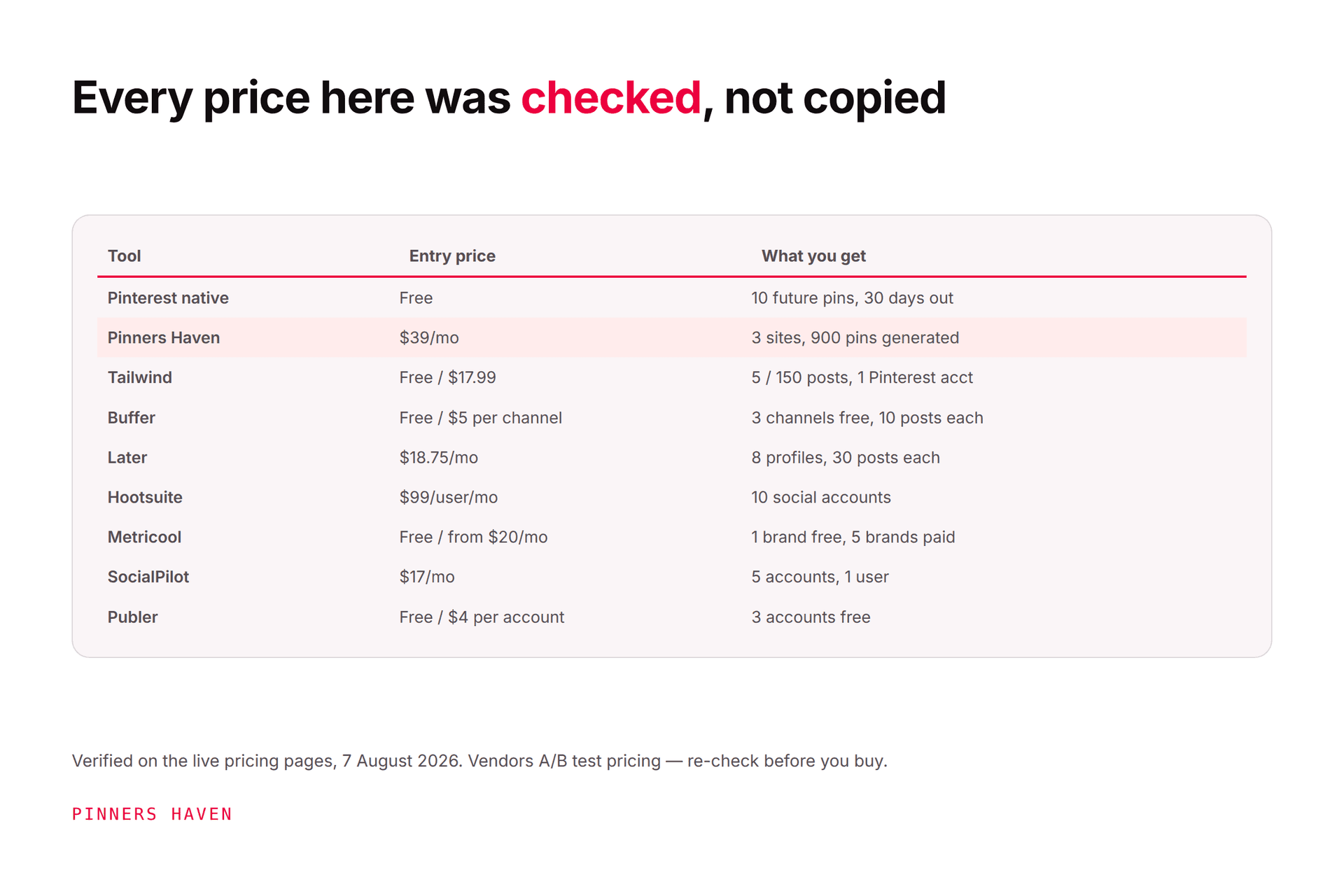
All figures checked 7 August 2026. Annual pricing shown where available. Tailwind is running more than one pricing structure concurrently — check what your own account displays.
Tool | Entry price | What you get | Best for |
|---|---|---|---|
Pinterest native | Free | 10 future pins, 30 days out | Light scheduling |
Pinners Haven | $19/mo | 3 sites, 900 pins generated | Pins made, not just queued |
Tailwind (the incumbent) | Free / $17.99 | 5 / 150 posts, 1 Pinterest acct | Multi-network on a budget |
Buffer | Free / $5 per channel | 3 channels free, 10 posts each | Simple multi-network queue |
Later | $18.75/mo | 1 social set (8 profiles), 30 posts/profile | Visual calendar planning |
Hootsuite | $99/user/mo | 10 social accounts | Teams needing governance |
Metricool | Free / from $20/mo | 1 brand free, 5 brands paid | Reporting-led operators |
SocialPilot | $17/mo | 5 accounts, 1 user | Agencies and client work |
Publer | Free / $4 per social account | 3 accounts free | Budget multi-network |
Canva | Free / paid tiers | Design only | Design-led teams |
Two things jump out of that table. Tailwind is genuinely inexpensive — a lot of "alternatives" cost more once you count channels or seats. And per-unit pricing (Buffer, Publer) scales badly: $5/channel is wonderful at three channels and painful at twelve.

1. Pinterest's native scheduler
Price: free.
Pinterest business accounts can schedule standard pins with no subscription. The current Pinterest scheduling instructions allow one pin at a time, up to 10 future pins, as far as 30 days ahead.
Use it if you publish a few pins a week and design elsewhere. It's free, it's first-party, and there's zero account risk.
Skip it if bulk preparation, a longer calendar, team approval, or cross-network publishing is the reason you pay for Tailwind, because it does none of those. The 10-pin ceiling is the wall almost everyone hits.
2. Pinners Haven
Price: $19/mo (Starter, 1 site, 120 pins) · $41 (Solo, 3 sites, 900 pins) · $124 (Operator, 25 sites, 11,250 pins) · $291 (Portfolio, 50 sites, 30,000 pins), billed annually. Monthly is 20% higher. 14-day trial, no card.
This is ours, so treat the recommendation accordingly and check it yourself.
It's built around a different job from everything else on this list. You bring a URL and target keywords; it picks among twenty angles, writes the SEO title and three to five unique descriptions, designs an original image, adds alt text, and queues it for your approval. A Freshness Meter retires each template after roughly 5–10 uses before reuse drags your reach down.
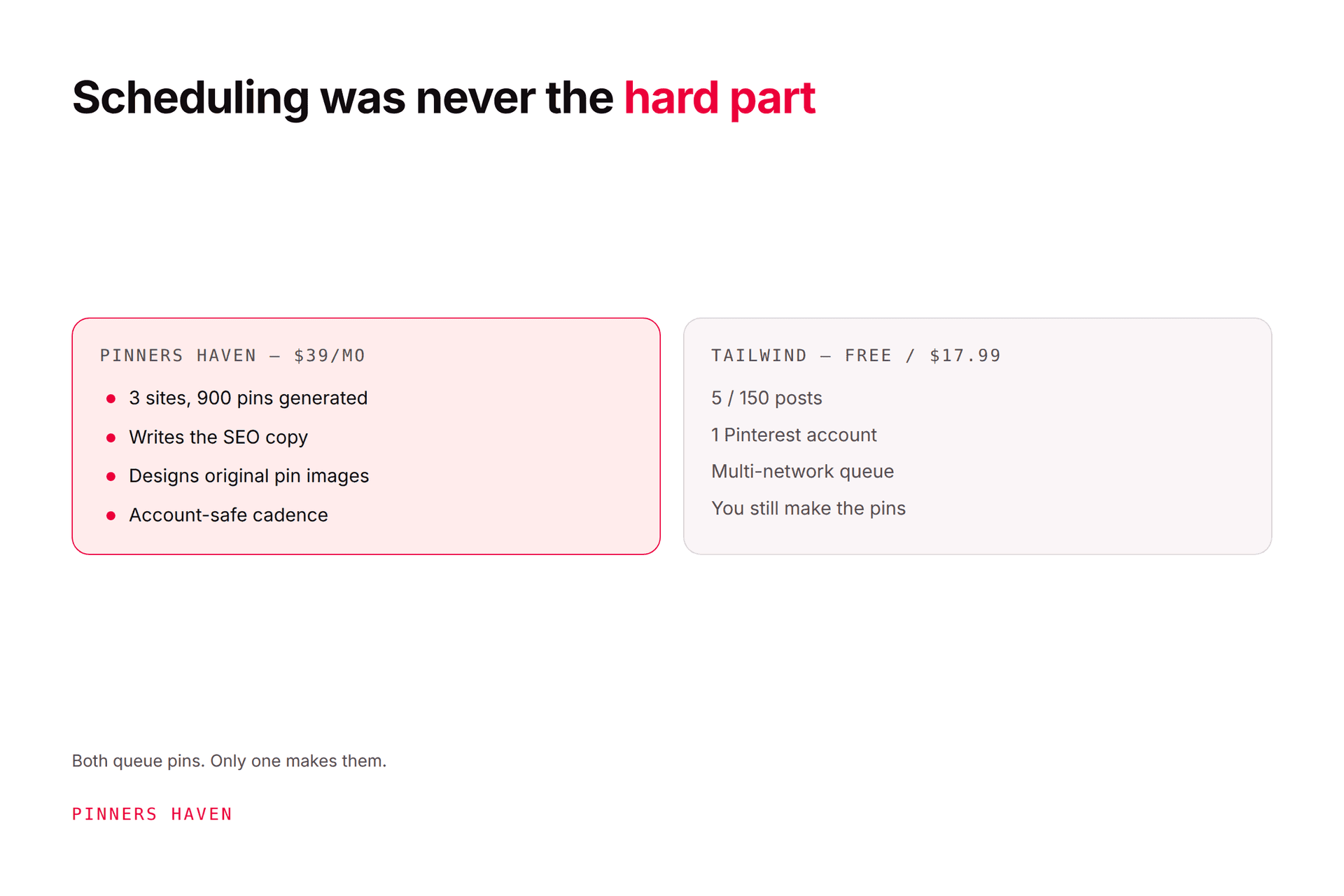
Use it if your bottleneck is producing pins rather than scheduling them, or you run more than three Pinterest accounts — Tailwind tops out at three, and Operator does 25.
Skip it if you need Instagram and Facebook (we're Pinterest-only), you want the cheapest possible entry (Tailwind's free tier and $17.99 Pro both undercut us), or you want unlimited raw posting volume (Tailwind Max is $49.99 for unlimited; our plans have hard pin caps).
One more honest note: we're not a Pinterest Marketing Partner. Tailwind and Later both are. We're architected around Pinterest's API rules and building toward Trusted Partner status, which isn't the same claim.
There's also a per-generation AI cost — you bring your own provider key and pay them directly, usually a few dollars a month, with a cap you set. No markup from us, but it is an extra setup step.
→ Start free for 14 days — no card needed; when the trial ends, publishing pauses until you pick a plan.
3. Buffer
Price: Free (3 channels, 10 scheduled posts each) · Essentials $5/month per channel · Team $10/month per channel. Annual saves two months.
Buffer supports Pinterest business and personal accounts alongside Instagram, TikTok, Facebook, LinkedIn, YouTube Shorts, and Google Business Profile. Its appeal is a clean, predictable queue rather than a Pinterest growth system.
Use it if one person needs reliable publishing across several networks and the free tier's three channels nearly covers you.
Watch for the per-channel model. Eight channels on Essentials is $40/month, which is more than Tailwind Max. Do that arithmetic before you switch, because the $5 headline is per channel, not per account.

4. Later
Price: Starter $18.75/mo · Growth $37.50/mo · Scale $82.50/mo, all billed yearly.
Later sells "social sets" — Starter is one set of 8 profiles with 30 posts per profile per month; Growth is 2 sets (16 profiles) at 180 posts per profile; Scale is 6 sets (48 profiles) with unlimited posts. Pinterest scheduling and click tracking are on every tier, and Later is a Pinterest Marketing Partner.
Use it if your planning genuinely starts from a visual calendar and you work across several networks.
Watch for the per-profile post cap on Starter. 30 posts per profile per month is thin for serious Pinterest work — that's one pin a day.
5. Hootsuite
Price: Standard $99/user/month · Professional $199 · Advanced $399, billed annually. 14-day free trial, no card required.
Hootsuite is the governance option: Standard covers 10 social accounts, Professional and above are unlimited, and the platform adds approvals, permissions, reporting, and listening.
Use it if you're a team that needs audit trails and permissions, and the cost is spread across people who'll use it.
Skip it if you're a blogger who wants a Pinterest queue. At $99/user/month you'd pay more than five times Tailwind Pro for capabilities you won't touch. Note also that trial accounts carry daily posting limits and no bulk scheduling.
6. Metricool
Price: Free (1 brand, 20 posts/month) · Starter from €16/$20 per month for 5 brands · Advanced from €43/$53 per month for 15 brands.
Metricool combines planning, analytics, reporting, and multi-brand management, and supports Pinterest on every tier including free.
Use it if the reason you're leaving Tailwind is reporting or consolidated cross-network measurement. The free tier is a genuinely useful trial at 1 brand.
Watch for creation depth. A strong analytics product can still have thin Pinterest creation tools, and Metricool won't design or write your pins.
7. SocialPilot
Price: Essentials $17/mo (5 accounts, 1 user) · Standard $34 (10 accounts, 3 users) · Premium $85 (20 accounts, 6 users) · Ultimate $170 (40 accounts, unlimited users), billed annually. 14-day trial, no card.
SocialPilot targets agencies with client calendars, approvals, and analytics. On accounts-per-dollar it's one of the better values here — 20 accounts at $85 undercuts Hootsuite considerably.
Use it if you manage several brands and Tailwind's three-account ceiling is the constraint.
Test properly before committing: run the full client handoff — draft, internal comment, approval, scheduled pin, failure alert, report, revoked access. Those details matter more than the headline account count, and they're where agency tools differ.
8. Publer
Price: Free (3 social accounts, 1 user) · Professional $4/month per social account · Business $8/month per social account, billed yearly. 7- and 14-day trials.
Publer offers multi-network scheduling, unlimited scheduling and drafts, reusable content, workspaces, and (on Business) analytics and post recycling.
Use it if you're price-sensitive, already have a design process, and connect only a handful of accounts.
Watch for two things. The per-social-account pricing scales the same way Buffer's does. And never turn on indefinite recycling for identical pins — Publer's Spintax recycling is powerful, but Pinterest explicitly warns against repeatedly saving duplicate content, and this is the single most common way people get themselves flagged with an otherwise legitimate tool.
9. Canva
Price: free tier plus paid plans.
Canva is the design alternative, not a Tailwind replacement. Templates, brand kits, resizing, team comments, and fast visual concepts.
Use it if design quality matters more than having everything in one dashboard. Pair it with Pinterest's native scheduler or another approved publisher.
Understand what it isn't: no Pinterest analytics, no scheduling, no keyword work. This is a split workflow by design.
How to migrate without breaking anything
The switch itself is where people lose reach, and almost always for the same reason: two publishers pointed at one account.
Export or record your future calendar, destinations, boards, and results.
Pause recurring or recycled queues before you connect a second publisher. This is the step people skip, and it produces exactly the burst-of-duplicates pattern that draws a spam flag.
Test one image pin and one video pin on a low-risk board.
Confirm title, description, board, link, alt text, image crop, and publish time all survived the transfer.
Deliberately trigger a failed post if the tool allows a safe test, then check whether it actually alerts you. Many don't, and you want to know that now.
Run both reporting systems for two to four weeks so you have a baseline to compare.
Revoke the old connection last, once the new workflow is stable.
Pinterest's Community Guidelines prohibit unauthorised services acting automatically for users, along with repetitive or deceptive content. Use official connections, avoid engagement bots, and keep a human approving what publishes. Our safe automation guide covers where the line sits.
Frequently asked questions
Is there a free alternative to Tailwind?
Several. Pinterest's own scheduler is free but capped at 10 future pins. Buffer's free tier gives 3 channels with 10 scheduled posts each, Metricool's covers 1 brand and 20 posts a month, and Publer's covers 3 social accounts. Tailwind also has its own Free Forever tier at 5 posts a month, so "free" may not require leaving at all.
Which alternative is closest to Tailwind?
For scheduling plus a visual calendar, Later is the nearest like-for-like and is also a Pinterest Marketing Partner. For the creation-plus-scheduling bundle, Pinners Haven is closer conceptually, though it's Pinterest-only. For team governance, Hootsuite. There's no single drop-in replacement, which is the honest answer.
Will Pinterest penalise third-party scheduling?
No. Pinterest permits approved partner tools, and scheduling by itself isn't the risk. Enforcement relates to prohibited behaviour — repetitive content, deceptive links, unsafe connections, bought engagement, unauthorised automation. See what actually triggers a spam flag.
Should I leave Tailwind because of its post caps?
Only after doing the arithmetic on your real monthly volume. Tailwind runs 5 posts on Free, 150 on Pro, 300 on Advanced, and unlimited on Max ($49.99/mo annual), and those totals are shared across Instagram, Pinterest and Facebook, which is what catches people out. If you're Pinterest-only on Pro, you have 150 pins a month, not 150 per network.
Is Tailwind still worth it in 2026?
For multi-network users who aren't hitting caps, yes — it's mature, it's a Pinterest partner, and Max at $49.99 for unlimited posting is hard to beat on raw price. Our full Tailwind review covers where it falls down.