Pinterest for Shopify: Drive Store Traffic Without Ads
You installed the Pinterest app, the catalog synced, Product Pins appeared, and then very little happened. That's not a broken integration. That's the integration working exactly as designed and stopping precisely where it's supposed to.
Joe Nyambura
Founder & operator, Pinners Haven · August 18, 2026
On this page17 sections
- What the integration actually does for you
- Do the Shopify housekeeping first
- Why the catalog alone doesn't bring traffic
- Boards that match how people shop
- Measurement, before you scale anything
- A realistic first 60 days
- Where Shopify merchants stall
- Eight mistakes that cost Shopify stores traffic
- Frequently asked questions
- Is the Pinterest Shopify app free?
- How often does Shopify sync products to Pinterest?
- Do I need a catalog to use Pinterest with Shopify?
- Why aren't my Shopify products getting Pinterest traffic?
- Should I link pins to the product page or a collection?
- Can I automate Shopify product pins?
- How long before Pinterest sends Shopify sales?
- Let the app do the boring half
You installed the Pinterest app, the catalog synced, Product Pins appeared, and then very little happened. That's not a broken integration. That's the integration working exactly as designed and stopping precisely where it's supposed to.
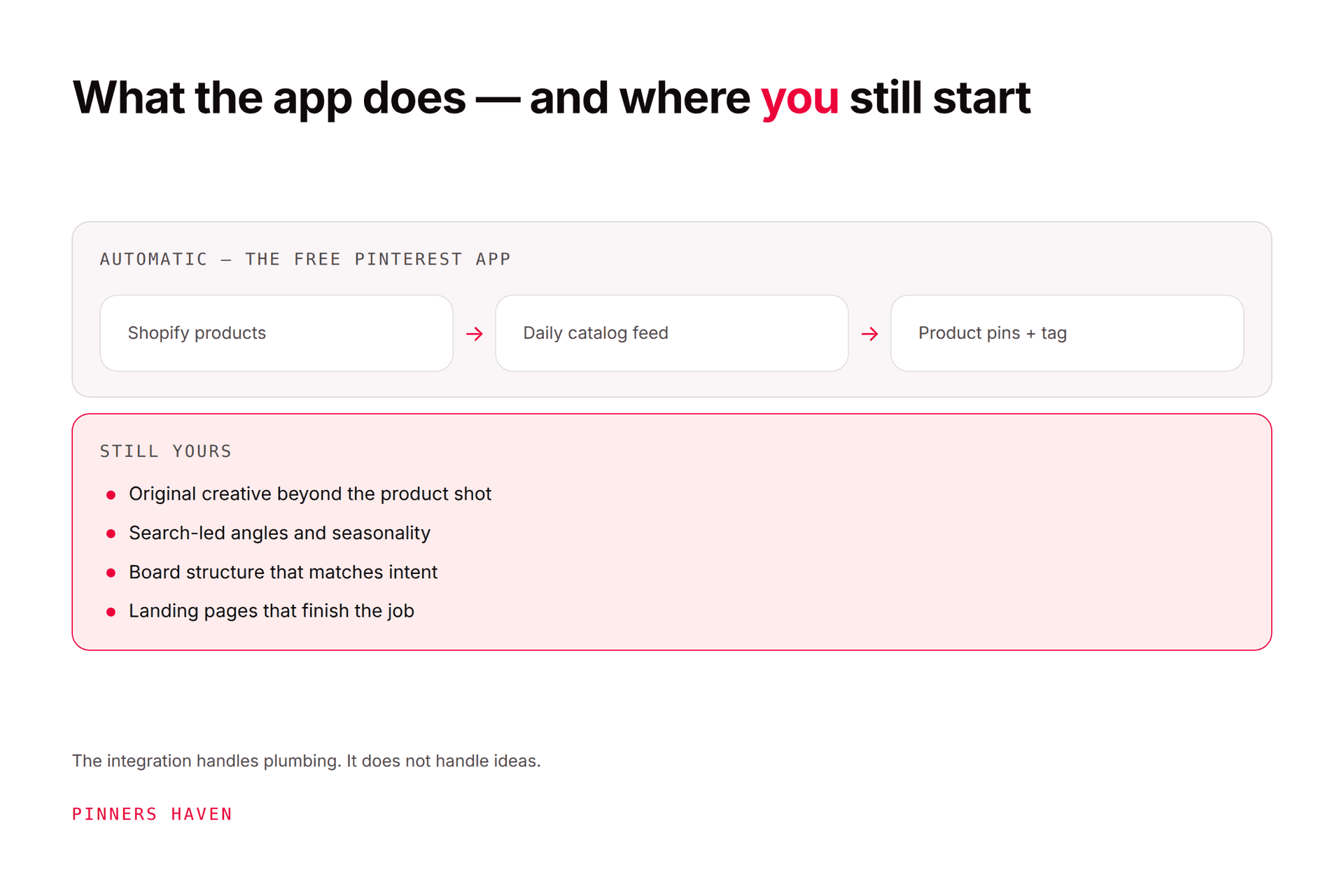
Connecting Shopify to Pinterest is a solved, free, roughly ten-minute job: the official Pinterest app on the Shopify App Store syncs your product catalog, generates Product Pins with live price and availability, sets up Rich Pins, and installs the Pinterest tag for conversion tracking. What it does not do is create demand. The catalog produces a product pin per SKU, and product pins alone rarely earn discovery, because nobody searches Pinterest for your SKU. The traffic comes from the creative layer that sits on top, and that layer is still entirely manual.
Get the plumbing done in an afternoon, then spend your effort where it actually moves.
What the integration actually does for you
Install the Pinterest channel from the Shopify App Store and connect your business account. From there Shopify hands Pinterest a product feed on a recurring schedule, so your catalog stays current without anyone touching it.
Handled automatically | Left to you |
|---|---|
Product data → Pinterest catalog | Every non-product pin concept |
Price and stock kept live on Product Pins | Board strategy and keyword research |
Rich Pins enabled | Lifestyle, comparison and how-to creative |
Pinterest tag installed for conversion tracking | Seasonal and campaign planning |
Collections mapped to product groups | Descriptions written for search, not for SKUs |
Sync is scheduled, not real time. Products refresh on roughly a daily cycle and collection changes take longer to appear, so a flash sale that starts and ends inside a day may never reach Pinterest correctly. Plan promotions with that lag in mind rather than discovering it during Black Friday.
Do the Shopify housekeeping first
The feed exports what you have, including the mess. Before you connect:
Tidy collections. They become Pinterest product groups, and a collection called "Untitled" or "New 2 – copy" becomes a product group with that name.
Check titles read like language, not like inventory codes. "Ribbed Knit Throw – Oatmeal" works. "TH-4471-OAT" does not.
Confirm images are clean and high resolution, since these become your pins by default.
Make sure stock levels are accurate. Promoting sold-out items is wasted reach and a bad first impression.
Fixing this after syncing means waiting a full refresh cycle to see whether it worked. Fixing it first costs nothing.

Why the catalog alone doesn't bring traffic
Here's the thing nobody tells you about the Shopify integration: it gives you a pin for every product, and product pins are a conversion surface, not a discovery surface.
Think about what people actually type into Pinterest. Not "ribbed knit throw oatmeal." They search "cosy neutral living room," "small apartment autumn decor," "housewarming gift ideas." Those searches are answered by editorial creative, and your catalog contains none of it.
So a store that syncs its catalog and stops has built the bottom of the funnel with nothing feeding it. The pins are technically perfect and structurally invisible.
The creative layer is where Shopify traffic comes from. For each priority product, that means concepts like:
the product in a real room or on a real person, at believable scale
dimensions, capacity or fit made explicit
material and construction close-ups
a comparison between two models you sell
styling several products as one look
gift framing for an occasion
the customer problem, then the product as the answer
Each of those answers a search your product pin can't. Our ecommerce guide covers the full catalog-and-measurement sequence; this article assumes Shopify has done that part for you and focuses on what's left.
Boards that match how people shop
Don't mirror your Shopify collections. Collections are organised for your merchandising; boards should be organised for your customer's search.
Shopify collection | Pinterest board that actually gets found |
|---|---|
"Throws" | "Cosy neutral living rooms" |
"New arrivals" | "Autumn home refresh ideas" |
"Under $50" | "Housewarming gifts under $50" |
"Bestsellers" | "Small apartment styling" |
Keep a handful of boards genuinely useful rather than thirty thin ones. Each board should read as a topic someone would follow, not as a filter from your admin.
Measurement, before you scale anything
The app installs the Pinterest tag, which is the easy part. The part that goes wrong is the tag firing without values, so conversions get reported with no revenue attached and every optimisation decision after that is made on fiction.
Before you spend anything, confirm:
purchase events arrive with currency and value populated
add-to-cart and checkout events fire distinctly
order IDs are present so you can reconcile
consent behaviour matches your legal obligations in every market you sell to
Then reconcile Pinterest's reported conversions against Shopify's own order records. They will not match exactly, because attribution is a model and Pinterest attributes to the last interacted pin rather than necessarily the item bought. Document your window settings and compare trends rather than expecting the totals to agree.
Get privacy review for tracking and consent. This is not optional and it is not a Pinterest question.

A realistic first 60 days
Days 1–3. Business account, install the app, tidy collections, connect the catalog, verify the tag reports a real test purchase with a value.
Days 4–14. Research what your customers actually search. Build six to eight intent-led boards. Write concepts for your top ten products, two to four each.
Days 15–45. Publish steadily rather than in a burst. Spacing matters more than volume, and how often to pin covers setting a rate your catalogue can sustain.
Days 46–60. Read the funnel. Impressions and saves tell you whether the concepts are landing. Outbound clicks tell you whether the creative earns the visit. Shopify tells you whether the visit was worth having. Fix the earliest stage that's leaking.
Don't judge any of it before a full seasonal cycle. Home, apparel and gifting all swing hard with the calendar, and 60 days in the wrong season proves nothing.
Where Shopify merchants stall
The integration scales infinitely. The creative doesn't.
Twenty SKUs with three concepts each is 60 pins, refreshed seasonally. That's manageable. Two hundred SKUs is 600, and what actually happens is your top ten products get good pins and the rest of the catalogue carries a single pack shot from whenever you last had a quiet week.
Pinners Haven is built for that specific layer, and only that layer. It writes up to 20 angles per product topic so a single SKU produces genuine keyword surface, generates an SEO title with three to five unique descriptions per pin, and designs original images on human-designed templates rather than skinning one layout. The Freshness Meter retires each design after roughly five to ten uses, which matters when you're publishing across hundreds of products and can't track template fatigue by eye. Nothing publishes until you approve it.
What it does not do, and this is the important part for a Shopify store: it does not manage your catalog, sync inventory, install your tag, or handle conversion measurement. The Pinterest app already does all of that, free, and better. If your product data or checkout is broken, more pins will lose you money faster.
Operator covers 25 sites and 11,250 pins a month at $124/mo billed annually, which is the tier that fits a multi-store operator. Solo is $41 for 3 sites. There's a 14-day trial; no card is needed, and when it ends publishing pauses until you pick a plan.
(Disclosure: we make Pinners Haven. We're not affiliated with Pinterest.)
Eight mistakes that cost Shopify stores traffic
syncing the catalog and treating the job as finished
letting Shopify collection names become public product group names
pinning only pack shots on white backgrounds
building boards that mirror admin collections instead of customer searches
linking every pin to the homepage instead of the product
running a one-day promotion that the feed cycle never picks up
spending on ads before purchase events report real values
judging performance inside a single season
Frequently asked questions
Is the Pinterest Shopify app free?
Yes. The official Pinterest channel on the Shopify App Store costs nothing and handles catalog sync, Rich Pins and the Pinterest tag in one setup flow. You need a Pinterest business account to connect it.
How often does Shopify sync products to Pinterest?
On a recurring schedule rather than instantly, with products refreshing roughly daily and collection changes taking longer. Plan short promotions around that lag instead of assuming price changes appear immediately.
Do I need a catalog to use Pinterest with Shopify?
Not to publish pins, but you do for Product Pins that display live price and availability, and for shopping ads where they're available in your market. The app makes the catalog the default path, so there's little reason to skip it.
Why aren't my Shopify products getting Pinterest traffic?
Almost always because product pins are the only creative in the account. Product pins convert existing intent; they rarely create it. Traffic comes from editorial concepts that answer what people actually search, with the product pin waiting underneath.
Should I link pins to the product page or a collection?
Product pages for specific products, collections for browse-style concepts like "autumn refresh." The rule is that the destination has to keep the pin's promise. A click to an unavailable variant is a cost, not a visit.
Can I automate Shopify product pins?
The catalog side is already automated by the app. The creative side can be assisted by tools, but you remain responsible for accuracy, policy compliance and destination quality, and nothing should publish without review. See safe Pinterest automation.
How long before Pinterest sends Shopify sales?
There's no guaranteed window and seasonality dominates most retail categories. Build the measurement first so that when it does start working you can prove which concepts did it and repeat them.
Let the app do the boring half
The good news for Shopify merchants is that the hardest technical part of Pinterest commerce, keeping accurate product data live in front of shoppers, is a free app and an afternoon.
The rest is a content problem. Boards built around what customers search, several honest concepts per product, published at a pace you can sustain through a full season. That's the half the integration was never going to do, and it's the half that decides whether any of it was worth connecting.