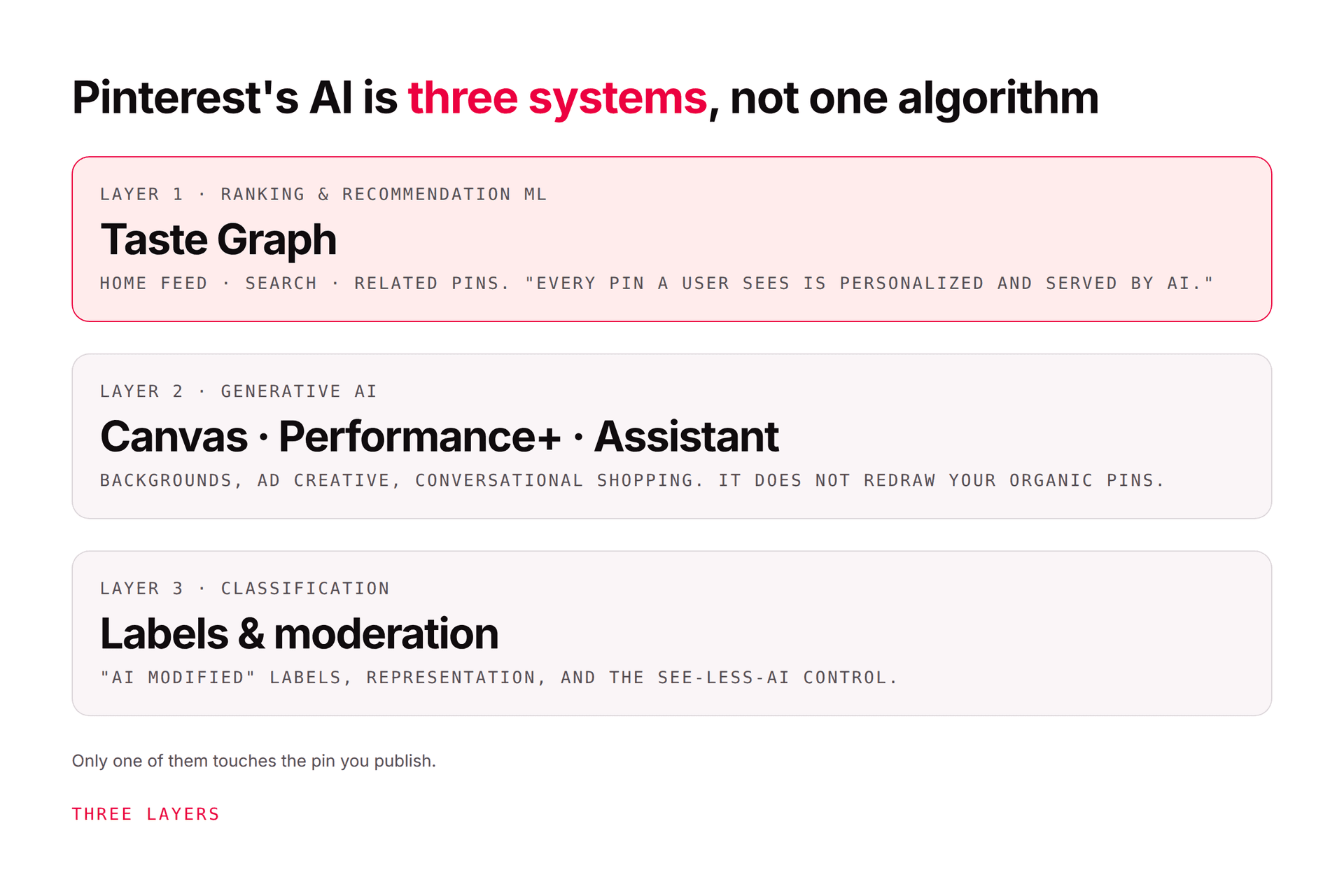
Pinterest has used machine learning for years to match Pins with a person's searches, saves, clicks, boards, and interests. Its AI transparency page describes classical machine learning across recommendations, relevant Pins and ads, moderation, and representation.
This is ranking, not necessarily generation. A photo made by a person can still be selected by an AI recommendation model.
2. Safety and content moderation
Pinterest uses automated systems alongside human review to identify content that may violate its policies. The same broad approach applies to account enforcement. Automated detection can scale review, but it can also produce mistakes, which is why appeal routes matter.
AI labels and safety enforcement are separate. A generated image is not automatically prohibited merely because it is generated. It must still comply with Pinterest's Community Guidelines.
Pinterest can label content as "AI modified" when its systems find generation or modification signals. According to Pinterest's GenAI label documentation, signals can include metadata, content-owner disclosure, or automated classifiers.
The label does not tell you which tool was used, how much of the image changed, or whether the underlying claim is true. It is a provenance signal, not a quality score. Creators who believe a label is wrong can use Pinterest's documented appeal process.
Pinterest is developing conversational and visual shopping experiences that use AI to interpret intent and connect people with products. In its 2026 business update, Pinterest described AI tools for marketers, including Business Assistant and partner infrastructure. "Ask Pinterest" was described as an early, limited shopping experiment, not a universally available replacement for search.
Pinterest also announced work with AWS on AI-driven visual search and discovery. Treat availability and results as changing product behavior, not a fixed global feature set.
Pinterest's creative systems can help advertisers generate backgrounds, adapt assets, and produce variants. Performance+ creative documents automated creative capabilities and their eligibility conditions.
Automation can speed production, but it does not transfer responsibility to Pinterest. Check product appearance, text, prices, claims, people, trademarks, and landing-page consistency before an asset goes live.
Pinterest Canvas is part of Pinterest's generative visual technology. Pinterest says one version was trained on roughly 500 million rows drawn from publicly available Pins, descriptions, and metadata that users saved or uploaded, plus licensed and synthetic data. Its transparency page says the material can date back to 2009 and was first used for model development around January 2023.
Pinterest also says the dataset may contain limited personal information and protected material, and that it applies safety and quality processing. Researchers can read the technical Pinterest Canvas paper. These disclosures describe Pinterest's model development; they do not grant a marketer rights to reuse any image found on the platform.
Pinterest currently documents AI-content preferences on desktop and Android:
Open Refine your recommendations.
Select AI content on desktop or GenAI interests on Android.
Choose the categories in which you want fewer AI recommendations.
Review Activity, Boards, Interests, and Following at the same time.
Pinterest's recommendation-controls page says iOS support is coming soon. The control does not guarantee removal, and recommendation choices do not change home-feed ads. See our step-by-step guide to reducing AI on Pinterest.
Record the source file, photographer or designer, license, model or editing tool, prompt owner, review date, and approver. If a label or rights question appears later, you will have more than memory to work from.
The 500 million rows above are not an abstraction — if you have been pinning your own product shots, photography, or designs, that is the pool being described. Pinterest lets you opt out, and almost nobody does it, because the setting is nowhere near the AI controls people go looking for.
It lives under Settings, then Privacy and data, as a box marked Use your data to train Pinterest Canvas. Clear it and save. The app has the same toggle in the same place, and accounts belonging to under-18s are opted out automatically. Our guide to turning off AI on Pinterest has the full walkthrough for each platform.
If you own the site behind your Pins, there is a second, broader route. Pinterest runs a form for content owners to exclude a website from future Canvas training, and a Content Claiming Portal where approved rights holders upload original work and tell Pinterest whether and how it should appear.
Two honest caveats before you make this a policy. Pinterest describes the website route as covering future foundation-model training, so neither control is a recall of anything already trained. And opting out is a stance, not a growth tactic — it changes nothing about your reach, your labels, or how your Pins are ranked. Decide it the way you would decide any other licensing question about your own work, and write the decision into the provenance record above so the next person on your team is not guessing.
Look for incorrect products, warped text, impossible rooms, misleading before-and-after scenes, unlicensed logos, and stereotyped people. Compare the final Pin with its destination page.
Use the relevant Pinterest disclosure field where available. Do not strip provenance metadata to avoid a label. If a platform applies a label incorrectly, appeal it through the official route.
Faster asset production is not the business result. Track saves, outbound clicks, qualified sessions, leads, and sales. Stop variants that attract attention but misrepresent the destination.
The same two questions apply to any tool you connect. Pinners Haven generates a pin image, title, and description from a niche or link and schedules approved pins on a paced cadence — with a named reviewer kept deliberately between generation and publication, because that gate is what separates useful automation from the kind that publishes an error at scale.
→ See how it works
(Disclosure: we make Pinners Haven. We're not affiliated with Pinterest.)